

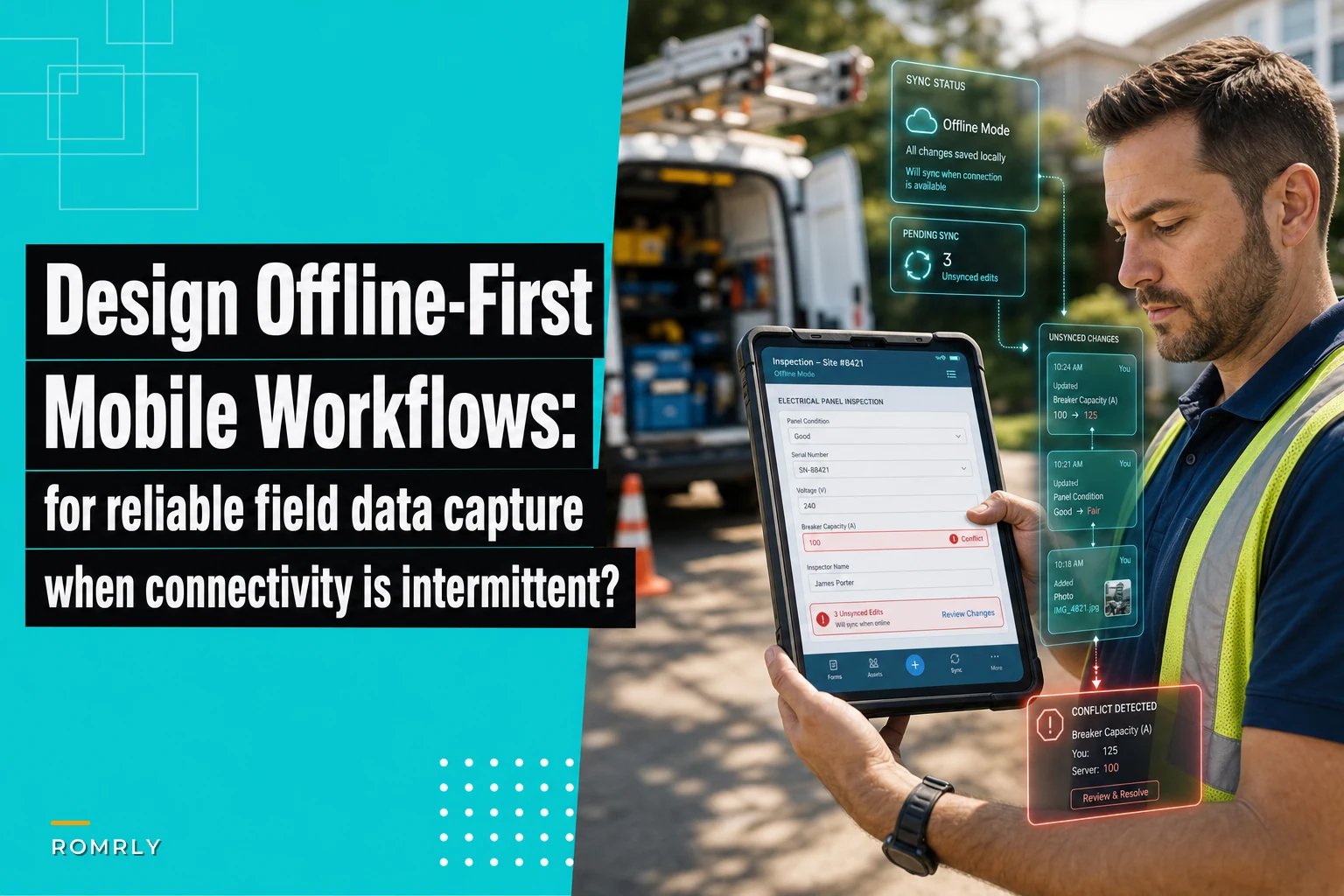

Field service managers keep telling me the same story: technician completes a job, fills out the inspection form, drives to the next site, and three hours later dispatch calls asking where the paperwork is. The tech swears they submitted it. The office swears they never received it. Meanwhile, the customer's waiting on their invoice.
This isn't a training problem. It's an architecture problem. And until you build offline mobile workflows that field service teams can actually depend on, you'll keep having the same conversation.
Why standard mobile forms break in field conditions
Most field service apps treat offline mode like an afterthought. They cache some data locally and hope the connection holds long enough to sync. When it doesn't, you get phantom submissions, duplicate entries, and techs redoing work they already finished.
The technical side matters here. Standard REST APIs expect immediate responses. When your tech is 40 feet underground inspecting pipes or inside a steel-frame warehouse, that expectation becomes a real liability. The app hangs waiting for a response that never comes, eventually times out, and if you're lucky it saved the data locally. If you're not lucky, it's gone.
Office-based developers often underestimate what field conditions actually look like. Basements kill signals. Rural areas have dead zones stretching for miles. Even in cities, parking garages and mechanical rooms drop connectivity to nothing. Your mobile workflow needs to treat disconnection as normal, not as an edge case.
Delta-sync patterns that actually work in the field
Instead of sending complete datasets back and forth, delta-sync only transmits changes. A tech updates three fields on a work order? The system syncs those three fields, not the entire 50-field form. In typical field operations this alone reduces data transfer by roughly 85%.
Eliminate field service chaos with Romrly.
Romrly helps you assign, track, and complete service jobs efficiently and on time.
- Unified job scheduling
- Technician dispatch & tracking
- Customer notifications & updates
No credit card required
Here's how it works in practice:
Each form element gets a timestamp and version number. When the tech makes changes, the app logs the modification locally with a new timestamp. Once connectivity returns, the system compares local timestamps against server timestamps and only syncs what's newer.
Conflict resolution is where things get interesting. Say a dispatcher updates job priority while the tech is offline writing completion notes. When sync happens, both changes need to merge without losing data. The fix is field-level conflict resolution, not form-level. The tech's notes merge with the dispatcher's priority update because they touched different fields entirely.
A plumbing company implemented this across their 22-person team. Before delta-sync, they averaged 4-6 lost forms per week, costing somewhere around $800-1,200 in unbilled work. After implementation, lost forms dropped to near zero. Sync times also fell from 30-45 seconds to under 3 seconds, even on weak connections.
Here's a simple workflow visualization.
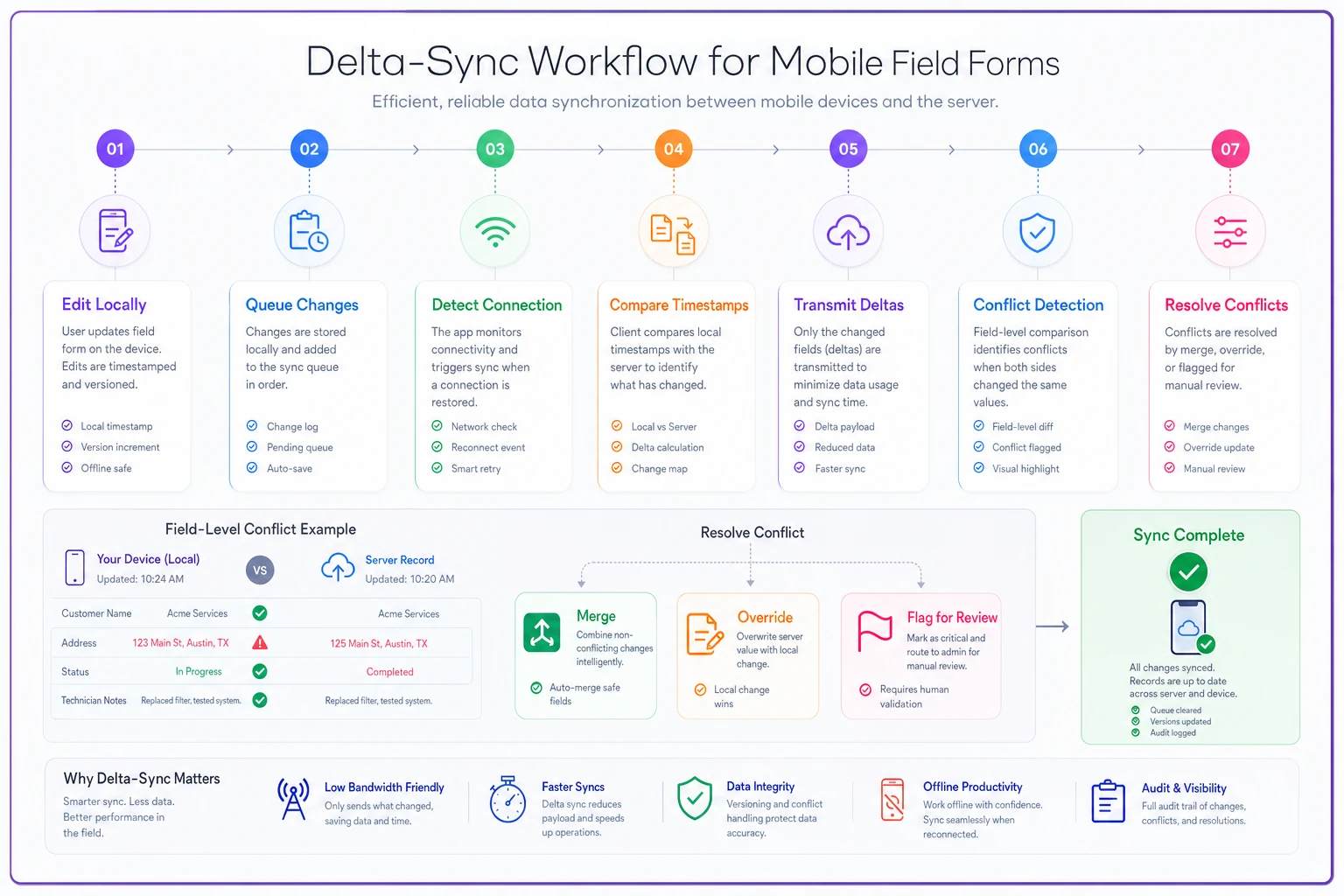
This visualization maps the steps from local edit to server merge and highlights where field-level conflict resolution and prioritization occur.
Building conflict resolution that field techs understand
Most conflict resolution means showing users cryptic error messages about version mismatches. Field techs don't care about version numbers. They care about finishing the job and getting to the next site.
The interface needs to speak their language. Instead of "Version conflict detected in record 4782," show them something like: "Dispatch updated this job while you were offline. Your notes have been saved. Want to review the changes?" Then display the specific fields that changed, who changed them, and when.
For critical fields like job status or customer signatures, set up supervisor review workflows. If a conflict hits those fields, flag them for manual review instead of auto-resolving. One HVAC company using this approach catches a couple of potential billing errors each week that would've been silently auto-resolved the wrong way.
The resolution interface should look something like:
| Field | Description |
|---|---|
| Their changes | What the tech entered offline |
| Office changes | What dispatch or another tech updated |
| Suggested merge | How the system proposes combining both |
| Override option | Let experienced techs make the final call |
Always keep both versions in the audit log. When accounting asks why an invoice changed three times, you need the full picture, not just the final result.
Testing scenarios that mirror real field chaos
Lab testing won't catch what actually breaks in the field. Your QA needs to simulate the exact conditions techs deal with every day.
Start with connection state transitions. Don't just test offline and online in clean isolation—test the messy middle. Connection dropping mid-sync. Two seconds of connectivity every minute. Upload working but download failing. These edge cases destroy standard sync logic every time.
Create data collision scenarios. Two techs updating the same job simultaneously from different locations. Dispatch reassigning a job while a tech is offline completing it. A supervisor modifying a submitted form while the tech is editing it again. Each scenario needs a defined resolution rule, not a guess.
Test with realistic data volumes. A tech handling 8-12 jobs daily creates completely different sync patterns than one handling 3-4 complex installs. Load test devices with 500+ historical jobs and watch what happens. Plenty of apps handle 50 records fine and fall apart at 500.
Battery and storage testing matters more than people think. Run your sync process at 5% battery. Test when storage is nearly full. Test when other apps are eating memory. Field devices aren't in pristine condition—they're beaten up, overloaded, and half the time running on fumes.
Run sync tests at low battery and with low available storage to reveal issues that won't show in pristine lab devices.
These realistic tests help you catch failure modes before they cost time and money in the field.
The pre-deployment checklist before going live
Before pushing offline workflows out to your field teams, verify these scenarios actually work:
Data integrity checks:
-
Forms save locally after every field change, not just on submission
-
Partial saves recover if the app crashes mid-entry
-
Duplicate submissions are detected and merged, not created twice
-
Timestamps survive timezone changes when techs cross regions
Confirm local save and recovery behavior under crash conditions before proceeding.
Sync reliability verification:
-
Sync queue shows pending items clearly
-
Failed syncs retry automatically with exponential backoff
-
Large file attachments sync separately from form data
-
Priority flags ensure critical updates sync first
Validate backoff and retry logic with intermittent connectivity patterns.
User experience validation:
-
Offline indicator is obvious, not buried in a settings menu
-
Sync status is visible without having to open each form
-
Conflict resolution uses plain language, not technical jargon
-
Manual sync button exists for techs who want direct control
Run user tests with actual techs to ensure indicators and controls match field needs.
Operational safeguards:
-
Server has the final say on business-critical fields
-
Audit trail captures every change, including conflicts
-
Rollback procedure exists for bad syncs
-
Support can force-sync a specific device remotely
One electrical contractor learned this the hard way. They deployed offline forms without testing duplicate detection. Techs accidentally submitted the same job multiple times when connections were spotty, and $47,000 in duplicate invoices piled up before anyone noticed. Their accounting team spent three weeks untangling the mess.
The checklist above isn't exhaustive, but it covers the failure points that show up most often. Work through it before your rollout, not after.
Measuring success beyond sync rates
Don't just track whether data syncs—track whether operations actually improve. Monitor the gap between job completion and office visibility. If techs finish at 2 PM but data doesn't show up until 6 PM, you still have a workflow problem regardless of sync success rates.
Track conflict frequency by field type. High conflict rates on certain fields usually signal a workflow issue, not a technical one. If job status conflicts keep happening, your status definitions might be unclear or your dispatch process needs a look.
Measure tech confidence through support tickets. Fewer "did my form submit?" calls means the system is doing its job. One aluminum siding installer saw those calls drop from 15-20 per week to under 3 after adding clear sync indicators.
When offline-first architecture pays for itself
Proper offline mobile workflows typically pay back within 4-6 months through reduced data loss and faster billing cycles. But the more lasting value is operational confidence.
Techs stop taking screenshots "just in case." Dispatchers stop calling to confirm submissions. Customers get invoices right after job completion instead of days later when someone finally processes the paperwork stack.
A pest control company running 18 trucks calculated that reliable offline workflows saved each tech roughly 20 minutes a day—time previously spent re-entering lost data or chasing confirmation. Across their whole team, that's around 6 hours of recovered productivity daily.
The downstream effects matter too. When techs trust their tools, they capture more detail. When syncing is reliable, they document issues properly instead of planning to "add notes later" (which usually means never). When conflict resolution is clear, they make better field decisions without waiting for someone at the office to weigh in.
AI-powered platforms add another layer here—predicting sync failures before they happen, automatically prioritizing critical data during weak connections, learning from conflict patterns to surface better field workflows. But none of that matters if the foundation isn't solid. No amount of automation can fix forms that lose data or sync processes that techs have stopped trusting.
Start with the basics: reliable offline storage, clear sync indicators, and simple conflict resolution. Once those work flawlessly, layer in the optimization. Your field techs will thank you, your dispatchers will trust the data, and your customers will notice the difference in how fast things actually get done.
Ready to optimize your field operations?
Join 2,000+ service teams using Romrly to boost productivity, reduce downtime, and enhance customer satisfaction.