


Most field service operations lose somewhere between $280 and $450 per unnecessary truck roll when you actually account for everything. Not just the tech's hourly rate and fuel—dispatcher time rescheduling, customer satisfaction drops that hurt future bookings, and the opportunity cost of that technician not handling revenue-generating calls.
The frustrating part? Around 35% of these truck rolls could probably be resolved remotely with the right diagnostic infrastructure in place. But building that infrastructure feels overwhelming when you're staring at vendor specs for IoT platforms, remote monitoring tools, and diagnostic software that costs more than your entire tech budget.
What actually works is a phased remote diagnostics pilot that starts small, proves ROI within 90 days, and scales based on real reduction metrics rather than vendor promises.
Why remote diagnostics pilots fail before they start
Field service managers typically approach remote diagnostics backwards. They start by evaluating enterprise platforms, get quotes for comprehensive monitoring solutions, then spend months trying to justify the upfront investment to ownership. By the time they've built the business case, nothing has changed operationally.
The companies that successfully reduce truck rolls by 30-40% take a different approach. They identify their highest-volume, most predictable service issues first. Then they build minimal diagnostic capability around just those issues. Once they prove the model works on simple cases, they expand.
Think about your current truck roll patterns. You probably have 5-8 issue types that represent 60% of your service calls. HVAC filter alerts, water heater pilot lights, electrical panel trips, network connectivity issues. These repetitive, diagnosable problems are where you start—not with trying to monitor every possible failure point.
The economics shift pretty dramatically when you focus on high-frequency issues. A commercial HVAC company handling 400 service calls monthly might see 80-90 calls for basic thermostat and filter issues. If remote diagnostics prevents even 30% of those truck rolls, that's $7,000-$10,000 in monthly savings before you factor in customer satisfaction improvements.
Required sensor feeds and data architecture
Your pilot needs three categories of data feeds, and most companies overcomplicate all three.
Eliminate field service chaos with Romrly.
Romrly helps you assign, track, and complete service jobs efficiently and on time.
- Unified job scheduling
- Technician dispatch & tracking
- Customer notifications & updates
No credit card required
Category 1: Equipment status data
Start with basic operational signals. For HVAC systems, thermostat readings, run status, and error codes. For commercial equipment, amperage draw, pressure readings, and cycle counts. For IT infrastructure, uptime, CPU usage, and network latency.
The mistake most companies make is trying to capture everything. You don't need 50 data points per device. You need 3-5 signals that correlate strongly with your most common service issues. One facilities management company reduced their sensor requirements from 28 data points down to 7 and actually improved diagnostic accuracy because their techs could process the information faster without getting lost in noise.
Category 2: Environmental context
This is data about the operating environment, not the equipment itself. Temperature variations, humidity levels, power quality metrics, usage patterns. A restaurant equipment service company found that 40% of their freezer compressor calls happened during the same 4-hour window each day—right when ambient kitchen temperatures peaked. Adding simple temperature monitoring near the units let them predict failures 18-24 hours out.
Category 3: Customer behavior signals
The most overlooked category. Door sensor logs showing when equipment rooms are accessed. Override patterns on control systems. Manual resets and power cycles. These behavioral signals often predict equipment issues better than the equipment data itself.
Here's a practical sensor deployment approach:
| Issue Type | Primary Sensors | Secondary Data | ROI Timeline |
|---|---|---|---|
| HVAC no-cooling calls | Thermostat API, current sensors | Ambient temp, door sensors | 30-45 days |
| Network/IT outages | Ping monitors, bandwidth meters | Power quality, CPU logs | 15-30 days |
| Water heater failures | Temp probes, flow meters | Gas pressure, usage patterns | 45-60 days |
| Electrical trips | Current monitors, voltage sensors | Panel temp, load patterns | 30-45 days |
| Refrigeration alarms | Temp sensors, compressor current | Door sensors, defrost cycles | 20-35 days |
The ROI timelines are intentionally aggressive. If you can't prove value within 60 days, the pilot loses momentum and dies.
Remote troubleshooting scripts that techs actually follow
Most remote diagnostic scripts fail because they're written like technical manuals instead of operational guides. Your field techs and customer service reps need decision trees, not engineering specifications.
A functional remote troubleshooting script has four components:
1. Customer verification sequence
Before any diagnostics, verify the basics. Is the equipment powered? Has anything changed recently? When did the issue start? These questions seem obvious but they filter out 15-20% of false alarms.
One property management company found that nearly 25% of their HVAC "failures" were tenants who didn't know how to switch from heating to cooling mode. A simple verification script saved them thousands in unnecessary dispatches.
2. Diagnostic decision tree
-
Is the display showing an error code?
-
YES → Proceed to error code matrix
-
NO → Is the unit receiving power?
-
YES → Check control panel indicators
-
NO → Verify breaker status
Keep each branch to a maximum of 5 steps before reaching either a resolution or a dispatch decision.
3. Customer-assisted checks
Some diagnostics require customer participation. Make these requests specific and safe. "Press and hold the reset button for 5 seconds" works. "Check if the capacitor is swollen" doesn't.
Build in safety gates. If you're asking a customer to check electrical panels or access equipment rooms, include explicit warnings and opt-outs. The liability risk isn't worth the truck roll savings if someone gets hurt.
4. Resolution confirmation
This step gets skipped constantly, which leads to repeat calls. After any remote fix, wait 10-15 minutes and verify the issue is actually resolved. Set a callback timer. Check telemetry if available. Confirm with the customer before closing the ticket.
Escalation triggers and dispatch decision matrix
Not every issue can be resolved remotely, and trying to force it damages customer relationships. You need clear escalation triggers that tell your team when to stop troubleshooting and dispatch.
Immediate dispatch triggers:
-
Safety concerns (gas leaks, electrical burning smell, water near electrical)
-
Complete equipment failure with no remote recovery options
-
Customer-critical systems during peak operation hours
-
Previous remote resolution attempt failed within 48 hours
-
VIP/contract customers with guaranteed response times
Conditional dispatch triggers:
-
Remote diagnostics inconclusive after 15 minutes
-
Customer unable or unwilling to assist with troubleshooting
-
Issue partially resolved but not fully functional
-
Intermittent problem that can't be replicated remotely
-
Preventive replacement indicated by diagnostic data
Give your team clear authority to make dispatch decisions without manager approval.
| Customer Type | Critical Equipment | Standard Equipment | After-Hours |
|---|---|---|---|
| Contract/VIP | Immediate dispatch | 15-min diagnostic max | Immediate dispatch |
| Standard commercial | 15-min diagnostic | 30-min diagnostic | Next-day unless critical |
| Residential | 30-min diagnostic | Remote only first | Next-day standard |
| Warranty | Follow MFG requirements | Follow MFG requirements | Per contract terms |
Nothing kills a remote diagnostics program faster than techs waiting 20 minutes for authorization while a customer sits on hold.
ROI checkpoints and success metrics
Most remote diagnostics pilots fail because they track the wrong metrics. Everyone obsesses over truck roll reduction percentage, but that number alone doesn't tell you if the program is working.
Week 2 checkpoint:
-
Remote diagnostic attempted on 60%+ of eligible calls
-
Average diagnostic time under 20 minutes
-
Tech adoption rate above 70%
-
Customer acceptance of remote troubleshooting above 80%
If you're missing these marks, the problem is usually training or script complexity, not the technology.
Week 6 checkpoint:
-
Truck roll reduction of 15-25% on pilot issue types
-
First-call resolution improving by 10-15%
-
Average ticket resolution time dropping
-
Repeat call rate for remote-resolved issues under 10%
This is where you identify which issue types actually respond well to remote diagnostics and which don't. A plumbing service company found they could remotely resolve 65% of water heater pilot light issues but only 8% of garbage disposal problems. That single insight shaped their entire expansion plan.
Week 12 checkpoint:
-
Cost per ticket reduced by $75-$150
-
Technician productivity up 15-20%
-
Customer satisfaction scores maintained or improved
-
Revenue per tech increased through capacity gains
One HVAC contractor running 8 trucks saw revenue per tech jump from $18,000 to $22,000 monthly after implementing remote diagnostics. Not because they charged more, but because each tech could handle 3-4 additional calls per week that previously required physical visits.
The compound effect of diagnostic data accumulation
The real value of remote diagnostics isn't the immediate truck roll reduction—it's the operational intelligence you build over time. Vendors won't lead with this, but it matters more long-term.
After 6 months of diagnostic data, patterns emerge that no one would catch manually. Equipment that fails on a predictable cycle. Temperature thresholds that reliably precede failures. Customer behaviors that accelerate wear. This predictive capability changes your entire service model.
One facilities management company serving retail chains noticed their rooftop units in coastal locations failed roughly 3x more often than identical inland units. Salt air was corroding specific components. They shifted to preventive replacement schedules for those parts and eliminated around 70% of emergency calls for coastal locations.
The data also reveals operational inefficiencies that have nothing to do with equipment. One company discovered their Monday truck rolls were 40% higher than any other day, but actual equipment failures were evenly distributed throughout the week. The issue was simpler than they expected—customers reported weekend problems all at once Monday morning, overwhelming the diagnostic queue. They added weekend remote monitoring and cut Monday dispatches by 35%.
Building your 90-day implementation roadmap
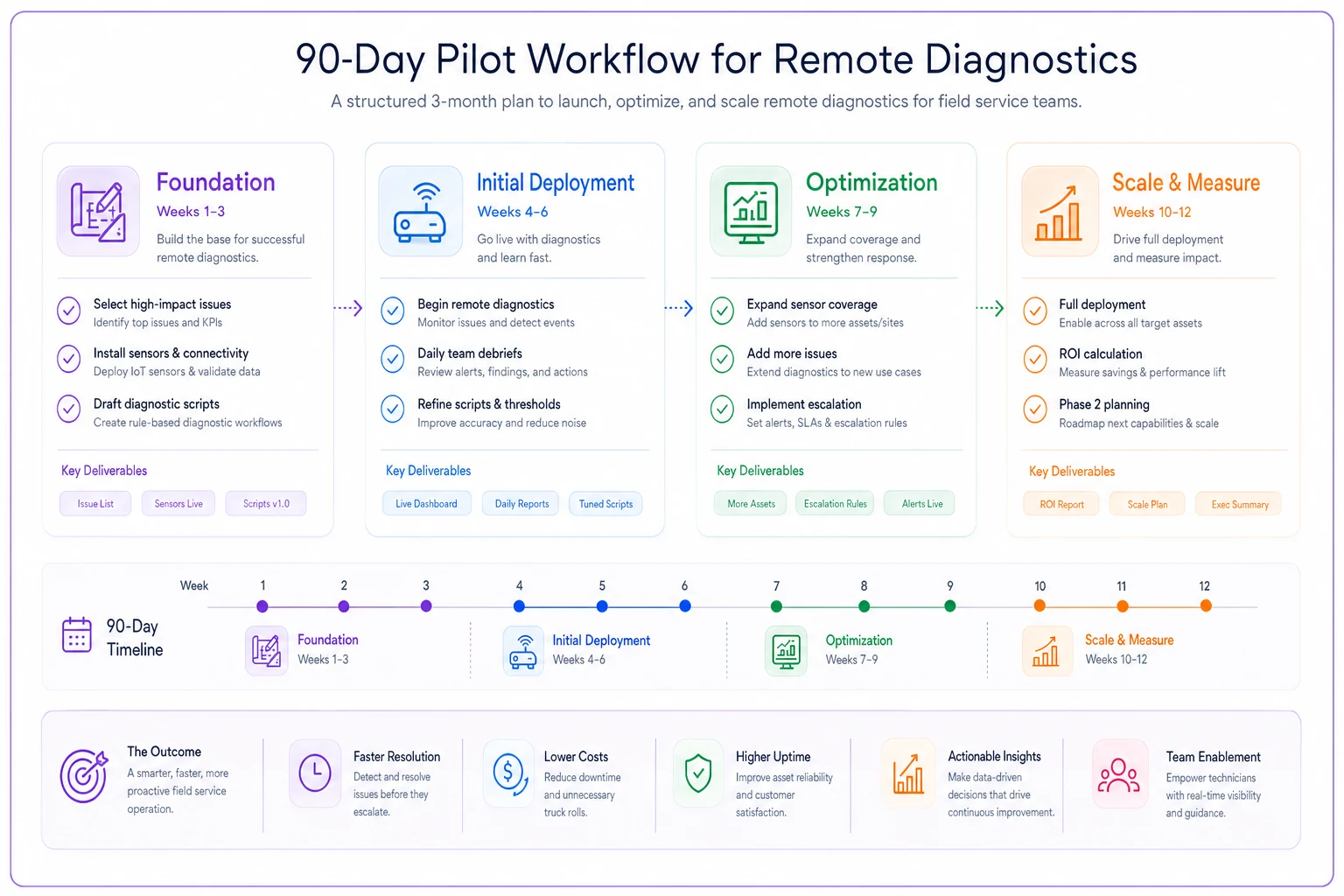
Week 1-2: Foundation
-
Select 2-3 high-volume issue types for pilot
-
Install basic sensors on 10-20% of equipment base
-
Draft initial troubleshooting scripts
-
Train first response team
Week 3-4: Initial deployment
-
Begin remote diagnostics on pilot issues
-
Daily debrief with team
-
Refine scripts based on real calls
-
Track every dispatch decision
Week 5-8: Optimization
-
Expand sensor deployment to 40-50% coverage
-
Add 2-3 additional issue types
-
Implement escalation matrix
-
Build reporting dashboard
Week 9-12: Scale and measure
-
Full deployment on pilot issue types
-
Calculate hard ROI metrics
-
Document process improvements
-
Plan phase 2 expansion
The companies that succeed all share one trait: they start small and expand based on proven results rather than theoretical benefits.
Visualize the 90-day pilot workflow:
Start small. Prove value. Scale what works.
Integration with existing dispatch workflows
The best remote diagnostics system becomes worthless if it doesn't integrate smoothly with current dispatch operations. This is mostly a workflow design problem, not a technical one.
Your dispatchers currently follow some version of: receive call → create ticket → assign technician → dispatch. Remote diagnostics adds a decision point: receive call → attempt remote diagnosis → resolve OR create ticket → assign technician → dispatch.
That additional step needs to feel natural. The diagnostic phase should take less time than normal ticket creation, or dispatchers will skip it under pressure.
-
Customer and equipment identification pulls from dispatch system to diagnostic platform
-
Diagnostic results and notes push to dispatch ticket
-
Resolution status updates sync between systems
Anything beyond these three is nice-to-have. Focus on making these handoffs seamless and reliable before chasing anything else.
Common pilot failure points and prevention strategies
Failure point 1: Technician resistance
Field techs often view remote diagnostics as a threat to their hours. Address this directly. Show them how it eliminates the worst calls—the ones where they drive 45 minutes to flip a breaker. Remote diagnostics frees them for higher-value work that actually requires their expertise.
One electrical contractor tied remote diagnostic savings directly to technician bonuses. Every truck roll avoided added to a monthly pool split among the techs. Resistance essentially vanished when techs realized they could earn an extra $300-500 monthly by helping the program succeed.
Failure point 2: Customer skepticism
Some customers interpret remote diagnostics as inferior service. They're paying for a technician and feel like they're getting something less.
Counter this by positioning it as premium service. You're monitoring their equipment proactively. You're resolving issues faster. You're minimizing disruption. One property management company started calling it their "Rapid Response Protocol" and actually charged more for properties with remote diagnostic capability.
Failure point 3: Scope creep
This kills more pilots than any technical issue. You start with HVAC filters and pilot lights. Someone suggests adding refrigeration. Then electrical. Then plumbing. Suddenly you're trying to remotely diagnose everything and succeeding at nothing.
Set hard boundaries. No new issue types until current ones show 30+ days of sustained success. No new sensors until ROI is proven on existing deployments. No platform expansions until core workflows are stable.
Moving from pilot to full program deployment
Once your pilot shows consistent ROI, resist the urge to immediately deploy everywhere. Successful scaling follows a specific sequence.
First, solidify your wins. Take your best-performing issue types and deploy them across your entire service area. If remote HVAC diagnostics works in one region, roll it out everywhere before adding new capabilities. This builds organizational confidence and funds further expansion.
Next, segment your customer base. Not every customer needs remote diagnostics. High-value commercial accounts with critical equipment? Absolutely. Residential customers with basic systems? Maybe not worth the sensor investment. Build your expansion plan around customer lifetime value and service frequency.
Finally, think about your operational platform. This is where AI-powered operational software pays for itself. You need systems that can handle diagnostic data streams, automatically trigger workflows, route tickets based on resolution probability, and track ROI metrics without manual intervention. The companies scaling successfully aren't just adding sensors—they're building operational platforms that improve as data accumulates, reducing the manual work of managing all of it.
Conclusion: The realistic path to 30% truck roll reduction
Remote diagnostics isn't magic. It won't eliminate all truck rolls or replace skilled technicians. But implemented correctly, it changes your operational economics in ways that compound over time.
The companies seeing 30-40% reductions didn't get there through massive technology investments or complete operational overhauls. They started with focused pilots, proved ROI on specific issues, and expanded based on real data.
Your pilot should be narrow, measurable, and fast. Pick your highest-volume issues. Deploy minimal sensors. Create simple scripts. Track everything for 90 days. Let the data tell you what works before committing to anything larger.
The field service companies thriving right now aren't the ones with the most advanced technology. They're the ones who identified their biggest operational inefficiencies and fixed them systematically. Remote diagnostics is just a tool. The real advantage comes from building operational systems that get smarter over time, reduce unnecessary work, and free your team to focus on problems that actually require them to show up.
Start small. Prove value. Scale what works.
Ready to optimize your field operations?
Join 2,000+ service teams using Romrly to boost productivity, reduce downtime, and enhance customer satisfaction.