


Most scheduling "build vs buy" debates die in a conference room because nobody brings real numbers. Someone says "we need control over our routing logic," someone else says "a vendor will be cheaper," and three weeks later the decision is made by whoever had more political capital that day. Then eighteen months in, the custom engine needs a second full-time engineer nobody budgeted for, or the off-the-shelf engine can't model your two-technician jobs and you're writing a shadow scheduler on top of it anyway.
This brief gives you the math and the risk framing to avoid that. It's built around a 3‑year total cost of ownership model, loaded staffing tables, a comparative risk matrix, and a monitoring baseline you can actually deploy. The goal is straightforward: make the build vs buy scheduling engine TCO decision defensible with numbers instead of opinions.
A note on scope: this is specifically about the routing and scheduling layer — the thing that decides which technician goes to which job in what order. Not your CRM, not your mobile app, not dispatch overrides. Keeping that scope tight is the single biggest reason build projects stay on budget.
Start with the uncomfortable question: what are you actually optimizing?
Before any TCO model means anything, you have to be honest about why you'd build. In practice there are only three defensible reasons:
-
Your constraints are genuinely unusual. Multi-day jobs, crew pairing rules, certification-gated assignments, union break windows, or routing that depends on live inventory in the truck. Off-the-shelf engines handle 80% of this. The last 20% is where build cases live.
-
Scheduling is the product. If your differentiation to customers is "we show up faster and more reliably than anyone," owning that logic may be strategic.
-
Vendor lock-in is an existential risk. If one engine controls your core revenue-generating workflow and you have no exit, that's a board-level concern.
If none of those apply, you're probably buying — and the rest of this brief will help you buy well and monitor the result. If one or more apply, keep reading closely, because the build cost is almost always higher than the first estimate.
Worth naming directly: teams underestimate build cost because they price the first working version, not the steady state. The engine that routes 200 jobs a day in a clean demo is not the engine that survives a snowstorm, a bad address feed, and a dispatcher who manually drags 40 jobs around at 7am.
The 3‑year TCO model
Every cost falls into one of these buckets, and the mistake is usually forgetting the bottom three.
Eliminate field service chaos with Romrly.
Romrly helps you assign, track, and complete service jobs efficiently and on time.
- Unified job scheduling
- Technician dispatch & tracking
- Customer notifications & updates
No credit card required
-
Initial build / integration (one-time)
-
Steady-state engineering (ongoing, the big one)
-
Infrastructure / compute (ongoing)
-
Vendor license or usage fees (buy path, ongoing)
-
Drift & maintenance (ongoing — model decay, map data, business-rule churn)
-
Incident & on-call cost (ongoing — often hidden in "other" budgets)
Assumptions used below
-
Loaded engineering cost (salary + benefits + overhead + tooling) at ~$180k/yr for a senior backend engineer, ~$210k/yr for an ML/optimization specialist. Adjust to your market — these are US mid-market figures.
-
"Small" = up to ~300 jobs/day, single region. "Medium" = ~300–1,500 jobs/day, multi-region. "Large" = 1,500+ jobs/day, multi-region with complex constraints.
-
Buy-path license figures are illustrative mid-market ranges; your actual quotes will vary widely, so treat these as placeholders to replace with real vendor numbers.
3‑Year TCO comparison
| Scenario | Path | Yr 1 | Yr 2 | Yr 3 | 3‑yr total |
|---|---|---|---|---|---|
| Small | Build | ~$420k | ~$300k | ~$300k | ~$1.02M |
| Small | Buy | ~$90k | ~$75k | ~$75k | ~$240k |
| Medium | Build | ~$780k | ~$620k | ~$640k | ~$2.04M |
| Medium | Buy | ~$280k | ~$260k | ~$300k | ~$840k |
| Large | Build | ~$1.4M | ~$1.2M | ~$1.25M | ~$3.85M |
| Large | Buy | ~$700k | ~$780k | ~$900k | ~$2.38M |
Two things stand out. First, buy wins on raw cost at every tier — that's almost always true. The build case is rarely about saving money; it's about control and fit. Second, the buy curve bends upward over time (usage-based pricing, seat growth, add-on modules), while the build curve flattens once you're past the initial push. At very large scale, over a longer horizon than three years, those lines can eventually cross. If your growth is aggressive, model five years, not three.
The build numbers include something most estimates skip: year two is not free. A built engine isn't a finished asset you walk away from. Map data changes, your business adds a new job type, a provider deprecates an API. That's the drift bucket, and it's roughly 40–60% of the initial build cost every year, indefinitely.
Staffing: the FTE tables nobody wants to show the CFO
The license fee on the buy side is visible. The headcount on the build side is the part that quietly grows. Here's what the staffing actually looks like.
Build — initial phase (first ~9–12 months)
| Role | FTE | Loaded cost (annualized) | Phase cost (9 mo) |
|---|---|---|---|
| Optimization/ML engineer | 1.0 | ~$210k | ~$158k |
| Senior backend engineer | 1.5 | ~$180k | ~$203k |
| Data/integration engineer | 1.0 | ~$170k | ~$128k |
| Product/ops lead (partial) | 0.3 | ~$190k | ~$43k |
| Total initial build | 3.8 | ~$530k |
Build — steady state (ongoing, per year)
| Role | FTE | Loaded cost | Annual |
|---|---|---|---|
| Optimization/ML engineer | 0.5 | ~$210k | ~$105k |
| Backend engineer (maintenance) | 1.0 | ~$180k | ~$180k |
| On-call rotation share | 0.4 | ~$180k | ~$72k |
| Total steady state | 1.9 | ~$357k/yr |
That steady-state ~1.9 FTE is the line item that quietly kills build ROI. It never shows up in the kickoff deck. It shows up when your one optimization engineer takes another job and the whole routing engine becomes a single point of human failure.
Buy — steady state
| Role | FTE | Loaded cost | Annual |
|---|---|---|---|
| Integration/config engineer | 0.3 | ~$170k | ~$51k |
| Ops admin (rules, overrides) | 0.5 | ~$110k | ~$55k |
| Total steady state | 0.8 | ~$106k/yr |
The buy path still needs people — anyone who tells you a bought engine is zero-maintenance hasn't actually run one. But you're paying for configuration and rule management, not for keeping an optimization solver alive.
The comparative risk matrix
Cost is only half the decision. The other half is what happens when things go wrong, and who's responsible. This is where buy and build genuinely diverge.
| Dimension | Build | Buy |
|---|---|---|
| Rollback primitives | You design them. Full control, full burden. Need versioned rule sets, shadow-mode replay, instant revert to last-good schedule. | Vendor-provided, often limited. You revert to their last config version; granularity varies wildly. |
| Drift responsibility | Entirely yours — map data, model decay, rule churn. | Shared or vendor-owned for the engine; yours for your rules and data feeds. |
| Observability surface | Total access. You instrument everything. If you don't, you're blind. | Limited to what the vendor exposes via API/dashboard. Black-box risk on why a route was chosen. |
| Exit risk | Low — you own the code. Risk is key-person, not vendor. | High if you're deeply integrated. Switching cost compounds yearly. |
| Data ownership | Full. Your schedules, your feature data, your history. | Depends on contract. Read your data-export and retention clauses carefully. |
The dimension most teams undervalue at decision time is observability on the buy side. When a bought engine routes a technician 40 minutes the wrong way, your dispatcher wants to know why, right now. If the vendor only exposes the output and not the decision factors, you can't debug it — you can only file a ticket and wait. For a revenue-critical workflow, that's a real operational cost, not a footnote.
On the build side, the sleeper risk is rollback. A surprising number of homegrown schedulers have no clean revert path. A rule change goes out, routes degrade, and the only "rollback" is a panicked git revert and redeploy while dispatchers manually fix the day's board. Design rollback first, not after your first bad deploy.
When build actually makes sense
When build actually makes sense
-
Your routing constraints break every off-the-shelf engine you've demoed (and you've demoed at least three, with your real data).
-
You have, and can retain, the optimization talent — not just hire it once.
-
Scheduling quality is a direct, measurable competitive advantage you can point to in revenue.
-
You've modeled the full steady-state FTE cost and the business still says yes.
When build is a bad idea
When build is a bad idea
When build is a bad idea
-
The pitch is "it'll be cheaper." It won't be, on a 3‑year horizon, in almost every case above.
-
You have one engineer who "gets it" and no backup. That's a staffing time bomb.
-
Your constraints are normal and you're building for ego or résumé reasons.
-
You can't commit to the drift budget every year, not just year one.
Who should not do this at all
Who should not do this at all
Who should not do this at all
-
Small operations under ~300 jobs/day with standard constraints. The math isn't close. Buy, configure well, and put your engineering energy into integration and data quality — which is where your actual leverage is anyway. If you're also wrestling with how to govern the models and automation sitting on top of whatever you choose, our note on governing automation and ML in field operations pairs well with this decision.
Whichever path you pick, you're accountable for scheduling health. Below is a concrete baseline. If you buy, instrument what you can from the vendor's API and treat the gaps as a known risk.
Monitoring baseline — build or buy, you need this
Whichever path you pick, you're accountable for scheduling health. Below is a concrete baseline. If you buy, instrument what you can from the vendor's API and treat the gaps as a known risk.
Core metrics
-
schedulersolveduration_seconds— histogram, how long the engine takes to produce a plan. -
schedulerjobsunassigned_total— counter, jobs the engine couldn't place. -
schedulerroutedistance_meters— gauge/histogram, per-route planned distance. -
schedulerplanchanges_total— counter, how often the plan churns after publish (instability signal). -
schedulerconstraintviolations_total— counter, by constraint type. -
dispatchermanualoverrides_total— counter, the truest quality signal you have.
Sampling and windowing
-
Scrape solver metrics at the solve event, not on a fixed interval — you want every run.
-
Window override and churn rates over a rolling 1‑hour and 24‑hour comparison. Spikes relative to the trailing week matter more than absolutes.
Example Prometheus queries
95th percentile solve time over 15m histogramquantile(0.95, sum(rate(schedulersolvedurationsecondsbucket[15m])) by (le)) # Unassigned jobs rate, last hour sum(increase(schedulerjobsunassignedtotal[1h])) # Manual override ratio vs total assignments (quality proxy) sum(increase(dispatchermanualoverridestotal[1h])) / sum(increase(schedulerassignments_total[1h]))
Suggested thresholds & SLOs
-
Solve time SLO p95 under 30s for medium scale. Alert (warning) at p95 > 45s for 10m; page at > 90s for 5m.
-
Unassigned jobs alert if > 2% of daily jobs by 9am.
-
Override ratio warning above ~15% over a rolling hour; sustained override spikes mean the engine's recommendations are being rejected, which is your real quality metric.
-
Plan instability alert if
plan_changesper published job exceeds ~3 in a shift.
The override ratio is the one to watch above all else. A beautiful solve time means nothing if dispatchers override half the assignments. High override rates are the earliest, most honest signal that your engine — built or bought — doesn't fit reality.
Instrument the override ratio from week one and make it a primary alertable metric.
Here's a simple workflow to collect solver metrics, evaluate them, and escalate when thresholds break.
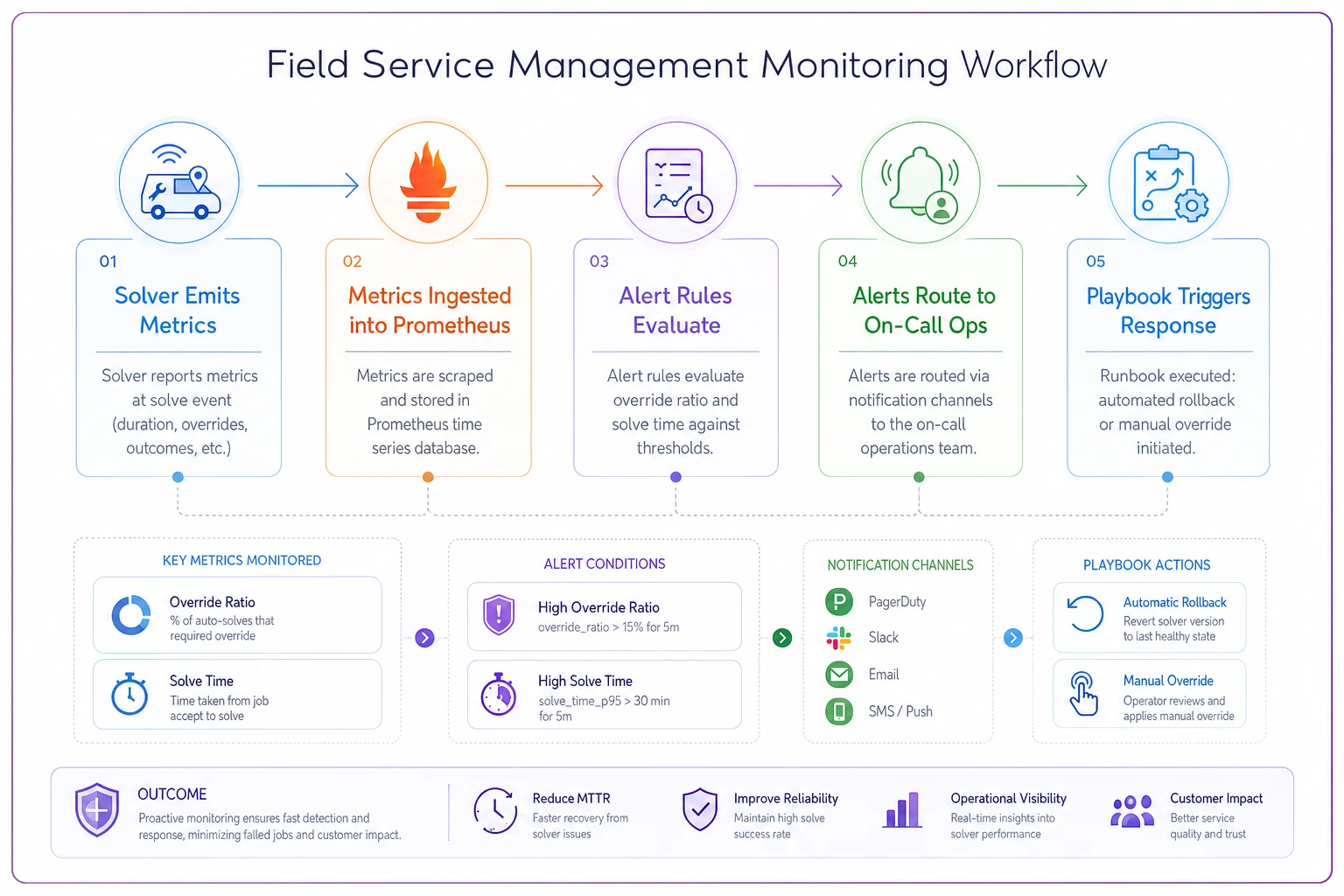
Keep the diagram near your runbook so engineers and ops share a single source of truth for detection and escalation.
Vendor evaluation checklist (buy path)
Run every candidate against this before signing. Use your real data, not their demo dataset.
-
- [ ] Handles your hardest constraint type natively (test it, don't trust the sales deck)
-
- [ ] Exposes decision factors, not just outputs (observability)
-
- [ ] Provides config versioning and documented rollback
-
- [ ] Clear data export format and retention terms in the contract
-
- [ ] Usage-pricing model modeled out to year 3 at your growth rate
-
- [ ] API rate limits won't choke your peak-morning solve load
-
- [ ] Sandbox / shadow-mode for safe testing against live data
-
- [ ] Named support SLA with escalation path for schedule-down incidents
-
- [ ] Reference customer at your scale and in your vertical
-
- [ ] Exit plan
what breaks, and what it costs, if you leave in 2 years
Run every candidate against this before signing. Use your real data, not their demo dataset.
A real scenario
A regional HVAC and plumbing operator running roughly 650 jobs/day across three metros debated this for most of a quarter. Engineering wanted to build — two-technician jobs and certification rules were painful in their current tool. Finance wanted to buy.
They ran the model. Build came in around $2M over three years with a steady-state of about 1.9 FTE they'd have to protect against attrition. Buy, with a stronger engine that actually supported crew pairing after a proper trial, came in near $820k. The deciding factor wasn't the $1.2M gap — it was the observability test. The build team couldn't staff a second optimization engineer, which meant the whole thing would've lived on one person's shoulders.
They bought, but did two things right: negotiated a clean data-export clause, and instrumented the override ratio from week one. Three months in, override rate sat around 11%, dispatchers stopped manually rebuilding the morning board, and they reclaimed a meaningful chunk of a dispatcher's day. Not a miracle — just a defensible decision that held up.
1‑page rollback / incident playbook skeleton
Keep this on one page, printed, near the dispatch desk. It applies whether you built or bought.
-
1. Detect - Trigger
override ratio spike, unassigned jobs > threshold, solve timeout, or dispatcher report. - Owner: on-call ops lead.
-
2. Assess (first 10 minutes) - Is the current published schedule usable as-is? (Yes → stabilize, don't rollback mid-shift.) - What changed in the last 24h? (rule edit, data feed, vendor deploy, map update)
-
3. Contain - Freeze further auto-republish. - Switch dispatch to manual-override mode for affected region only.
-
4. Rollback - Build
revert to last-good rule set / config version; redeploy. - Buy: restore previous vendor config version; if engine-side, open Sev‑1 with vendor.
-
5. Verify - Confirm override ratio and unassigned jobs return to baseline. - Spot-check 5 routes manually.
-
6. Communicate - Notify dispatchers the system is trusted again. - Log the incident with root cause.
-
7. Post-incident - Within 48h
what detection caught it (or didn't), what the fix was, what prevents recurrence.
Keep this on one page, printed, near the dispatch desk. It applies whether you built or bought.
Downloadable calculator
To run your own numbers, build a simple CSV with these columns and plug in your org's figures — it reproduces the TCO model above:
category,path,year,fte,loadedcostperfte,onetimecost,licensecost,infracost,notes buildinitial,build,1,3.8,185000,,,,initial build phase buildsteady,build,2,1.9,185000,,,45000,drift + oncall buylicense,buy,1,0.8,140000,,90000,12000,config + admin
Fill one row per cost bucket per year, sum by path, and compare the three-year totals. The honest version of this model always includes the steady-state FTE rows on the build side and the usage-growth escalation on the buy side — those are the two places where estimates tend to lie.
Bottom line
The build vs buy scheduling engine TCO question almost never comes down to year-one cost. It comes down to three-year staffing reality, who owns observability and rollback when a schedule breaks on a bad morning, and whether your constraints are genuinely unusual enough to justify owning a solver. Buy wins on cost at nearly every tier. Build wins only when fit, control, and retained talent all line up — and when you've actually budgeted for the drift that nobody mentions in the kickoff deck.
Run the model with your real numbers, run three vendors against your real data, and instrument the override ratio no matter which way you go. That one metric will tell you, within a few weeks, whether you made the right call.
Run the model with your real numbers, run three vendors against your real data, and instrument the override ratio no matter which way you go. That one metric will tell you, within a few weeks, whether you made the right call.
Ready to optimize your field operations?
Join 2,000+ service teams using Romrly to boost productivity, reduce downtime, and enhance customer satisfaction.