


Your field tech burns 40 minutes round-trip fetching a $12 capacitor from the main warehouse. Meanwhile, that customer's HVAC sits dead and your dispatcher is scrambling to push three afternoon appointments. This plays out across your service territory every single day.
Remote parts lockers solve this specific problem. But most field service operations botch the implementation — wrong locations, inventory gone sideways within a few weeks, and what should've been a smart investment turns into an unsecured storage unit that techs raid without any accountability.
The difference between a parts locker network that works and one that falls apart comes down to three decisions: where you place them, how you control access, and how consistently you reconcile inventory. Get those wrong and you've created expensive theft opportunities. Get them right and you can cut response times by 35–45% while keeping full inventory visibility across your territory.
Why Traditional Parts Distribution Breaks Field Service Operations
The hub-and-spoke model made sense when gas was cheap and you had five techs covering a tight area. That's not most operations today. Service territories stretch well past 100 miles. Emergency calls come in at 3 PM when your parts room closes at 4. Techs lose productive hours just driving back to base for components they use every week.
The math adds up fast. A tech at $32/hour spending 8 hours weekly on parts runs costs you over $13,000 a year in lost productivity — per tech. Scale that across 15 techs and you're looking at nearly $200k in opportunity cost, not counting fuel, vehicle wear, or the customer satisfaction hit from slower repairs.
What catches managers off guard is that just dropping lockers around your territory creates a different problem. Without proper controls, you lose inventory visibility within 30 days. Techs pull parts without documenting usage. Expensive components go missing. Your accounting team can't reconcile anything. The solution becomes its own operational headache.
Candidate Site Selection: The 80/20 Rule for Locker Placement
Most managers overthink site selection. They build heat maps, run location algorithms, try to optimize for everything at once. The actual answer is simpler: 80% of your parts usage happens within 20% of your service area.
Eliminate field service chaos with Romrly.
Romrly helps you assign, track, and complete service jobs efficiently and on time.
- Unified job scheduling
- Technician dispatch & tracking
- Customer notifications & updates
No credit card required
Pull your dispatch data from the past 90 days. Plot every service call that required a parts run. Clusters will show up — usually around commercial districts, older residential developments, or industrial zones with high equipment density. Those clusters are your primary candidates.
The Three-Criteria Filter for Site Validation
Service Density Threshold A location needs a minimum of 12–15 service calls monthly within a 5-mile radius. Below that, the locker sits underutilized and your reconciliation overhead outweighs any savings.
Secure Access Requirements You need 24/7 accessibility without creating a security liability. Secured commercial parking garages work well. So do equipment rooms in buildings where you hold service contracts. Exposed outdoor locations or spots with multiple access hurdles are hard to manage and usually don't pan out.
Tech Route Convergence Map your techs' daily routes and find the natural convergence points — highway interchanges, major commercial corridors, zone boundaries. Those spots consistently outperform locations that look good on a map but don't fit actual movement patterns.
One HVAC contractor placed their first locker in a strip mall lot because the rent was cheap. Six weeks later they'd lost $3,400 in parts to theft and vandalism. Their second attempt was a secured underground garage beneath a building where they serviced 40+ units monthly. That locker now handles 70+ transactions a month with zero shrinkage.
Building Your Initial Parts Kit List
The biggest mistake in parts locker implementation is trying to stock everything. Remote lockers aren't miniature warehouses — they're strategic caches for high-frequency, emergency-critical components.
Start with your transaction data. Look for parts that meet all of the following criteria:
-
Used in 5 or more service calls monthly
-
Under $75 per unit
-
Fit standard locker dimensions
-
No special storage requirements
-
Support emergency repairs
For HVAC that usually means capacitors, contactors, basic thermostats, common filters, and refrigerant gauges. Plumbing operations tend to stock valve repair kits, standard fittings, basic faucet cartridges, and wax rings. The specific SKUs matter less than the methodology you use to pick them.
The Min-Max Stocking Formula
Every SKU needs clear stocking parameters:
| Part Category | Min Stock | Max Stock | Reorder Point |
|---|---|---|---|
| High-frequency consumables | 3 units | 8 units | 4 units |
| Emergency repair components | 2 units | 5 units | 3 units |
| Seasonal items | 1 unit | 3 units | 2 units |
| Specialty tools | 1 unit | 2 units | 1 unit |
The min-max spread prevents both stockouts and excess inventory, and the reorder point triggers replenishment before techs face empty bins.
Setting these levels once and never revisiting them is a common mistake. Usage patterns shift seasonally, and a reorder point that worked in March may leave you short in July. Build a quarterly review into your cadence from the start.
Access Control: Balancing Security with Operational Speed
Physical security is only half the problem. Smart lockers with individual PINs or badge readers create audit trails, but the provisioning flow determines whether techs actually use the system correctly. Technology without a clear process behind it tends to get worked around.
The Three-Tier Access Model
Tier 1: Standard Tech Access Regular techs access common parts bins during scheduled shifts. The system logs entries and requires parts documentation before unlocking. This covers roughly 70% of transactions.
Tier 2: Emergency Override Senior techs and supervisors can access restricted bins for expensive components or specialty tools. These transactions trigger automatic notifications and require follow-up documentation within 24 hours.
Tier 3: Admin Access Parts managers and operations leads have full access for restocking, audits, and maintenance. They also hold override capability for lockouts and emergencies.
A commercial HVAC contractor ran this model across four remote lockers. Shrinkage dropped from 8% to under 1% within 60 days, with sub-30-second access times for standard transactions.
Assign a single role to handle provisioning to keep access grants consistent and auditable.
The tier model works because it creates friction only where it matters. Most techs never need anything beyond Tier 1. When they do need elevated access, the automatic notification creates accountability without slowing them down significantly.
Reconciliation Cadence: The Weekly-Monthly-Quarterly Rhythm
Inventory accuracy degrades without consistent reconciliation. Daily counts waste time, quarterly audits let problems stack up. The answer is a tiered schedule that catches discrepancies before they turn into real losses.
Weekly Spot Checks (about 15 minutes per locker) Every Monday, verify high-value and fast-moving SKUs. Count five random SKUs completely. Check for damaged packaging or expired components. This quick pass catches most issues before they escalate.
Monthly Full Counts (about 45 minutes per locker) First Friday of each month: full physical inventory. Compare counts against system records. Investigate any variance over 5%. Update min-max levels based on actual usage. This is what keeps your baseline accurate.
Quarterly Deep Audits (roughly 2 hours per locker) Every quarter, run a complete reconciliation that covers serial number verification for tracked components, expiration date reviews, damage assessments, usage pattern analysis, access log reviews, and cost-per-transaction calculations.
One plumbing operation running six remote lockers found $4,200 in "missing" inventory during their first quarterly audit. The parts weren't stolen — techs were pulling items without scanning barcodes, creating phantom shrinkage. They added a pre-unlock scan requirement and the problem disappeared.
How a Typical Reconciliation Cycle Works
The flow from weekly spot check through monthly full count to quarterly deep audit isn't just three separate tasks — each level feeds the next. Weekly counts flag SKUs that need closer attention during the monthly review. Monthly reviews surface usage patterns that inform the quarterly cost-per-transaction analysis. When you run these as connected steps rather than isolated checkboxes, problems surface earlier and the fixes are smaller.
Here's a quick visual of the reconciliation workflow:
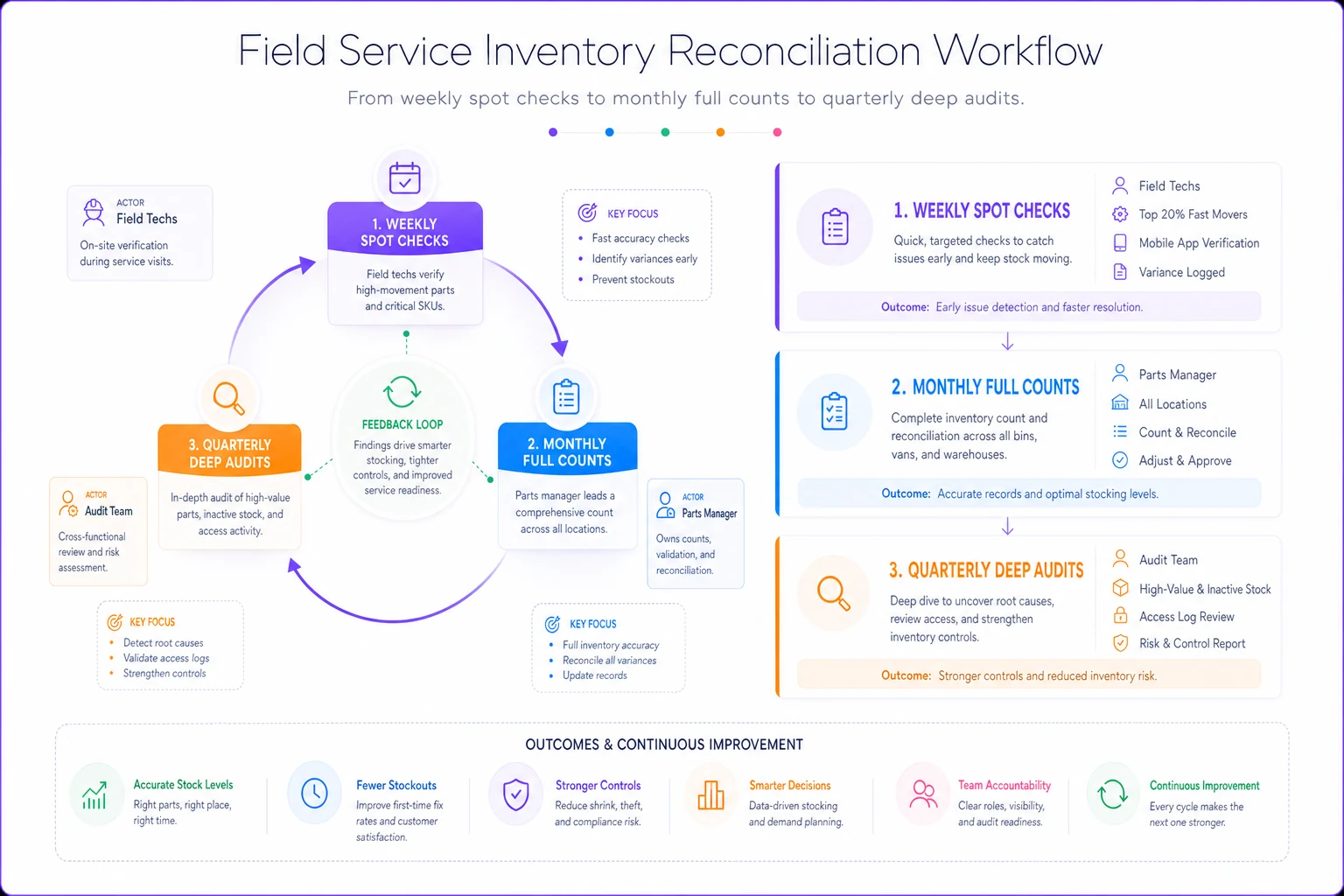
When you run these as connected steps rather than isolated checkboxes, problems surface earlier and the fixes are smaller.
KPIs That Actually Matter for Parts Locker Performance
Most organizations track the wrong things. Locker utilization rates and total transaction counts look nice on a dashboard but don't tell you whether the program is actually working. Focus on metrics that connect directly to service efficiency and profitability.
Primary Performance Indicators
First-Time Fix Rate Impact Compare FTF rates for calls within 5 miles of a locker versus calls requiring warehouse runs. Strong implementations show 15–20% FTF improvement in locker zones. If you're not seeing that lift, the kit list needs work.
Drive Time Reduction Track actual windshield time saved per tech weekly. You want at least 3–4 hours per tech. Below that, either your locker placement is off or your stocking strategy needs adjustment.
Shrinkage Rate Keep shrinkage under 2% monthly. Above 3% means access control or reconciliation failures. One percentage point of shrinkage on $10k in monthly parts flow costs $1,200 a year.
Cost per Part Transaction Total operational cost (lease, maintenance, reconciliation labor) divided by monthly transactions. Target under $3. Above $5 means you're over-investing in underutilized locations.
Leading Indicators to Watch
Before your KPIs go sideways, these tend to appear first: after-hours access log entries without corresponding service tickets, repeated restock requests on the same SKUs from specific lockers, variance patterns during spot checks — especially if it's always the same items coming up short — tech complaints about empty bins or wrong parts, and growing gaps between transaction and documentation time.
Common Implementation Failures and How to Avoid Them
The "Set and Forget" Problem Organizations deploy lockers and ignore them for months. By the time someone checks, inventory accuracy has degraded past recovery. Fix: establish reconciliation cadence from day one and assign specific ownership for each locker.
The Everything Locker Trying to stock every possible part turns your locker into an unsecured warehouse. Techs spend 10 minutes hunting for items. High-value components walk out. Fix: limit initial stocking to 30–40 SKUs maximum and only add items after proving demand.
The Honor System Trap Relying on techs to self-report parts usage without any verification holds for about two weeks before accountability erodes completely. Fix: deploy access control that requires item scanning or bin selection before the locker unlocks.
Scaling Your Parts Locker Network
Early success creates pressure to expand fast. Resist it. Rapid expansion before your operational model is proven leads to widespread inventory problems that are genuinely painful to unwind.
-
Pilot Phase (Months 1–3)
Deploy 1–2 lockers at your highest-value locations. Get the process right.
-
Validation Phase (Months 4–6)
Measure actual ROI. Confirm shrinkage stays under 2%. Document time savings.
-
Controlled Expansion (Months 7–12)
Add one locker per month maximum. Each new location should meet stricter criteria than the previous.
-
Network Optimization (Year 2)
Analyze usage patterns across all lockers. Relocate underperformers. Adjust kit lists based on real demand.
A regional appliance repair company rushed 8 lockers in 4 months. Within 90 days they'd lost track of $22k in inventory and were spending more time managing lockers than they were saving in drive time. After pulling back to 3 strategic locations with proper controls, they now run a 5-locker network handling 400+ transactions monthly.
The pattern repeats itself enough that it's worth taking seriously: the operations that scale carefully almost always outperform the ones that move fast.
Technology Integration for Inventory Visibility
Manual tracking breaks down at scale. Spreadsheets and paper logs can't keep pace with distributed inventory across multiple locations. But full enterprise systems often add complexity without adding much value for smaller operations.
A practical stack looks like this: smart locks with badge or PIN access, barcode scanners for transaction logging, a cloud inventory system with mobile access, automated reorder notifications, and basic reporting dashboards.
This runs roughly $300–500 per locker monthly and prevents far more than that in shrinkage while saving significant reconciliation time. More importantly, it keeps inventory accurate enough that the whole system stays viable.
For operations already running modular field service operations playbooks, parts locker integration slots in as another module. The access controls, reconciliation procedures, and KPI tracking all connect to existing SOPs without requiring a separate management layer.
Companies using remote diagnostics to reduce truck rolls can take this further by prestaging parts based on diagnostic data before the tech ever leaves — which pushes first-time fix rates up in a pretty meaningful way.
When Remote Parts Lockers Make Sense (And When They Don't)
Distributed parts inventory isn't the right answer for every operation. Knowing when it adds value versus when it adds complexity saves you from expensive mistakes.
Clear Win Scenarios:
-
Service territory exceeds 50-mile radius
-
10+ techs making daily parts runs
-
High concentration of standard, repeatable repairs
-
Predictable parts usage patterns
-
Strong inventory control discipline already in place
Better Alternatives Exist When:
-
Tight geographic service area (under 20 miles)
-
Highly variable parts requirements
-
Low-volume, high-value component needs
-
Weak inventory tracking systems
-
Limited infrastructure to support integration
One elevator service company spent $45k on a parts locker network before realizing 80% of their repairs required custom components that couldn't be prestocked. They pivoted to mobile inventory vans for senior techs — a much better fit for what they actually do.
Building Your Implementation Roadmap
Days 1–30: Foundation
-
Analyze 6 months of parts usage data
-
Identify top 3 candidate locations
-
Select initial 30-SKU kit list
-
Choose access control technology
-
Draft reconciliation procedures
-
Assign pilot team (3–5 techs)
Days 31–60: Pilot Launch
-
Deploy single locker at the optimal location
-
Train pilot techs on access procedures
-
Run daily reconciliation for the first week
-
Shift to weekly counts after that
-
Track KPIs manually
-
Gather tech feedback actively
Days 61–90: Optimization and Validation
-
Adjust kit list based on actual usage
-
Refine access procedures
-
Calculate real ROI
-
Document time savings
-
Present findings to leadership
-
Decide on expansion or adjustment
This approach prevents the expensive mistakes that kill parts locker programs before they deliver anything.
The Real ROI of Strategic Parts Distribution
When it works, the economics are hard to argue with. A tech saving 4 hours weekly on parts runs at $32/hour fully loaded is worth roughly $6,600 a year. Across a 10-tech operation that's $66k in recovered productivity. Add fuel savings (around $2,400 per tech annually), reduced vehicle wear, and faster customer response times, and total impact can clear $100k annually for a mid-sized operation.
Against that, you're spending roughly $2,000 monthly on leases, technology, and reconciliation labor for a 3-locker network. Payback typically runs 4–6 months with sustained ROI well past that.
The financial return is almost secondary to what changes operationally, though. Techs stop losing afternoons stuck in traffic. Customers get faster repairs. Dispatchers have more flexibility. Your parts room team stops fielding constant pick requests and can actually focus on strategic inventory management.
Start Small, Prove Value, Scale Systematically
Remote parts lockers aren't complicated, but they're easy to get wrong. Organizations fail when they treat distributed inventory like a real estate problem instead of an operational one. Success comes from methodical implementation, consistent controls, and not scaling faster than your processes can support.
Run one locker well before adding a second. Lock down your reconciliation rhythm before expanding territory coverage. Build access accountability before increasing inventory value. It might feel slow, but it prevents the inventory disasters that quietly kill distributed parts programs.
The organizations seeing strong ROI from parts lockers didn't get there through rapid deployment. They got there through careful site selection, thoughtful kit design, solid access controls, and consistent reconciliation. None of that is exciting, but all of it determines whether your parts lockers become operational assets or expensive liabilities.
Start the pilot. Prove it works. Then scale it.
Ready to optimize your field operations?
Join 2,000+ service teams using Romrly to boost productivity, reduce downtime, and enhance customer satisfaction.