

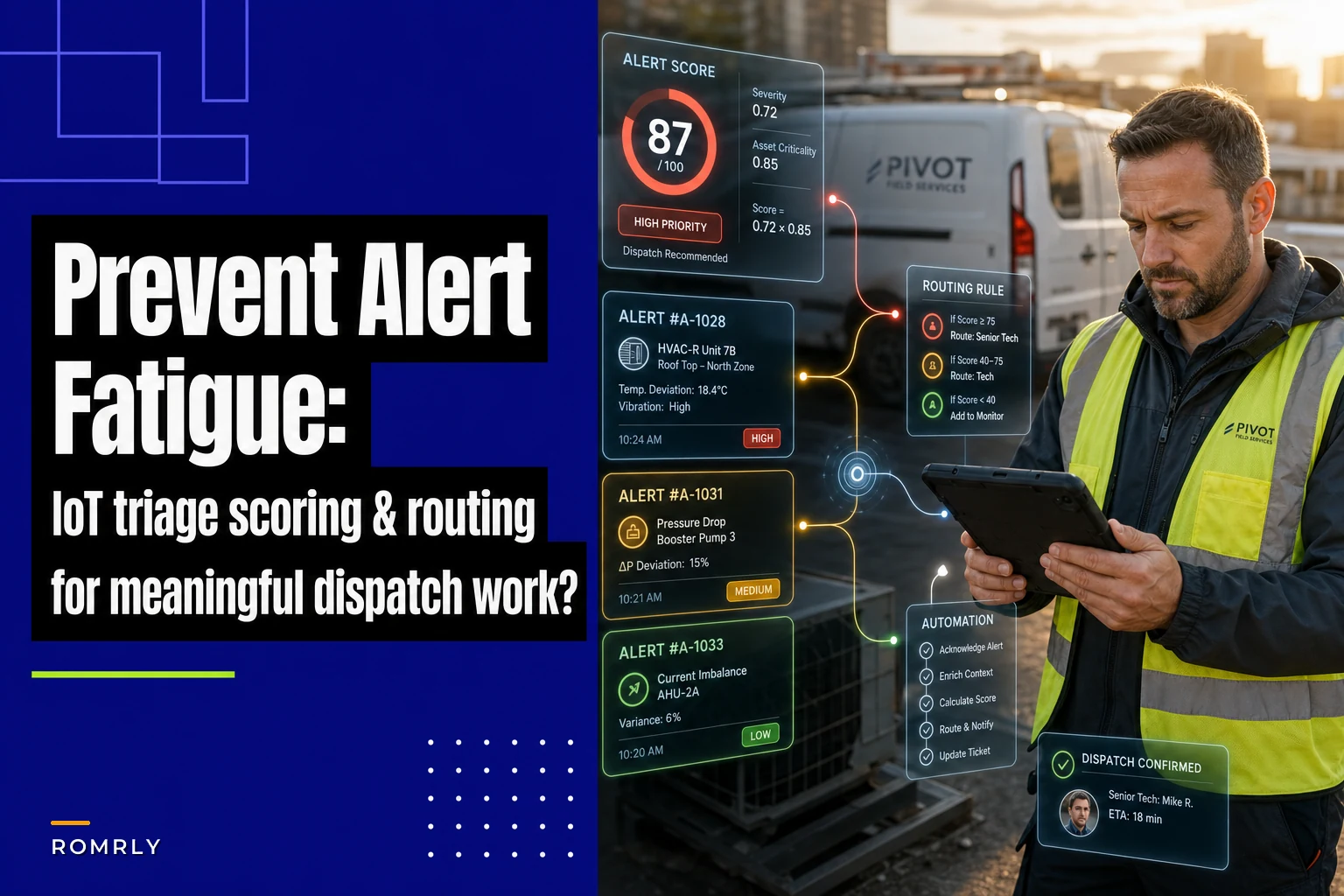

Your dispatcher's screen lights up with 47 alerts before 8 AM. Temperature sensor in Unit 14 showing marginal readings. Pressure alarm from a client site that goes off twice a week. Critical compressor failure buried somewhere in the middle. By noon, your team has burned three hours chasing ghosts while a $30,000 chiller sits dead at your biggest account.
This is what happens when IoT alerts for dispatch in field service operations treat every signal the same. No prioritization. No context. Just noise.
The fix isn't turning off alerts or hiring more dispatchers. You need a scoring system that separates real emergencies from background chatter, plus routing rules that get the right alerts to the right people at the right time.
Why standard IoT alerting breaks down in field service
Most IoT platforms dump raw alerts straight into dispatch queues. A temperature sensor crossing 78°F gets the same treatment as a complete system shutdown. Your dispatchers become human filters, manually sorting through hundreds of notifications trying to spot actual problems.
The math gets ugly fast. Say you monitor 400 pieces of equipment across 80 client sites. Each asset has 5-8 sensors. Even at a 2% daily alert rate, you're looking at 160+ notifications hitting dispatch every morning. Multiply that by false positive rates around 40% for standard threshold alerts, and dispatchers are spending half their shift on alerts that don't need action.
Field service operations have a specific problem here that in-house facility teams don't. You're dealing with equipment spread across dozens of locations with different usage patterns, environmental conditions, and criticality levels. That HVAC unit at the dentist office runs differently than the identical model at the warehouse. Generic thresholds don't account for any of that.
The human cost compounds fast. Dispatchers start ignoring "cry wolf" sensors. Response times creep up. When real failures hit, they're buried under a pile of low-priority noise. A commercial refrigeration company I worked with missed a freezer failure at a restaurant because their dispatcher had learned to ignore temperature alerts from that location — prior alerts were always door-left-open situations. That one incident cost them the contract.
Building your triage scoring formula
The core formula combines three factors that determine whether an alert needs immediate attention or can wait:
Eliminate field service chaos with Romrly.
Romrly helps you assign, track, and complete service jobs efficiently and on time.
- Unified job scheduling
- Technician dispatch & tracking
- Customer notifications & updates
No credit card required
Alert Score = Severity Level × Asset Criticality × False Positive Adjustment
Here's what each component actually means in practice.
Severity Level (1-5 scale):
-
Level 5
Complete failure or safety issue (equipment down, leak detected)
-
Level 4
Performance severely degraded (efficiency below 60%, multiple faults)
-
Level 3
Approaching failure thresholds (vibration trending up, pressure dropping)
-
Level 2
Minor deviation from normal (temperature 5°F above baseline)
-
Level 1
Informational only (maintenance reminder, filter change due)
Asset Criticality (1-5 scale):
-
Level 5
Mission-critical, no redundancy (main chiller at data center)
-
Level 4
Revenue-generating equipment (MRI machine, production line)
-
Level 3
High-impact on operations (main HVAC for office building)
-
Level 2
Moderate impact (backup systems, non-essential areas)
-
Level 1
Minimal impact (storage area ventilation, landscaping irrigation)
False Positive Adjustment (0.2-1.0): Track accuracy per sensor over 30 days. If a sensor triggers 20 alerts but only 4 required action, your adjustment factor is 0.2. New sensors start at 0.7 until you build history.
Here's what this looks like with real numbers:
| Alert Type | Severity | Criticality | FP Adjust | Final Score | Action |
|---|---|---|---|---|---|
| Chiller offline at hospital | 5 | 5 | 0.9 | 22.5 | Immediate dispatch |
| Temperature +3°F in server room | 2 | 4 | 0.8 | 6.4 | Monitor closely |
| Pressure sensor at retail store | 3 | 2 | 0.3 | 1.8 | Review end of day |
| Maintenance due on backup generator | 1 | 3 | 1.0 | 3.0 | Schedule this week |
Anything scoring above 15 triggers immediate action. Scores between 8 and 15 go to queue for review within 2 hours. Below 8 gets batched for daily review unless multiple alerts are coming from the same asset.
Smart routing rules that actually work
Scoring tells you priority. Routing gets alerts to the right person. Most companies blast everything to dispatch, creating a bottleneck. Better approach: route based on score, time, and capability.
Score-based routing thresholds:
-
Above 20
Page on-call tech directly, bypass dispatch
-
15-20
Dispatch creates immediate ticket, calls tech
-
8-15
Queue for dispatch review within 2 hours
-
4-8
Batch for shift supervisor review
-
Below 4
Weekly operations report
Time-based modifications matter. After hours, bump all thresholds down by 5 points — fewer resources available. Weekends, only route scores above 12 to on-call.
Geographic routing cuts windshield time. If Tech A is already at a site and a low-priority alert comes in from the same location, route it directly to them. One HVAC company cut their truck rolls by around 18% just by bundling nearby alerts.
Skill-based routing prevents wasted trips. A complex chiller alert needs your commercial tech, not the residential guy who happens to be closer. Build a capability matrix:
-
Tech Level A
All equipment types
-
Tech Level B
Standard commercial, no specialized
-
Tech Level C
Residential and light commercial only
Route nearby low-priority alerts directly to techs already onsite to save windshield time.
The routing workflow below shows decision points for score, time, geography, and skill.
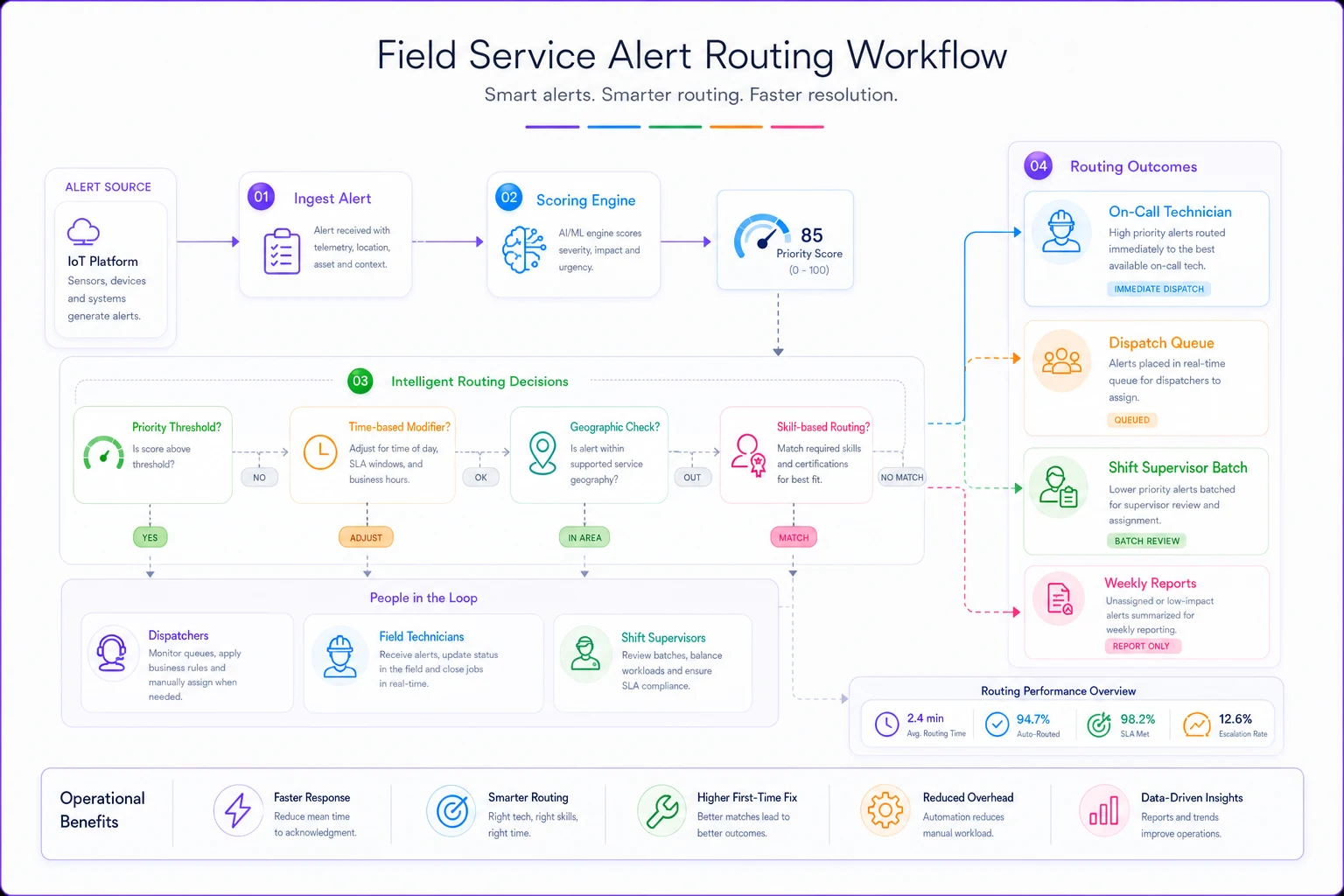
This visual maps how high scores bypass dispatch while low scores are batched or routed by proximity and skill.
Automation that prevents dispatcher burnout
Manual triage burns out dispatchers fast. They're making hundreds of micro-decisions daily, each one carrying risk. Miss something important, customer calls angry. Overreact to false alarms, waste thousands in unnecessary truck rolls.
Automation handles the obvious decisions so humans can focus on the complex ones. These are the implementations worth starting with:
Auto-acknowledge patterns: If the same sensor triggers 3+ times in 24 hours with no equipment impact, auto-acknowledge future alerts for 7 days and flag for maintenance inspection. This handles chattering sensors without hiding real problems.
Correlation grouping: Multiple alerts from one asset within 10 minutes get grouped into a single ticket. Dispatchers see "Unit 14 — Multiple Alerts (4)" instead of four separate notifications. Reduces screen clutter by roughly 60%.
Threshold adjustment: Track seasonal patterns and adjust automatically. That rooftop unit runs hotter in July — your thresholds should reflect that. AI automation can analyze 90 days of historical data and set dynamic thresholds that reduce false positives by somewhere in the 35-40% range.
Escalation automation: Alert sits unacknowledged for 15 minutes? Auto-escalate to supervisor. Still nothing after 30? Page backup on-call. Prevents alerts from falling through cracks during shift changes or busy periods.
Client notification triggers: Score above 15 at a key account? Auto-generate client notification: "We've detected an issue with your equipment and have dispatched a technician. Estimated arrival: 2:30 PM." Keeps clients informed before they even notice a problem.
One facilities management company implemented these automations across roughly 200 properties. Their dispatchers went from handling 300+ daily alerts to reviewing around 40 that actually needed human judgment. Response time to critical issues dropped from 35 minutes to 12 minutes on average.
Setting false positive thresholds without crying wolf
False positives kill trust in your alerting system faster than anything else. But set thresholds too loose and you miss real failures. The balance requires data, not guessing.
Start by categorizing your false positive types:
Environmental false positives: Door left open triggers temperature alert. Cleaning crew unplugs equipment. These need procedural fixes, not threshold changes.
Sensor degradation: Old sensors drift. Vibration sensors get loose mountings. Track sensor age and accuracy — you'll typically start seeing degradation after 18-24 months on standard IoT hardware.
Operational variance: Equipment runs different patterns on different days. Restaurants have different thermal loads Monday versus Saturday. Build day-of-week and time-of-day profiles.
Calculate what false positives actually cost to justify fixes. Each unnecessary dispatch runs roughly $180-280 depending on your market (tech time, vehicle, opportunity cost). A sensor causing two false dispatches monthly is costing $5,000+ per year. Spending $500 to replace or recalibrate it is an obvious call.
A practical threshold-setting process:
-
Collect 30 days of baseline data for normal operations
-
Calculate standard deviation for each metric
-
Set initial thresholds at 2.5x standard deviation
-
Monitor for 14 days, track false positive rate
-
Adjust in 0.5x increments until false positive rate drops below 20%
-
Lock in thresholds, review quarterly
For critical equipment, run parallel thresholds. Conservative threshold (3x deviation) for alerting, aggressive threshold (2x deviation) for logging. Lets you catch developing issues without creating alert fatigue.
Real scenario: How one company cut alerts 70% while catching more failures
Regional food service equipment company, 8 techs covering 300 restaurants. They installed IoT sensors on walk-in coolers and freezers — temperature, door position, compressor current. First month was chaos. 400+ daily alerts, mostly door-open notifications during busy lunch rushes.
Initial setup had every alert going straight to dispatch. Single threshold for all equipment. No prioritization. Dispatchers started ignoring the system after week two.
We implemented the scoring model over a 6-week period:
Weeks 1-2: Baseline data collection. Tracked which alerts led to actual dispatches, which were false alarms, which equipment actually failed. Found that 73% of alerts were door-related, 18% were normal temperature variation, only 9% indicated real issues.
Weeks 3-4: Deployed the scoring formula. Freezer compressor failures scored 20-25. Door alerts scored 2-3. Temperature variations scored based on deviation size and duration.
Weeks 5-6: Added routing rules and automation. Scores above 15 went straight to on-call tech's phone. Door alerts got batched into daily reports unless open longer than 20 minutes. Correlation engine grouped related alerts.
Results after 90 days:
-
Daily alerts to dispatch dropped from 400+ to roughly 120
-
Actionable alerts requiring dispatch increased from 36 to 44 monthly (catching issues earlier)
-
Average response time to critical failures
47 minutes down to 19
-
False positive truck rolls
dropped from 32 monthly to 6
-
Saved approximately $8,400 monthly in unnecessary dispatches
The key wasn't reducing alerts — it was organizing them intelligently. The system still captured everything, but humans only saw what needed human decision-making.
Who should NOT use this approach
This scoring model fails in certain situations. Worth knowing the limitations before you build anything.
Single-site operations: If you're monitoring 20 or fewer assets in one location, the overhead isn't worth it. Your dispatcher can mentally track that many assets without formal scoring. Stick with simple threshold alerts.
Life safety equipment: Medical devices, fire systems, emergency generators — these need different treatment entirely. Every alert matters. Don't risk scoring down something that could affect safety.
Brand new installations: You need 30+ days of operational data to set baselines. During commissioning and break-in periods, anomalies are constant. Wait until operations stabilize.
Extremely simple equipment: Basic exhaust fans, sump pumps, lighting controls. These either work or they don't. Binary alerting is fine. Scoring adds unnecessary complexity.
If your false positive rate is already below 15%, scoring might not move the needle much. Focus elsewhere first.
Integration with existing dispatch systems
The scoring model needs to flow into your current operations, not blow them up. Most field service companies run some combination of dispatch software, ticketing system, and communication tools. The scoring layer sits between the IoT platform and dispatch.
Standard integration points:
IoT Platform → Scoring Engine: Pull raw alerts via API or webhook. Process every 30-60 seconds for non-critical, real-time for high scores. Don't poll too frequently or you'll overload systems.
Scoring Engine → Dispatch Software: Push scored alerts as tickets with priority pre-set. Include score breakdown in ticket notes so dispatchers understand the reasoning behind prioritization.
Dispatch Software → Communication: Use existing channels. Don't introduce new apps for techs to monitor. If they use text for dispatch, send high-score alerts there. If they use a mobile app, integrate there.
For companies already using remote diagnostics systems, the scoring model becomes significantly more useful. Combine alert scores with remote diagnostic capability. Score of 18+ with remote access available? Try diagnosis first before rolling a truck. Could save the dispatch entirely.
The scoring model also feeds into your operational playbooks. High-score alerts trigger specific response procedures. Medium scores follow different workflows. Keeps response consistent across dispatchers regardless of experience level.
Watch for integration bottlenecks. If your dispatch software can only handle 100 API calls per minute, batch low-score alerts. Process high scores individually, queue everything else.
Manual overrides and edge cases
No scoring model handles every situation perfectly. Build in override capabilities for dispatchers who know something the algorithm doesn't.
Common override scenarios:
VIP client sites: CEO's office HVAC might score low, but you respond fast anyway. Flag these assets for an automatic score boost (+5 to any alert).
Known problem equipment: Unit scheduled for replacement next month starts acting up. Dispatcher can suppress non-critical alerts to cut the noise.
Seasonal adjustments: First heat of winter always triggers alerts as dust burns off heating elements. Dispatcher sets temporary suppression for specific alert types.
Tech proximity override: Tech finishing at Site A, low-score alert at Site B next door. Dispatcher overrides threshold to bundle the work.
Track override patterns. If dispatchers consistently override certain scores, the model needs adjustment. Monthly review of override logs reveals gaps in the scoring logic.
Build an override audit trail — who overrode what and why. Prevents abuse and helps with training. A new dispatcher reviewing past overrides can start to understand the judgment calls that don't fit neatly into any formula.
Making the transition from chaos to control
Moving from alert chaos to scored triage feels like a big lift. Your dispatchers are used to their current chaos — at least it's familiar. Sudden change causes resistance and mistakes.
Phase the implementation over 8-12 weeks:
Weeks 1-2: Shadow mode Run scoring in the background. Don't change the dispatch process yet. Compare what the scoring model recommends versus what dispatchers actually do. Find the gaps.
Weeks 3-4: Soft launch Show scores to dispatchers but don't enforce them. Let them get comfortable seeing the numbers. Gather feedback on scoring accuracy.
Weeks 5-6: Partial automation Automate only the obvious categories first. Auto-acknowledge known false positives. Batch very low scores. Keep humans in the loop for everything else.
Weeks 7-8: Full implementation Enable all routing rules. Activate escalation automation. Dispatchers now work primarily with scored and routed alerts.
Weeks 9-12: Optimization Fine-tune thresholds based on real results. Adjust routing rules. Add new automation patterns as trends emerge.
Training matters more than technology here. Dispatchers need to understand not just how to use the system but why scores are calculated certain ways. When they trust the scoring, they stop second-guessing every alert.
Run parallel operations for the first week of full implementation. Old way and new way side by side. Proves the new system catches everything important while reducing noise.
Measuring success beyond fewer alerts
Fewer alerts doesn't automatically mean better operations. You could achieve zero alerts by turning off monitoring. Track metrics that actually mean something:
Response time to critical failures: Should drop 40-60% within the first quarter. Easier to spot real problems when they're not buried in noise.
First-time fix rate: Better alert context means techs arrive better prepared. One company saw first-time fix jump from 68% to 81% because alerts included richer diagnostic data.
Customer-reported issues: Should decrease as you catch more problems before customers notice. If complaints stay flat while alerts drop, you're filtering too aggressively.
Dispatcher overtime: Less alert fatigue means more efficient shifts. Track overtime specifically attributed to alert management.
False dispatch cost: Calculate monthly. Should see a 50-70% reduction in unnecessary truck rolls — somewhere in the range of $5,000-15,000 monthly savings for a typical 8-tech operation.
Mean time to acknowledge: How fast dispatchers respond to alerts. Faster acknowledgment with the scoring model shows improved confidence in alert validity.
Don't expect clean metrics immediately. The first month will be messy as everyone adjusts. By month three, patterns stabilize. By month six, you'll have a hard time remembering how you operated without it.
The real win isn't in the operational metrics anyway — it's dispatcher retention. Alert fatigue drives good dispatchers to other jobs. When dispatchers feel in control rather than overwhelmed, they stick around. That institutional knowledge is worth more than any efficiency metric.
IoT alerts in field service dispatch don't have to be a flood of noise that drowns your operations. The scoring model — Severity × Asset Criticality × False Positive Adjustment — gives you a number that actually means something. Add smart routing rules and basic automation, and suddenly your dispatchers are managing exceptions instead of drowning in data.
The companies that get this right aren't the ones with the most sensors or the fanciest IoT platforms. They're the ones who took time to build scoring logic that matches their actual operations — started small, measured everything, and adjusted based on real results rather than vendor promises.
Your dispatchers shouldn't be human alert filters. They should be operational coordinators making decisions about resource allocation. The scoring model gets you there by handling routine decisions automatically while surfacing the alerts that genuinely need human judgment.
Start with your highest-volume, lowest-value alerts. Score them, route them, automate them. Free up mental bandwidth for the situations that actually need experienced decision-making. Build from there as you learn what works for your specific operation.
The path from alert chaos to operational control isn't about perfect algorithms or expensive software. It's about understanding your patterns, scoring appropriately, and giving your team tools that support their judgment rather than replace it. When you get the balance right, everybody wins — techs, dispatchers, and the customers who get faster, more accurate service when their equipment really needs it.
Ready to optimize your field operations?
Join 2,000+ service teams using Romrly to boost productivity, reduce downtime, and enhance customer satisfaction.