


Every dispatcher has felt the pull. It's 10:40am, a job just blew past its window by 45 minutes, a "quick" repair turned into a two-hour teardown, and now three afternoon appointments are wobbling. The instinct is to grab the map, drag a couple of pins around, and re-sequence half the board to "fix" it.
That instinct is usually wrong.
Day-of route re-optimization in field service isn't about squeezing out the theoretically shortest path. By late morning the day already has commitments baked in — customers who took time off work, techs who staged specific parts, promised windows that trigger SLA credits if you miss them. A re-route that looks cleaner on the screen can quietly break four of those commitments to save eleven minutes of drive time.
The dispatchers who handle this well aren't better at map-reading. They have a decision tree that tells them when moving a job is actually worth it, and when the schedule should just roll forward and absorb the slip. That's what this covers — the actual logic, plus some automation recipes and A/B test templates so you can check whether your re-route rules are helping or quietly costing you.
The core question: re-route or roll?
There are really only two responses to a slipping schedule, and they get confused constantly.
Rolling means you keep the sequence intact and let the delay cascade. Job 3 runs late, so jobs 4, 5, and 6 each shift later by roughly the same amount. Nobody gets reassigned. You're betting that a late arrival is less costly than the disruption of moving things around.
Re-routing means you actively change assignments — pull a job off Tech A and hand it to Tech B, resequence a tech's remaining stops, or push a low-priority job to tomorrow. You're betting the disruption is worth it because rolling would break something expensive.
The mistake most dispatchers make is treating every slip as a re-route problem. Rolling is the right call more often than not. A tech running 30 minutes behind on a four-stop residential day usually just... runs 30 minutes behind. The customer at stop 4 gets a heads-up text and life goes on. Re-routing that day means someone drives across town, burns fuel, arrives at an unfamiliar site, and probably loses the time you were trying to recover.
Re-routing earns its keep in a narrow set of conditions. The trick is knowing them before the pressure hits.
The dispatcher decision tree
Below is the logic worth handing a dispatcher on day one. Walk it top to bottom the moment a job starts projecting past its window by more than 20 minutes.
Eliminate field service chaos with Romrly.
Romrly helps you assign, track, and complete service jobs efficiently and on time.
- Unified job scheduling
- Technician dispatch & tracking
- Customer notifications & updates
No credit card required
Here's a quick visual of the decision flow to keep in mind.
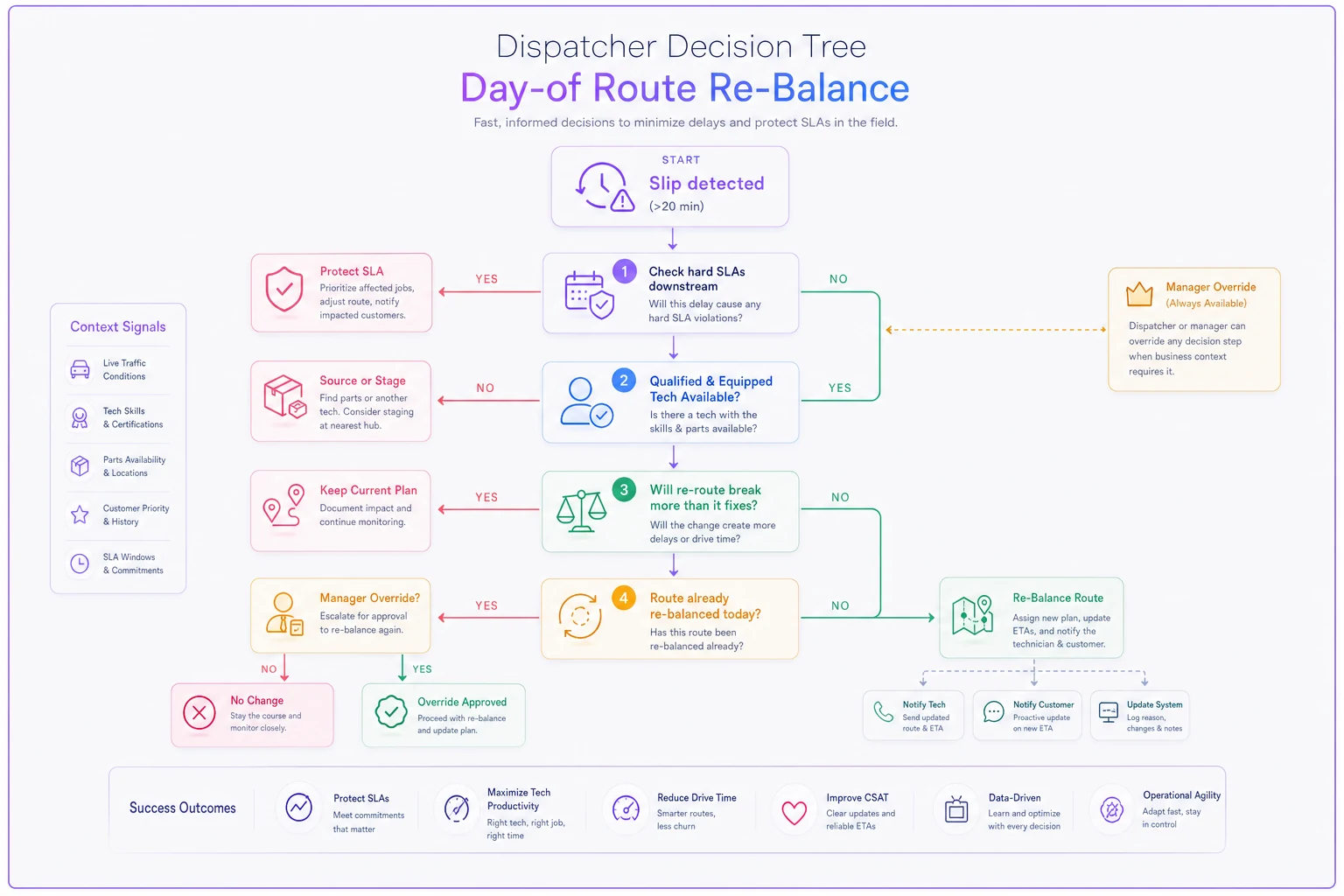
Walk it top to bottom the moment a job starts projecting past its window by more than 20 minutes.
Step 1 — Is a hard SLA or contractual window at risk downstream? If the slip threatens a job with financial penalties or a guaranteed window, that jumps the priority. Not the slipping job — the downstream one. Protect the commitment that costs money to break.
-
No penalty at risk → lean toward rolling.
-
Penalty at risk → continue to Step 2.
Step 2 — Is there a genuinely closer tech with the right skills and parts? "Closer" is not enough. A tech 8 minutes away who lacks the certification or doesn't have the part staged is not a real option. The re-route only counts if the receiving tech can actually complete the job on the first visit.
-
No qualified, equipped tech nearby → roll and notify.
-
Yes → continue to Step 3.
Step 3 — Does the re-route break more than it fixes? Count the commitments. If moving one job forces you to disturb two or more stops that were fine, the math rarely works out. One clean swap is good. A three-piece re-shuffle at 2pm is chaos wearing a costume.
-
Breaks two or more stable jobs → roll.
-
Breaks zero or one → re-route.
Step 4 — Has this route already been re-balanced today? This is the guardrail everyone forgets. A second or third re-route on the same tech's day compounds uncertainty. Techs lose track, customers get conflicting texts, staged parts end up on the wrong truck. Cap it. One re-balance per tech per day, hard stop, unless a manager overrides.
-
That last rule sounds arbitrary but it might be the single most useful one on the list. Left unchecked, dispatchers "optimize" the same route four times before lunch and wonder why first-time-fix dropped.
The decision tree isn't magic — it's just a way to make the same judgment call consistently instead of differently every time pressure spikes.
SLIP DETECTED (>20 min past window) │ ▼ Hard SLA or penalty at risk downstream? │ │ NO YES │ │ Roll forward Qualified + equipped Notify customer tech available? │ │ NO YES │ │ Roll + notify Re-route breaks 2+ stable jobs? │ │ YES NO │ │ Roll Route already re-balanced today? │ │ YES NO │ │ Manager Execute re-route override + notify all parties required
Safe re-route heuristics (the rules that keep you out of trouble)
The decision tree tells you whether. These heuristics keep the how from backfiring.
These aren't abstract principles — each one exists because skipping it causes a specific, repeatable problem.
| Heuristic | What it means | Why it protects you |
|---|---|---|
| Protect the window, not the sequence | It's fine if a tech does stops out of order, as long as every promised window still holds | Sequence is a means, not a goal — chasing "optimal order" breaks promises |
| One swap beats three shuffles | Prefer a single job hand-off over resequencing multiple techs | Every touch adds a chance for miscommunication |
| Parts before proximity | A closer tech without the part isn't closer | Sending an unequipped tech guarantees a second visit |
| Freeze the next 30 minutes | Never re-route a job whose tech is already en route or within 30 min of arrival | You'll create two trucks converging on one site |
| Notify before you commit | Customer and both techs confirm before the board changes | Silent re-routes are how you get two no-shows instead of one late arrival |
Use the "freeze the next 30 minutes" rule to avoid most dispatch double-books.
The "freeze the next 30 minutes" rule catches more dispatch double-books than any other. When a tech is 12 minutes out and you re-route the job to someone else, there's a real chance the original tech never sees the update and shows up anyway. Now you've got an annoyed customer and two techs standing in a driveway.
When day-of re-optimization actually makes sense
Re-balancing a live route is worth the disruption when:
-
A high-penalty SLA job is about to be missed and a qualified tech can genuinely rescue it
-
A tech goes out of service mid-day (vehicle breakdown, injury, sick) and their remaining jobs have nowhere to go without intervention
-
An emergency same-day request lands that can't wait, and you have a nearby tech with slack — which ties directly into how you handle same-day emergency requests without derailing planned work
-
A cancellation opens a clean gap that lets you pull a slipping job earlier with zero downstream cost
That last case is underrated. Re-routes are almost always framed as damage control, but the best ones are opportunistic — a customer cancels their 1pm, and suddenly there's a hole you can slide a stressed afternoon job into. That's a re-route that only makes things better.
When it's a bad idea
These aren't edge cases.
They're the majority of re-route attempts on any given day.
-
The slip is under around 20 minutes and no penalty is involved. Just roll and text the customer.
-
You'd be re-routing a route that's already been touched once today.
-
The "closer" tech is closer by drive time but weaker on the actual work — you're trading a late fix for a failed one.
-
It's the last hour of the day. Late-day re-routes almost never save the time they claim to, and they routinely push a job into overtime or into tomorrow anyway.
These aren't edge cases. They're the majority of re-route attempts on any given day.
Who should not build heavy re-route automation
If you run four techs in a tight metro doing mostly residential work, you probably don't need automated re-optimization at all. A good dispatcher with the decision tree above will out-perform any algorithm because they know the customers and the techs personally.
Automation earns its place when you're past roughly 12–15 techs, running mixed job types with real SLA exposure, and the dispatcher physically can't hold the whole board in their head anymore. Before that threshold, the tooling tends to add complexity without adding much clarity.
Simple automation recipes
You don't need a heavy optimization engine to get most of the value here. A few targeted rules — the kind you can wire into a modern field service platform — remove the guesswork from the routine stuff and let the dispatcher focus on the actual judgment calls.
These recipes are worth building in roughly this order, since each one reinforces the one before it.
Recipe 1 — Slip detection alert. Trigger: a job's projected completion crosses its window threshold by more than 20 minutes (based on GPS + estimated remaining duration). Action: flag the downstream jobs at risk and surface them to the dispatcher with the decision-tree prompt attached. No auto-move — just the right information, early.
Recipe 2 — Re-route candidate suggestion. Trigger: dispatcher marks a job as "needs re-route." Action: the system lists only techs who are (a) within a set drive radius, (b) carry the required skill tag, and (c) have the part staged. This enforces "parts before proximity" automatically — unqualified techs never even appear as options.
Recipe 3 — Re-balance counter and lock. Trigger: any assignment change on a tech's route. Action: increment a daily counter; on the second change, require a manager PIN. This is Step 4 of the decision tree, enforced instead of just remembered.
Recipe 4 — Confirm-before-commit notifications. Trigger: a re-route is approved. Action: hold the change in a pending state until both techs acknowledge and the customer gets a new-window text. No silent board changes.
None of these recipes require sophisticated AI routing. They're workflow guardrails — the kind that keep a decision tree from existing only on a laminated card nobody reads after week two. On the triage side, if you can determine before dispatching whether a job actually needs a truck, half your re-route pressure disappears. That's covered in the remote diagnostics pilot plan to reduce truck rolls.
Proving it works: A/B test templates
Most dispatch teams have no real idea whether their re-routing helps. They re-route on instinct and assume it's saving the day. It might be quietly costing them. So test it.
Test A — Re-route vs. roll, measured on first-time-fix. Split comparable slipping-job situations into two groups. Group A follows the decision tree (re-route only when it passes all four steps). Group B uses your old approach (re-route on gut). Measure:
-
First-time-fix rate on the affected jobs
-
On-time arrival for downstream jobs
-
Total drive time per affected route
-
Customer satisfaction on the re-routed job specifically
Run it for two to four weeks. The pattern worth expecting: the disciplined group shows fewer re-routes overall but higher first-time-fix, because the re-routes that survive the tree are the ones that actually needed to happen.
Test B — Re-balance cap on vs. off. Half your dispatchers get the one-re-balance-per-day cap; half don't. Compare same-day repeat visits and overtime hours. This is the fastest way to show that "more optimization" and "better outcomes" are not the same thing.
A quick checklist before you trust any test result:
-
[ ] Are the two groups genuinely comparable (similar job mix, similar day types)?
-
[ ] Are you measuring the downstream jobs, not just the slipping one?
-
[ ] Is first-time-fix tied to the specific re-routed jobs, not the daily average?
-
[ ] Did you run it long enough to cover a normal range of chaos (at least a couple weeks)?
-
[ ] Are you tracking re-route count, so you can see if discipline reduced churn?
Both tests are worth running together if you can manage it. The re-balance cap result usually lands faster and is easier to sell internally.
A real scenario
A regional HVAC company running about 22 techs across a metro area had a dispatcher who prided herself on aggressive re-optimization. On a busy summer day she'd re-shuffle routes 15–20 times. The board always looked tight. But first-time-fix on re-routed jobs was sitting around 71%, noticeably below their overall rate of roughly 84%.
When they dug into why, the pattern was pretty clear. Re-routed jobs kept going to whichever tech was geographically closest — not whoever had the right part or the refrigerant certification. Techs were arriving, diagnosing, and then rolling a second visit for parts they didn't carry.
They implemented the four-step tree, capped re-balances at one per tech per day with manager override available, and turned on the candidate-suggestion rule that filtered out unqualified techs entirely. Re-route volume dropped to around 5–7 a day. First-time-fix on the remaining re-routed jobs climbed into the low 80s within about a month, close to their overall baseline. Downstream on-time arrivals improved too, mostly because stable jobs were no longer getting disturbed.
Nobody worked harder. The dispatcher did less re-routing and got better results. The gains came almost entirely from not moving things that didn't need to move.
Day-of route re-optimization gets sold as a technology problem — better algorithms, tighter maps, smarter routing engines. But the real lever is restraint. Most schedule slips should roll, not re-route. The value isn't in your ability to rearrange the board; it's in knowing which of the day's commitments are load-bearing and which ones can bend.
Build the decision tree, cap the re-balances, protect the windows instead of the sequence, and then — this is the part most teams skip — actually test whether your re-routing is helping. Half the time you'll find that doing less is the improvement you were looking for.
Ready to optimize your field operations?
Join 2,000+ service teams using Romrly to boost productivity, reduce downtime, and enhance customer satisfaction.