

Most integration projects don't fail loudly. They fail quietly, one mismatched record at a time, until a dispatcher notices the ERP shows a job as "closed" while the FSM still has it open and unbilled. By then the data has drifted for weeks and nobody trusts the numbers.
That's the real problem with field service integrations. It's not the initial connection — anyone can wire an API. It's what happens on day 90 when three systems each think they own the same asset record, and each one is confidently wrong in a different direction.
This post covers the plumbing underneath all of that: what your canonical objects should look like, which system wins when data conflicts, how to make syncs safe to retry, and what to check before you flip anything on in production.
Why field service data breaks differently than other businesses
A retail or SaaS company usually has a clean center of gravity. The order lives in one place, the customer lives in one place, and everything else references those.
-
the job record (labor, status, resolution code)
-
the asset record (new serial, warranty reset, install date)
-
the parts inventory (one out of van stock, one core returned)
-
the customer history (for the next dispatch and for SLA tracking)
-
sometimes the IoT baseline (the new unit's normal operating range)
If any of those five updates lands late, out of order, or duplicated, you get drift. And drift in field service isn't cosmetic — it shows up as double-billed parts, missed warranty windows, and SLA disputes you can't win because your own systems disagree about what happened.
Start with canonical objects, not connectors
The first mistake most teams make is thinking integration-first: "How do I connect FSM to ERP?" That leads to point-to-point spaghetti. Six systems means up to fifteen connections, each with its own field mapping, each breaking independently.
Eliminate field service chaos with Romrly.
Romrly helps you assign, track, and complete service jobs efficiently and on time.
- Unified job scheduling
- Technician dispatch & tracking
- Customer notifications & updates
No credit card required
The better mental model is to define a small set of canonical objects — the shared definition of what a "Job" or "Asset" actually is across your business — and have every system map to and from that shared definition. You're not necessarily building a physical hub; you're agreeing on a contract.
For most field service operations, you need roughly six canonical objects:
| Canonical Object | System of Record (typical) | Consumed By | Why it drifts |
|---|---|---|---|
| Customer / Site | CRM | FSM, ERP | Duplicate accounts, address vs. service-location confusion |
| Asset / Equipment | FSM or IoT | ERP, CRM | Serial swaps, multiple systems creating the same asset |
| Job / Work Order | FSM | ERP, CRM | Status models don't match between systems |
| Parts / Inventory | ERP | FSM | Van stock vs. warehouse stock counted twice |
| Technician / Resource | HR or FSM | FSM, payroll | Skills and certs live in different places |
| Invoice / Billing Line | ERP | CRM | Labor and parts totals recalculated differently |
The column that matters most is System of Record. Every canonical object needs exactly one system that owns the truth for each field. Not each object — each field. That distinction is where most rollouts go sideways.
Take the Asset. The FSM might own the service history and current location. IoT owns the live telemetry and health state. The ERP owns the asset's book value and depreciation. All three touch the same physical machine, but if you let all three write to "asset status," you'll have a unit that's simultaneously "active," "in maintenance," and "retired."
Field-level ownership is the whole game
Worth internalizing: ownership is per field, not per object.
A typical example — the customer's billing address is owned by the ERP. The customer's service address is owned by the FSM, because dispatchers correct it constantly when they discover the gate code changed or the actual equipment is around back. If you let the CRM overwrite the FSM's service address every night because "CRM owns the customer," you'll erase the corrections your dispatchers made all week. That's a real failure mode, and it's maddening because everything technically "synced correctly."
So the exercise is to build a field-level ownership map. It's tedious. It's also the single highest-leverage document in the whole project. For each field on each canonical object, you write down:
-
which system owns it (can write)
-
which systems can read it
-
what happens on conflict
Keep the field-level ownership map in a living document and require sign-off from ops, finance and dispatch.
Skip this and you'll spend the next year debugging "why did this field change" tickets that nobody can explain.
Sync directions: one-way beats two-way whenever you can get away with it
Two-way sync feels safer because it sounds thorough. In practice it's the source of most conflicts. Every field that syncs both directions doubles your conflict surface.
The discipline is to make each field one-way by default, flowing from its system of record outward, and only allow two-way where there's a genuine operational reason.
A workable direction pattern for most shops:
-
CRM → FSM
new customer requests, contract terms, SLA tier. One-way. The FSM should almost never write back to the CRM's contract data.
-
FSM → ERP
completed jobs, labor hours, parts consumed. One-way, but this is your money path, so it needs the strongest guarantees.
-
ERP → FSM
parts availability, pricing, cost. One-way. The FSM reads inventory; it doesn't decide inventory truth.
-
IoT → FSM
alerts, health scores, telemetry-triggered work orders. One-way, filtered. (You do not want raw telemetry flooding the job system — the triage layer belongs upstream.)
-
FSM ↔ CRM
job status and appointment times. This is a legitimate two-way case, because customers see status in a portal fed by CRM, and technicians update status in FSM.
That last one is the exception that proves the rule. When you allow two-way, you must define a conflict rule before go-live, not after the first collision.
Idempotency and retries: assume every message arrives twice
Networks fail. Field connectivity fails constantly — which is exactly why offline-first mobile workflows matter so much, because the moment a technician's device reconnects, it fires a burst of queued updates, and some of those will get retried.
If your integration isn't idempotent, retries create duplicates. The classic version: a "parts consumed" event gets sent, the network times out before the ACK comes back, the sender retries, and now the ERP shows two compressors consumed for a job that used one. Your inventory is wrong, and it'll stay wrong until someone does a physical count and gets confused about the discrepancy.
The fix is boring and non-negotiable:
-
Every event carries a unique, deterministic ID. Not a random UUID generated at send time — a deterministic key like
job-4471-parts-consumed-line-3. If the same logical event is sent twice, it carries the same ID both times. -
The receiving system deduplicates on that ID. Process once, ignore repeats.
-
Retries use exponential backoff with a cap. First retry after a few seconds, then longer, then dead-letter it after a set number of attempts instead of hammering forever.
-
Failed messages go to a dead-letter queue a human actually watches. A DLQ nobody monitors is just a place where data goes to die silently.
The deterministic-ID part trips people up. If you generate a fresh ID every time the device tries to send, dedup can't help you — each attempt looks like a new event. The ID has to be a function of the underlying business fact, not the transmission attempt.
Conflict resolution: pick a rule per field and write it down
When two systems change the same field before a sync completes, something has to break the tie. There are only a handful of viable rules, and the mistake is not choosing one — letting "whoever synced last wins" happen by accident.
-
Source-of-record wins. Simplest and best for most fields. If the ERP owns cost, ERP always wins, full stop.
-
Last-write-wins (by timestamp). Fine for low-stakes fields like notes. Dangerous for anything financial, and dependent on clock synchronization, which field devices are notoriously bad at.
-
Field-level merge. Different fields from different sources on the same record — this is really just field ownership applied at sync time.
-
Human review queue. For genuinely ambiguous, high-value conflicts. A job that both an office user and a technician marked "complete" with different resolution codes shouldn't auto-resolve — it should go to a queue.
A realistic conflict rule set for a job status field might read: FSM owns job status; if the CRM portal receives a customer cancellation while the FSM shows the job in-progress, don't auto-overwrite — flag it for a dispatcher. That single rule prevents the ugly scenario where a customer's late cancellation silently wipes out a job a technician already drove to.
This is closely tied to governance and audit trails. If you can't reconstruct why a field changed and which system won, you can't defend an SLA credit dispute. The teams that protect their SLA credits treat their conflict log as evidence, not exhaust.
A mapping template you can actually reuse
Field mapping usually lives in someone's head or in a spreadsheet that goes stale the day after launch. Make it a living artifact with a consistent shape. For each field, capture:
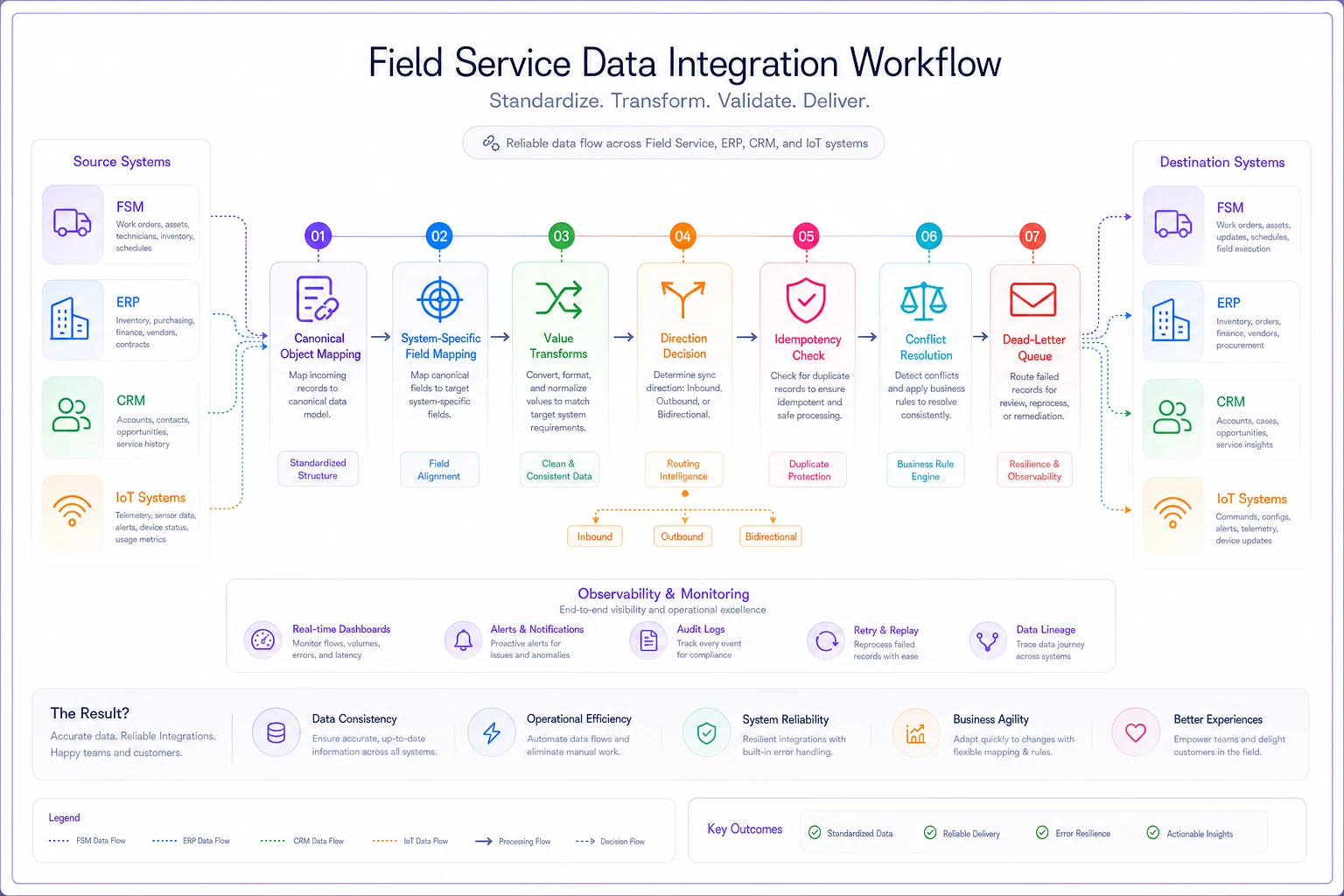
Below is a simple workflow illustrating how mappings flow from canonical objects into system-specific fields and then through transforms and sync gates.
-
Canonical field name (e.g.,
job.status) -
System field in each connected system (
FSMWO_State,
ERP: OrderStatus) -
Direction (one-way / two-way / read-only)
-
Value mapping — because status models never match. FSM's "En Route / On Site / Complete" has to map to ERP's "Open / Closed." Write the translation table explicitly.
-
Transform rules — units, timezones, rounding. Labor in decimal hours on one side, minutes on the other.
-
Conflict rule for that field.
The value-mapping row is where silent data loss hides. If FSM has five statuses and ERP has two, you're collapsing information every sync. That might be fine — but it should be a decision you made, not an accident you discover during month-end close when finance asks why they can't tell "cancelled" from "completed."
What breaks specifically as you scale
At two connected systems and a few hundred jobs a month, you can survive on manual reconciliation. Someone eyeballs the exceptions on Friday and fixes them. Here's roughly how the failure profile shifts as volume grows:
-
Small (a few hundred jobs/month, 2 systems) occasional duplicates, caught by hand. Reconciliation is a Friday task. Tolerable.
-
Growing (1,000–3,000 jobs/month, 3–4 systems) manual reconciliation can't keep up. Duplicate parts events and status mismatches accumulate faster than anyone fixes them. This is where most shops first feel real pain.
-
Larger (3,000+ jobs/month, 5+ systems + IoT) without idempotency and conflict rules baked in, the data becomes untrustworthy for reporting. Dispatchers stop believing the dashboard and start calling technicians to confirm status — which defeats the entire point of the integration.
The pattern is consistent: the integration that worked fine at 400 jobs a month quietly rots at 2,000, because the volume of edge cases scales faster than the volume of jobs. A 0.5% conflict rate is 2 problems a month at 400 jobs and 15 a month at 3,000 — except each one now touches more systems and takes longer to untangle.
A short real scenario
A regional HVAC contractor running about 1,800 work orders a month had FSM, an ERP for parts and billing, and a CRM for their customer portal. Their integration was two-way on almost everything, built by a contractor who left. No deterministic IDs, no conflict rules.
Their symptoms were textbook. Roughly 30–40 jobs a month showed parts-consumption mismatches between FSM and ERP — sometimes double-counted, sometimes missing entirely. Month-end billing took the office team an extra two to three days just reconciling. And they'd lost a handful of warranty claims because the asset's install date got overwritten by a stale CRM record, pushing units out of their warranty window on paper.
The fix wasn't a new platform. It was architectural: they cut two-way sync down to two justified fields, assigned field-level ownership (ERP owns parts and cost, FSM owns job status and service address, IoT owns asset health), and added deterministic event IDs so retries stopped creating phantom parts consumption.
Within about two months the parts mismatches dropped to a handful a month, and the ones that remained landed in a review queue instead of quietly corrupting inventory. Month-end reconciliation went from a multi-day slog to a few hours. Nothing dramatic on the surface — but the office stopped firefighting.
QA gating: what to verify before you turn it on
Never cut over a field service integration all at once. Gate it. Each of these should pass before the next flows live:
-
[ ] Field ownership map signed off by ops, finance, and dispatch — not just IT.
-
[ ] Duplicate test send the same event three times, confirm the receiver records it once.
-
[ ] Out-of-order test send a "job complete" before its "job started" and confirm the system handles it sanely.
-
[ ] Conflict test force a two-way collision on purpose and verify the right side wins (or lands in the queue).
-
[ ] Value-mapping coverage confirm every source status maps to a defined target — no silent "unknown" buckets.
-
[ ] Timezone and unit checks on every date and quantity field. This is where a surprising number of bugs live.
-
[ ] Dead-letter queue is monitored and someone owns it by name.
-
[ ] Reconciliation report comparing record counts across systems after 24 hours, then weekly.
Run the integration in shadow mode first — let it read and log what it would write without actually writing. Diff the proposed changes against reality for a week or two. Nearly every serious mapping bug surfaces in shadow mode, before it can touch a customer invoice.
Shadow mode is worth emphasizing because most teams skip it to hit a deadline and then spend three months cleaning up the mess. The week or two of observation is almost always cheaper than the first major incident it prevents.
When this level of rigor is overkill
If you're running a couple hundred jobs a month with two systems and a person who reconciles them without much stress, you don't need deterministic event IDs and a dead-letter queue. Building that machinery too early is its own kind of waste — you'll spend weeks engineering for a scale problem you don't have yet.
The trigger to invest is when reconciliation stops fitting into someone's normal week, or when a data disagreement costs you real money — a lost warranty claim, a disputed SLA credit, a double-billed customer. That's when manual patching has stopped being cheaper than doing it right.
And if you're already at five systems with IoT in the mix and no field-level ownership map, the rigor isn't optional anymore. You're just choosing between paying for it now, deliberately, or paying for it later as untraceable data corruption.
The through-line
Field service data architecture isn't really a technical project — it's an agreement about who owns what, enforced by plumbing that assumes things will go wrong. The systems will drift; connectivity will drop; messages will arrive twice and out of order.
The question is whether your architecture absorbs that gracefully or lets it accumulate into distrust of your own numbers.
Get three things right and most of the pain disappears: one owner per field, one-way sync wherever you can justify it, and every event safe to retry. Everything else — the mapping templates, the QA gates, the conflict queues — is just the discipline that keeps those three principles intact as you grow.
Get three things right and most of the pain disappears: one owner per field, one-way sync wherever you can justify it, and every event safe to retry. Everything else — the mapping templates, the QA gates, the conflict queues — is just the discipline that keeps those three principles intact as you grow.
Ready to optimize your field operations?
Join 2,000+ service teams using Romrly to boost productivity, reduce downtime, and enhance customer satisfaction.