

Every field service operation has a shelf, a van, or a corner of a warehouse that's slowly turning into a graveyard. Control boards for equipment models discontinued three years ago. Compressor kits bought in bulk during a "great deal" that never moved. Sensors that fit a product line you stopped servicing. Nobody wants to write them off, so they just sit there—counted as assets on paper, worth close to nothing in reality.
The messy part isn't the write-off itself. It's the decision-making around it. When a $180 part fails in the field, does your tech repair the unit or swap the whole thing? When do you pull a slow-moving SKU before it's fully worthless? And when a returned part comes back to the shop, does anyone actually decide if it's refurbishable or trash?
Most shops treat these as separate gut-feel calls. That's where the money leaks. This playbook connects three things that usually live in different heads: age and failure data, repair-vs-replace logic, and the reverse-logistics flow that determines whether a returned part gets refurbished, scrapped, or forgotten in a bin.
Why obsolescence sneaks up on field service specifically
Retail and manufacturing catch obsolescence faster because inventory turns are visible. In field service, parts inventory hides across a fragmented footprint—main warehouse, satellite lockers, and dozens of van stocks. A part can sit obsolete for eighteen months before anyone notices because it's still on a shelf somewhere, still on the books, and nobody's tracking whether it's actually moving.
-
Model churn outpaces stock burn. You bought a two-year supply of a specific igniter. The OEM discontinued the unit twelve months in. Now you've got 40 igniters for equipment that's aging out of your service base.
-
Van hoarding. Techs keep "just in case" parts in their trucks that haven't been touched in a year. That inventory ages silently and often gets forgotten entirely.
-
Warranty and returned cores pile up. Parts come back from jobs—swapped out, defective, or unused—and land in a return bin with no triage. Six months later nobody remembers if that returned board was good or bad.
None of this feels urgent day to day. It's a slow bleed. And because parts still show as inventory value, the financial hit doesn't register until year-end when someone does a hard count and writes off a five-figure chunk.
The core idea: link age, failure rate, and availability into one matrix
The repair-vs-replace decision and the obsolescence decision are actually the same decision viewed from two angles. Both hinge on three variables:
Eliminate field service chaos with Romrly.
Romrly helps you assign, track, and complete service jobs efficiently and on time.
- Unified job scheduling
- Technician dispatch & tracking
- Customer notifications & updates
No credit card required
-
Asset/part age relative to expected life
-
Failure rate — how often this part or unit is coming back
-
Availability of the part going forward (still being made? lead time? price trend?)
When you plot these together, the "obvious" answers shift. A cheap repair on a unit whose replacement part is going obsolete is a bad repair—you're investing labor into something you'll be forced to replace within a year anyway. On the flip side, a unit with rising failure rates but strong parts availability might be worth repairing repeatedly until you plan a coordinated replacement.
This is the same failure-mode thinking behind a proper failure-mode decision matrix and mixed-fleet replacement rollout—except here we're pushing it down to the part level and connecting it to inventory and accounting triggers.
The decision matrix
Here's a working version. Score each part or unit on the three axes, then read the recommended action.
| Age vs. life | Failure rate | Parts availability | Recommended action |
|---|---|---|---|
| Early (<40%) | Low | Good | Repair. Standard call. |
| Early (<40%) | High | Good | Repair + open a chronic-asset watch |
| Mid (40–70%) | Low | Good | Repair |
| Mid (40–70%) | High | Shrinking/EOL | Replace unit; stop restocking the part |
| Late (>70%) | Low | Good | Repair if cheap; flag for planned replace |
| Late (>70%) | High | Any | Replace; run down remaining part stock |
| Any | Any | Discontinued, no substitute | Replace unit; scrap-or-refurb the SKU now |
The right-hand column drives two workflows at once: what the tech does on site and what happens to the corresponding inventory. That linkage is the whole point. When a SKU hits "stop restocking" or "scrap-or-refurb now," that's your obsolescence trigger firing automatically instead of waiting for a year-end surprise.
Setting the thresholds so the matrix actually fires
A matrix is useless if the inputs are fuzzy. You need concrete thresholds—and they should be a little uneven, because real equipment doesn't fail on round numbers.
Age vs. life. Pull the manufacturer's expected service life, then adjust based on your actual observed data if you have it. Express current age as a percentage. A rooftop unit rated for 15 years that's 11 years old sits at roughly 73%—late stage.
Failure rate. Track returns and failures per SKU on a rolling 12-month basis. Set a "high" threshold relative to your install base. If you've got 60 of a part installed and 8 or more come back in a year, that's a chronic signal worth escalating—this connects directly to how you'd run a hot-list and force root cause analysis on repeat offenders.
Availability. This is the one most shops skip, and it's the most predictive signal for obsolescence. Track three things per critical SKU:
-
OEM lifecycle status (active / last-time-buy / discontinued)
-
Lead time trend (creeping past 3–4 weeks is a warning)
-
Price trend (a part climbing 20%+ year over year usually means it's going scarce)
When availability turns red, repair economics flip fast. A repair that made sense at a $95 part cost stops making sense when that same part is $210 with a six-week lead time and no restock coming.
The reverse-logistics flow (the part that everyone under-builds)
Forward logistics—getting parts to techs—gets all the attention. The reverse flow is where obsolescence value quietly dies. A part comes off a job and needs a decision within days, not months.
Here's the workflow that keeps returned parts from rotting in a bin.
Step-by-step reverse flow:
-
Tag at the point of return. The moment a tech removes or returns a part, it gets a status:
defective,used-good,unused, orwarranty-core. No tag, no acceptance into the return area. -
Triage within 5 business days. A designated person—not "whoever's around"—inspects and routes: refurbish, return-to-vendor, scrap, or restock.
-
Apply refurbishment criteria (below). If it passes, it goes to the refurb queue with a target cost. If refurb cost exceeds roughly 50% of replacement, it's scrap.
-
Fire the accounting trigger. Scrap and refurb both change the part's book value—log it the same week, not at year-end.
-
Reconcile monthly. Return bin count vs. system count vs. resolved items. Anything sitting unresolved past 30 days gets escalated.
That five-day triage window is the single highest-leverage rule in this whole system. Parts that sit untriaged past a couple of weeks almost always end up scrapped—not because they were bad, but because nobody can vouch for them anymore.
Refurbishment criteria checklist
-
[ ] Part is still an active or near-active SKU (not already obsolete)
-
[ ] Estimated refurb labor + materials < 50% of new replacement cost
-
[ ] No safety-critical component involved (compressors, pressure vessels, anything life-safety = scrap or vendor-return only)
-
[ ] Passes functional bench test after refurb
-
[ ] There's real forward demand—install base still exists
-
[ ] Refurb turnaround beats new-part lead time OR saves meaningful cost
Miss any one, and the honest answer is usually scrap. The most common mistake is refurbishing parts for equipment you're already phasing out. You spend the labor, the part sits, and it's obsolete inventory again—just with refurb cost sunk into it.
Assign a single person to own the return-bin triage so the five-day window doesn't become "whenever someone has time."
Here's a quick visual of that reverse-logistics workflow.
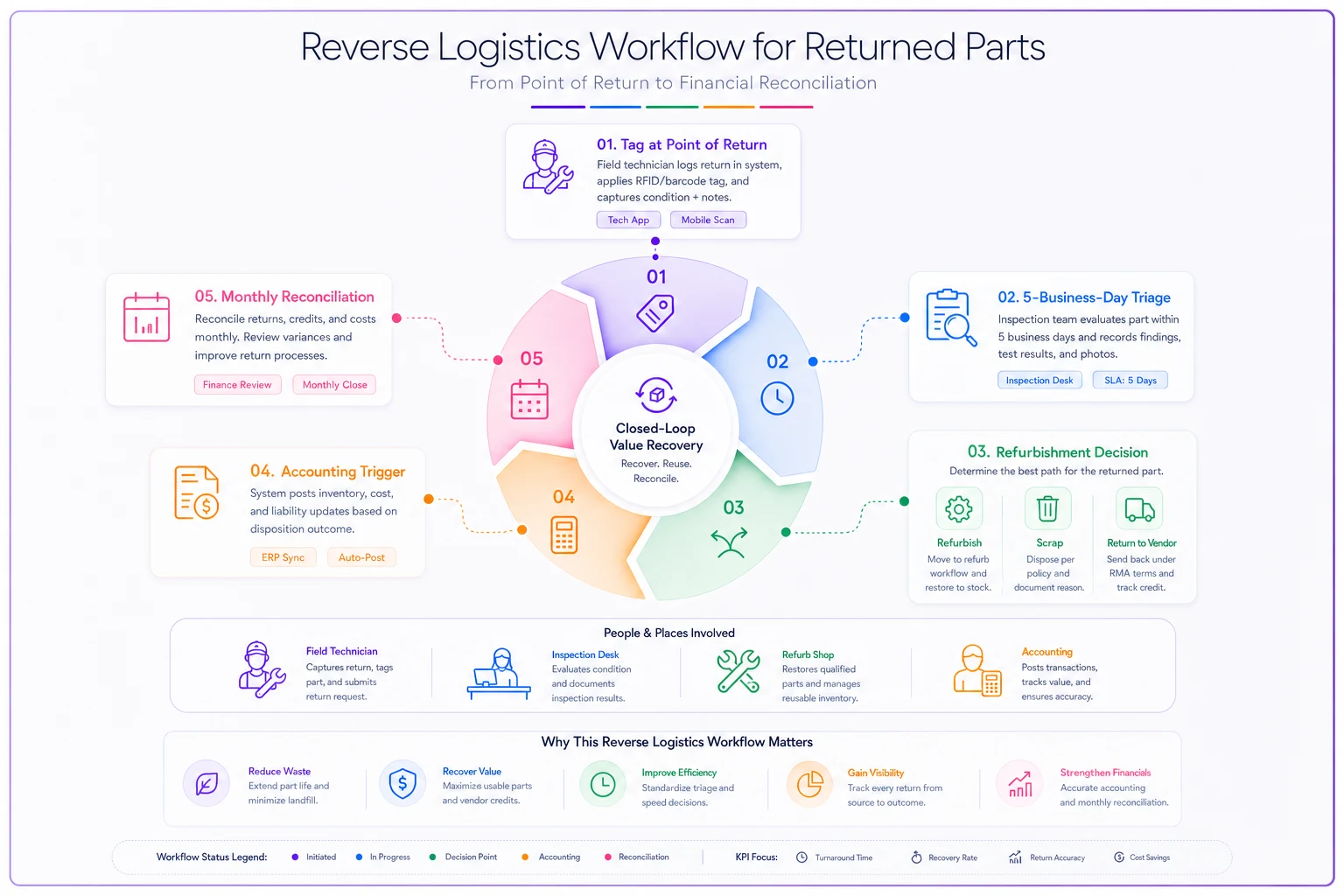
When that five-day triage window is enforced, parts get resolved quickly and don't silently age into a year-end problem.
Accounting triggers so finance and ops stop fighting
The classic breakdown: ops knows a bunch of parts are dead, but finance still carries them at full value because nobody sent the signal. Then year-end hits and there's a painful write-down that makes ops look like they were asleep.
Fix it with defined triggers that flag a SKU for reserve or write-down automatically:
| Trigger condition | Accounting action |
|---|---|
| SKU discontinued by OEM, no substitute, install base shrinking | Reserve 100%, plan disposal |
| No movement in 12 months | Reserve 50% |
| No movement in 18–24 months | Reserve 100% |
| Related equipment past 90% of service life across most of base | Reserve 50–75% |
| Refurb cost sunk but part unsold after 6 months | Write down refurb value |
When these triggers are baked in, write-downs become small, frequent, and expected—instead of one ugly annual surprise. It also stops the opposite problem: hoarding parts that show as "valuable" on paper but are actually worthless, which distorts every decision built on top of that inventory number.
Worked example: HVAC service company
The situation:
-
Around 35 fan motors and 22 control boards in stock, carried at roughly $9k–$11k total
-
The OEM moved the control board to last-time-buy, then discontinued it
-
Board price had crept from about $140 to $230 over 18 months
-
The equipment line sat at roughly 78% of expected service life across most installs
-
Techs were still "repairing" units by swapping boards—burning through the last stock without anyone tracking availability
Running the matrix flipped the call. Late-stage age plus discontinued part meant replace the unit, run down remaining board stock, stop repairing. The reverse-logistics triage turned up 6 returned boards sitting in a bin—3 were used-good, but only worth refurbing if the install base still justified it. It didn't, since the units were aging out. Those went to scrap with the write-down logged that month.
Roughly what changed over the next two quarters:
-
They stopped sinking labor into board swaps on units they were about to replace anyway—saved a meaningful number of repeat truck rolls on chronic units
-
The year-end obsolescence write-down came in far smaller because reserves had been taken incrementally
-
They avoided a last-time-buy panic order of around $3k in boards they'd have mostly scrapped
Nothing dramatic. But the difference between a controlled run-down and a surprise write-off was a few thousand dollars and a lot less finger-pointing between ops and accounting.
When this system makes sense—and when it doesn't
When it's worth building:
-
You carry parts across multiple locations or van stocks and lose visibility
-
You service equipment lines that churn faster than your stock burns
-
You've had an ugly year-end inventory write-down at least once
-
Repair-vs-replace calls are made purely on gut with no availability input
When it's overkill:
-
Tiny operation with a handful of fast-moving SKUs you can eyeball
-
You service a narrow, stable equipment base with no discontinuation risk
-
Your parts turn quickly enough that obsolescence never really shows up
Who should NOT start here: If you don't yet have basic stock accuracy—if your system count and your shelf count regularly disagree—fix that first. A decision matrix built on inventory numbers you don't trust just automates bad calls faster. Getting your forecasting and reorder logic solid, along the lines of a proper tiered parts-forecasting model and reorder-point setup, is the foundation this whole playbook sits on.
Where software quietly does the heavy lifting
You can run all of this on spreadsheets, and plenty of shops start there. It works until volume grows and manual tracking falls behind—which it always does. The three inputs (age, failure rate, availability) live in different systems, and keeping them synced by hand is exactly the kind of task that slips first.
This is where AI-powered operational software earns its keep. Not by making decisions for you—by watching the thresholds so triggers fire on time. A platform that tracks part age against equipment records, counts returns per SKU automatically, and flags a part when it crosses a no-movement or discontinuation threshold turns a quarterly cleanup into a background process.
The reverse-flow triage gets a queue with a countdown instead of a physical bin nobody checks. Accounting triggers get logged the week they happen instead of surfacing at year-end. The goal isn't to remove judgment—it's to make sure the numbers reach the person making the call while the decision still matters, before the repair labor is sunk, before the last-time-buy panic, before the part is too old for anyone to vouch for.
Getting started without boiling the ocean
You don't need to instrument every SKU. Start with your top 20–30 parts by carrying value and the equipment lines you know are aging. Pull their age, pull a rolling 12-month failure count, and check OEM lifecycle status on each. Run them through the matrix once, by hand. You'll almost certainly find a handful of parts you're still repairing into that should be run-down-and-replace calls, and a few bins of returns nobody's triaged.
Fix those first. Set the reverse-flow triage window at five days and assign someone specific to own it. Define your accounting triggers with finance so the write-downs stop being a quarterly argument. Then expand from there.
The obsolescence problem is rarely one big bad decision. It's a hundred small deferred ones—repairs that should've been replacements, returns that should've been triaged, write-downs that should've been taken months earlier. Wire the age, failure, and availability signals into a single matrix, connect it to the reverse flow, and those hundred small decisions start getting made at the right time instead of piling up for year-end.
The obsolescence problem is rarely one big bad decision. It's a hundred small deferred ones—repairs that should've been replacements, returns that should've been triaged, write-downs that should've been taken months earlier. Wire the age, failure, and availability signals into a single matrix, connect it to the reverse flow, and those hundred small decisions start getting made at the right time instead of piling up for year-end.
Ready to optimize your field operations?
Join 2,000+ service teams using Romrly to boost productivity, reduce downtime, and enhance customer satisfaction.