

Most field service device policies are borrowed from corporate IT. That's the core problem. An office laptop lives on the same network for three years, gets patched overnight, and never leaves a controlled environment. A tech's tablet gets dropped on concrete, rides in a hot truck, loses signal in a basement mechanical room, and needs to authenticate into a work order before the tech even climbs out of the cab. When you run corporate MDM rules on that hardware, you get devices that push updates mid‑job, lock techs out at customer sites, and store sensitive data on units that occasionally walk off.
This is a practical checklist for managing the full mobile device lifecycle in field service — from provisioning through decommission — with runbooks your dispatch and ops leads can actually run without paging IT every time.
Why field device management is a different animal
The failure pattern is almost always the same. A shop buys 40 rugged tablets, hands them out, enrolls them in whatever MDM the reseller bundled, and calls it done. Nobody defines an update window, nobody owns lost‑device response, and offline caching is left at whatever the app defaults to.
Six months later you've got three device generations in the field, a handful running an OS the app no longer supports, two units nobody can account for, and a tech who couldn't close a job on Tuesday because the device force‑installed an update in the parking lot and wanted a reboot.
A few things make field fleets genuinely different from office environments:
-
Devices leave managed networks daily. Updates and policy pushes can't assume overnight Wi‑Fi.
-
Downtime has a direct revenue cost. A locked device at 9 a.m. isn't an inconvenience — it's a missed or delayed job.
-
Loss and theft are routine, not exceptional. Trucks get broken into. Devices get left on rooftops. It happens.
-
Offline data lives on the device longer. Which means a lost unit can carry customer info, site access notes, and cached work orders.
The damage rarely shows up as a single big incident. It's the drip of small ones: a device that won't sync, a login loop at a customer site, a tech driving back to the shop because their tablet bricked. Each one is 30–90 minutes of lost wrench time, and across a 40‑person crew that adds up fast.
The provisioning template: define it once, stamp it every time
The biggest time sink isn't managing devices — it's the inconsistency between them. When every device is configured slightly differently, every support ticket becomes a mystery. The fix is a locked provisioning template that turns a fresh device into a field‑ready one with zero manual decisions.
Eliminate field service chaos with Romrly.
Romrly helps you assign, track, and complete service jobs efficiently and on time.
- Unified job scheduling
- Technician dispatch & tracking
- Customer notifications & updates
No credit card required
A field provisioning template should specify exactly this, per device role:
| Config item | Field tech tablet | Supervisor phone | Shared truck device |
|---|---|---|---|
| Enrollment mode | Zero‑touch / auto‑enroll | Zero‑touch | Kiosk / shared mode |
| App set | Work orders, forms, nav, camera | Full set + dashboards | Work orders + forms only |
| Login model | Named user | Named user | Shift PIN + device auth |
| Offline cache limit | 7 days of jobs | 3 days | Current shift only |
| Auto‑lock timeout | 5 min | 3 min | 2 min |
| Update channel | Stable (delayed) | Stable | Stable |
| Remote wipe | Enabled | Enabled | Enabled + daily cache purge |
The detail people miss: shared truck devices need their own profile. When two techs share a unit across shifts, named‑user login creates constant friction, and personal caching becomes a data‑hygiene mess. A shift‑PIN kiosk profile with a daily cache purge solves both.
Write the template as a document, not just an MDM config. When the reseller's console changes or you switch platforms, the intent survives.
OS and update windows: stop patching during work hours
This is where borrowed corporate policy does the most damage. Default MDM behavior pushes OS and app updates as soon as they're available. On an office network at 2 a.m., that's fine. On a field device, "as soon as available" means "in the middle of a job with a customer standing there."
Set explicit update windows and treat them like a maintenance schedule:
-
Never during shift hours. Define the shift window per team and block all forced updates inside it. Updates land in an overnight or pre‑shift window only.
-
Require charge + Wi‑Fi + idle. Updates only proceed when the device is docked/charging, on known Wi‑Fi, and hasn't been touched in 20+ minutes. This kills the "updated on cellular in the truck" problem.
-
Delay OS majors by 30 days minimum. New OS versions break field apps constantly. Sit on the delayed/stable channel and let someone else find the bugs.
-
Pin app versions to a tested build. Don't auto‑update the field app. Promote a version only after it clears your canary group.
Treat update windows like a maintenance schedule and involve ops leadership when defining them.
Worth internalizing: your update window is a business decision, not an IT setting. If your busiest hours are 7 a.m.–11 a.m., your update window is not 6 a.m.
Canary and config release rules: never push to the whole fleet at once
The single most preventable field‑wide outage is a bad config or app version pushed to 100% of devices at once. One incompatible update and your entire crew is dead in the water before 8 a.m.
Run releases in rings:
-
Ring 0 — Bench (2–3 devices). Devices sitting in the shop. Test the update against your actual app and forms, not a generic acceptance test.
-
Ring 1 — Canary (roughly 10% of the fleet). Volunteer techs who are comfortable reporting issues, ideally across different device models and regions. Run for 48–72 hours.
-
Ring 2 — Broad (remaining fleet). Only after canary passes clean.
Define your canary pass/fail rules before you start, not after something breaks. A workable set:
-
Zero sync failures attributable to the new build
-
No increase in login/auth errors
-
No unexpected battery drain reports
-
Forms submit and reach the backend with correct field mapping
If any canary device hits a blocker, the release stops and rolls back. No exceptions, no "let's just push it and monitor." The whole point of the canary ring is that you're willing to honor its verdict.
This ring discipline follows the same logic as any staged operational rollout — the field service adoption playbook covers the broader pilot‑to‑scale mechanics, and device releases should follow that same gated approach rather than big‑bang pushes.
Lost‑device SOP: the runbook dispatch can run at 7 a.m.
When a device goes missing, the wrong response is "email IT and wait." By the time anyone acts, cached customer data has been sitting on an unlocked unit for hours. The right response is a runbook that a dispatcher or shift lead can execute immediately, with a clear decision point.
Lost/stolen device runbook:
-
Report captured (tech texts or calls dispatch)
device ID, last known location, time, circumstance (misplaced vs. stolen vs. vehicle break‑in).
-
Lock immediately (within 15 min)
trigger remote lock from the console. This is reversible and buys time.
-
Locate pull last‑known GPS and check whether the device is still checking in.
-
Decision point (within 60 min)
- Likely recoverable (left at a job site, still online, low‑risk area) → keep locked, dispatch to recover, set a hard cutoff. - Stolen or unrecoverable (vehicle break‑in, offline, past cutoff) → remote wipe now.
-
Wipe confirmation logged with timestamp and who authorized it.
-
Reprovision a spare from the template so the tech isn't dead weight for the rest of the day.
-
Post‑incident note was cached data at risk, what was on the device, does anyone need to be notified.
A simple flow ops can follow in the moment.
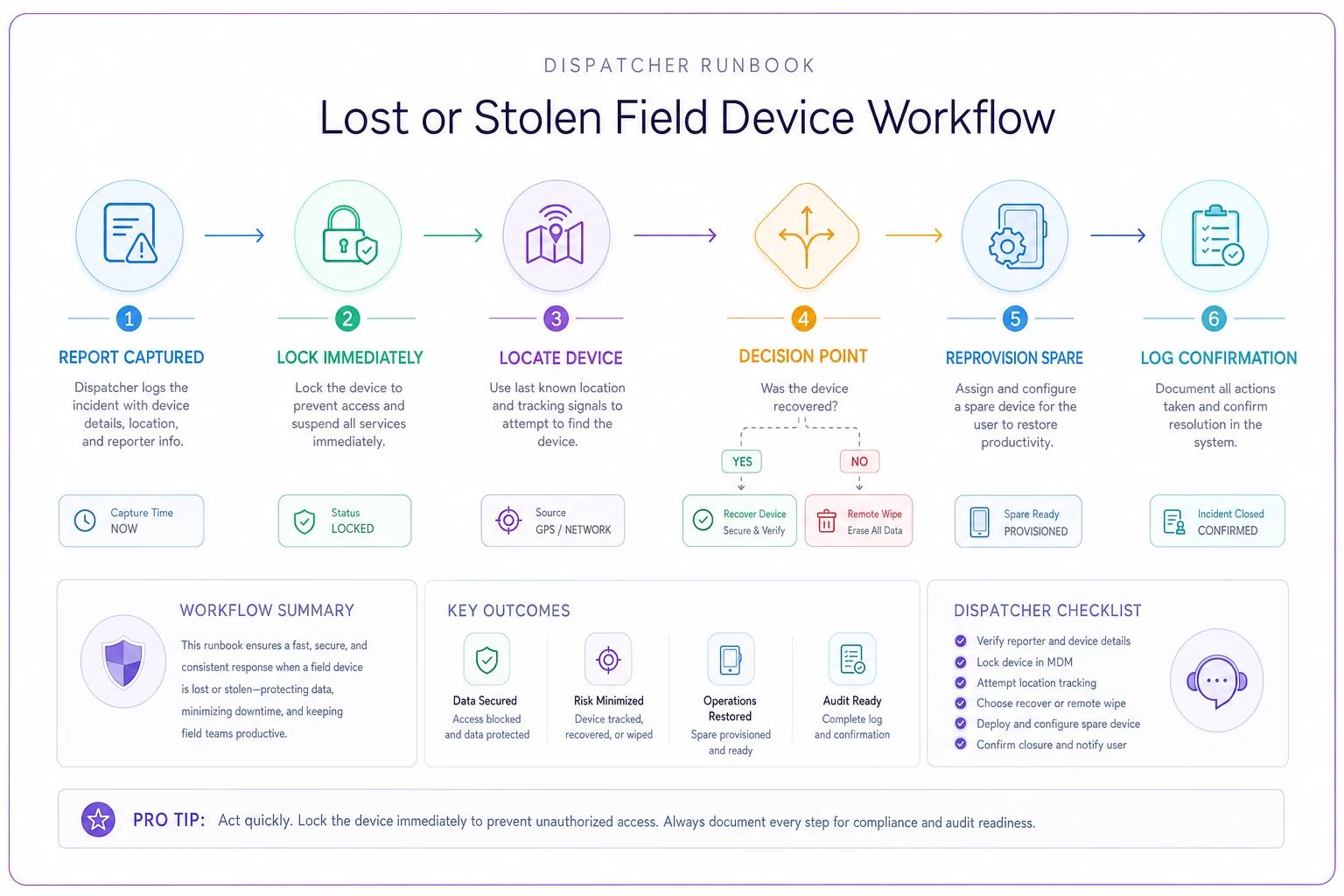
The step people skip is #6. A wiped device solves the security problem but leaves you with a tech who can't work. Keep 2–3 pre‑provisioned spares per region so recovery is same‑day. Because provisioning is templated, a spare goes live in minutes rather than a service ticket.
The other overlooked piece: decide your recovery cutoff in advance. "We wipe any stolen device not recovered within 2 hours" is a policy. Deciding case‑by‑case in the moment is how devices sit unwiped overnight.
Offline‑sync security checks: the part everyone forgets
Field devices cache data specifically because connectivity is unreliable — that's the right design, and it's covered in depth in designing offline‑first mobile workflows. But offline caching creates a security surface that most MDM policies ignore entirely. If a device holds a week of work orders locally, that's a week of customer addresses, access codes, and site notes sitting on hardware that regularly goes missing.
Run these checks on every device profile:
-
Encryption at rest is on and verified. Not "should be" — confirm it per device in the MDM report.
-
Cache window is bounded. No device should hold more offline data than the job actually requires. A 7‑day cache on a tech who works a 2‑day route is 5 extra days of exposure.
-
Cache purges on wipe. Confirm remote wipe actually clears the app's local store, not just the app shell.
-
Auth survives offline, but expires. Techs need to work offline, but a device that's been dark for days shouldn't stay authenticated forever. Set an offline‑auth expiry.
-
Sensitive fields are minimized in cache. Full payment details don't belong in an offline work‑order cache at all.
-
Sync logs are auditable. You should be able to answer "what data was on that lost device" from records, not guesswork.
The common mistake is trusting defaults. App defaults optimize for "always works offline," which usually means "caches as much as possible for as long as possible." That's the opposite of what you want on a device that might disappear.
A real scenario
A regional HVAC and refrigeration outfit running about 45 field techs was on a mix of three tablet generations with no defined update policy. Two recurring problems: devices force‑updating during morning routes and a device‑loss process that meant stolen units sometimes sat unwiped for a full day.
They made three changes. Locked update windows to a pre‑shift charging window with Wi‑Fi‑and‑idle requirements. Set up a canary ring of five volunteer techs for all app releases. Wrote a one‑page lost‑device runbook dispatch could execute, with a 2‑hour recovery cutoff and pre‑provisioned regional spares.
Over the next quarter, mid‑job update disruptions basically went to zero — the one app bug that would have hit the whole fleet got caught in the canary ring instead. Device‑loss response dropped from "sometime the next day" to under an hour, and every wipe got logged. Reclaimed wrench time came out somewhere in the range of 25–35 tech‑hours a month across the crew, plus the harder‑to‑price benefit of not having customer data riding around on unaccounted‑for hardware.
When this level of process makes sense — and when it doesn't
Worth doing fully if you run more than about 15–20 devices, use more than one device model, or store any sensitive customer data in offline caches. At that scale, inconsistency and loss are basically guaranteed, and the process pays for itself in avoided downtime.
Scale it down if you're a small shop with under ten devices on identical hardware. You still need a lost‑device runbook and encryption, but a formal three‑ring canary is overkill — a bench test plus a couple of volunteer devices is enough.
If you're running a two‑ or three‑person operation where the owner personally knows every device, skip the full framework. You'd spend more time maintaining the process than you'd save. Handle the security basics — encryption, remote wipe, bounded cache — and revisit the rest when you grow.
Putting it into practice
Start with the one that quietly bleeds money: update windows. Blocking forced updates during shift hours takes an afternoon to configure and eliminates a whole category of recurring disruption. Then write the lost‑device runbook — one page, laminated at the dispatch desk — because that's the gap that turns a stolen tablet into a data‑exposure problem. Provisioning templates and canary rings come after, once you're not firefighting daily incidents.
The through‑line across all of it is that field devices aren't office devices, and the difference matters because downtime and loss both carry direct operational cost. Manage the lifecycle around that reality — controlled update timing, staged releases, fast loss response, and disciplined offline caching — and the fleet stops being a source of surprise outages and starts behaving like the reliable tool your techs actually need it to be.
Manage the lifecycle around that reality — controlled update timing, staged releases, fast loss response, and disciplined offline caching — and the fleet stops being a source of surprise outages and starts behaving like the reliable tool your techs actually need it to be.
Ready to optimize your field operations?
Join 2,000+ service teams using Romrly to boost productivity, reduce downtime, and enhance customer satisfaction.