


Most field service managers can tell you their techs are "busy." What they can't tell you is where the day actually goes. Not the billable stuff — the other 90 minutes to two hours that vanish into paperwork, staging, driving the long way, re-reading job notes at a red light, and waiting on a dispatcher to text back a part number.
That's technician time leakage. And in field service it's rarely one big leak. It's forty small ones. The problem with small leaks is they're invisible in your KPI dashboard — a tech shows 6.2 billable hours and everyone shrugs, because "that's just how the trade works." It isn't. A fair chunk of that missing hour and a half is recoverable, and you don't need new hires or new trucks to get it back. You need to audit it first, honestly, before you touch a single process.
This playbook walks through how to run that audit, what to measure, and the handful of changes that actually move the number — batching admin, geo-templated job notes, and a few straightforward mobile automations. No transformation program. Just find the leaks, plug the cheap ones first.
Why "billable hours look fine" is the trap
Billable utilization hides leakage inside jobs and between jobs. That's the core problem with relying on it as your only read.
A typical example: a residential HVAC tech runs 5 jobs a day. On paper, each job is 90 minutes of wrench time. But the clock between jobs — the windshield time, the parking, the walk-up, the customer chit-chat before real work starts, the closeout notes typed in the driveway — none of that shows up as a discrete line item. It gets smeared across the day and quietly written off as the cost of doing business.
-
Pre-job
staging, reading the work order, calling ahead, finding the address, hunting for the gate code
-
Travel
routing that's set by booking order instead of geography, mid-day return trips
-
In-job admin
photos, notes, forms, signature capture, invoicing on-site
-
Closeout & handoff
end-of-day paperwork, syncing forms, re-explaining a job to tomorrow's tech
The mistake almost everyone makes is guessing which bucket is worst and "fixing" it. Managers love to blame travel because it's visible on a map. But when you actually time it, the biggest reclaimable block is usually in-job and closeout admin — travel is at least partly fixed by geography, while admin is almost entirely reshapeable.
You won't know which is true for your crew until you sample it. So start there.
Step one: run a time‑motion sample (the cheap version)
You don't need a consultant with a stopwatch and a clipboard. You need about a week of structured observation across a representative slice of your techs.
Eliminate field service chaos with Romrly.
Romrly helps you assign, track, and complete service jobs efficiently and on time.
- Unified job scheduling
- Technician dispatch & tracking
- Customer notifications & updates
No credit card required
Here's the process that works without derailing the whole team:
-
1. Pick 4–6 technicians who represent your range — a fast senior tech, a couple of mid-level, one newer hire. Don't cherry-pick your best.
-
2. Sample 3 full days each, not partial days. Leakage is lumpy; a half-day sample lies to you.
-
3. Log timestamps at transition points, not continuously. You only care about when one activity ends and the next begins.
-
4. Have techs self-log OR have a dispatcher shadow-log from job status changes. Self-logging is less accurate but far more scalable.
-
5. Reconcile against actual arrival/departure data if you have GPS or job-status timestamps already flowing in.
Your sampling worksheet only needs these columns:
| Field | What to capture | Why it matters |
|---|---|---|
| Job ID | Reference | Ties back to job type |
| Depart prior site | Timestamp | Start of travel block |
| Arrive site | Timestamp | Travel duration |
| Work start | Timestamp | Pre-job staging gap |
| Work end | Timestamp | True wrench time |
| Depart site | Timestamp | Closeout duration |
| Admin notes | Free text | "Waited 12 min on gate code" |
That "admin notes" column is where the gold is. Numbers tell you how much; the notes tell you why. When five different techs write "couldn't find electrical panel access" for the same property type, you've found a template problem, not a people problem.
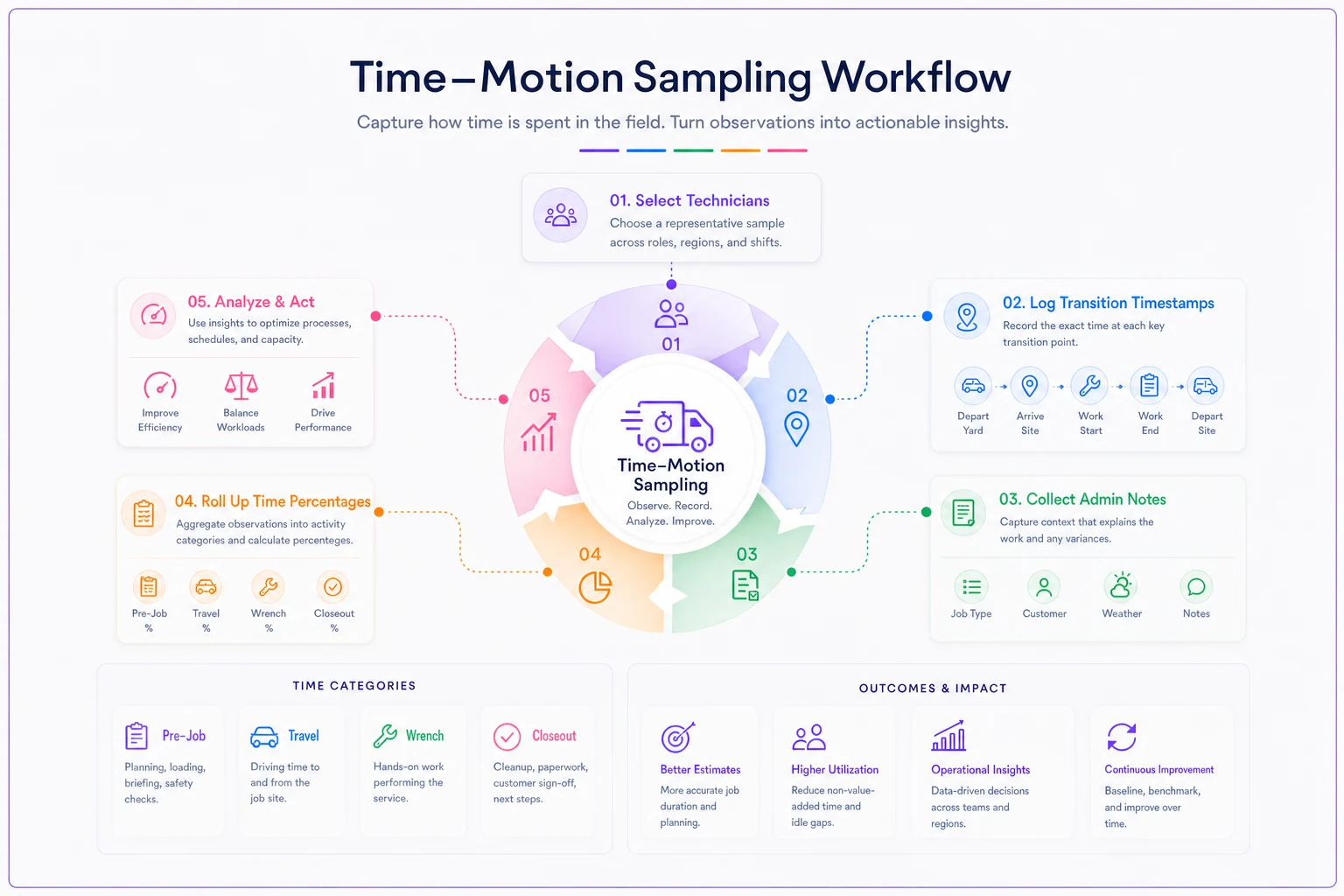
Here's a quick visual of the sampling flow to keep in your audit pack.
Prioritize transitions where techs note manual lookups (addresses, gate codes) — those notes often map to cheap, automatable fixes.
Combine timestamps with the free-text notes and you'll have both the how-much and the why you need to prioritize fixes.
Reading the sample: turning timestamps into buckets
Once you have three days across a handful of techs, roll it up into four percentages: pre-job, travel, wrench, closeout. Wrench time is your only truly billable slice. Everything else is overhead you're either paying for or absorbing.
-
Wrench
~52%
-
Travel
~22%
-
Pre-job
~11%
-
Closeout
~15%
That closeout number is the one that usually makes managers wince. If a tech spends roughly 45–60 minutes a day on notes, photos, forms, and end-of-day sync — and that's pretty common — you're looking at close to 4–5 hours a week per tech of pure administrative drag. Across ten techs that's the better part of a full-time position, evaporated.
The observation that matters most: closeout time barely correlates with job complexity. The senior tech and the newer tech both spend the same 12 minutes typing the same notes, because the form is slow, not the person. That's why closeout is the best first target — it's a system problem, and system problems scale their fixes.
Quick wins, ranked by effort vs. payback
Not every fix is worth the disruption. Here's how the common moves actually stack up once you've run the audit.
| Fix | Effort | Typical time reclaimed / tech / day | Risk |
|---|---|---|---|
| Batch admin into 2 blocks | Low | 15–25 min | Very low |
| Geo-templated job notes | Low | 8–15 min | Low |
| Mobile rule-based auto-fill | Medium | 10–20 min | Low |
| Route by geography, not booking order | Medium | 20–40 min | Medium (schedule constraints) |
| Photo/form pre-population by job type | Low | 5–12 min | Very low |
Start top-left. The batching and templating wins are boring, cheap, and reversible — which is exactly why they're the right place to begin.
Batching admin instead of drip-feeding it
The single most common leak: techs doing admin between every job. They finish, sit in the truck, type notes, upload photos, then drive to the next call. Feels efficient. It isn't. Context-switching between "wrench brain" and "paperwork brain" all day quietly burns time on every transition.
Batch it instead. Two admin blocks — one mid-day, one at end-of-day — where the tech knocks out closeouts in sequence. Same total forms, far less switching cost. In practice this alone recovers 15–25 minutes a day because the tech isn't cold-starting the paperwork mindset five separate times.
The catch: this only works if job data is captured at the moment (quick photos, a voice note, a checkbox) and written up in the batch. If a tech has to reconstruct a job from memory three hours later, you've traded time savings for accuracy problems. Capture live, write batched.
Geo-templates: stop re-typing the same site every visit
If you service the same buildings, complexes, or equipment types repeatedly, your techs are re-describing identical conditions over and over. Geo-templates fix this by attaching a pre-built job-note skeleton to a location or asset type.
A typical example: a commercial refrigeration crew hitting the same grocery chain layout across 30 stores. Panel location, shutoff sequence, access quirks, safety notes — identical across sites. A geo-template loads all of that the moment the job opens, so the tech confirms and adjusts instead of typing from scratch. That's the difference between a 10-minute note and a 2-minute one.
The mobile automation layer — keep it rule-based and dumb
This is where people overreach. They want the app to be clever. Clever breaks in the field. What holds up is a set of boring, deterministic rules that remove typing and clicking without requiring judgment.
-
Auto-stamp arrival/departure off geofence or status change — no manual clock in/out
-
Pre-fill forms by job type — a "no-cool" call opens with the right checklist already staged
-
Photo prompts tied to job stage — the app asks for the nameplate photo before it lets you close, so nobody drives back for it
-
Auto-attach location data and asset history so the tech isn't hunting through past visits
-
Trigger the closeout draft automatically when work-end is logged, so batching later is faster
This is where AI-assisted operational software earns its keep — not through anything flashy, but the quiet stuff: turning a 20-second voice memo into a structured job note, flagging when a tech's sampled closeout time drifts above the crew norm, or spotting that a particular job type consistently runs 15 minutes long on staging so you can build a better template for it. The point isn't automation for its own sake — it's removing repetitive keystrokes and surfacing patterns you'd never catch reading logs by hand.
One rule of thumb: if an automation requires the tech to decide whether it should fire, it's not saving time — it's adding a decision. Automate the certain things. Leave judgment to people.
Real scenario: a 9‑truck plumbing operation
A residential and light-commercial plumbing company running 9 trucks suspected they were under-scheduling and were seriously considering hiring two more techs. Before doing that, they ran a five-day time-motion sample across 5 of their crew.
The sample showed wrench time around 49%, with closeout eating roughly 55 minutes a day per tech and pre-job staging another 25. Travel was actually fine — routing was already decent. The leak was almost entirely admin.
-
Batched closeouts into a mid-day and end-of-day block
-
Built geo-templates for their 20 most-common repeat accounts and job types
-
Turned on automatic arrival stamping and stage-based photo prompts
A follow-up sample four weeks later showed wrench time up to roughly 57–58%. That's around 40–45 minutes reclaimed per tech per day — just over half an extra job's worth of capacity across the crew. They shelved the two hires. The recovered capacity absorbed the growth they'd been worried about, and closeout data actually got cleaner, not sloppier, because it was captured live.
The lesson wasn't "automation fixed it." It was that the audit told them the leak was admin, not headcount — and they'd have wasted somewhere in the range of $130k–$150k a year on unnecessary hires if they'd trusted their gut instead of the sample.
When this is worth it — and when it isn't
When the audit-first approach makes sense:
-
Your wrench-time utilization feels stuck below ~60% and you can't explain why
-
You're about to hire based on "we're maxed out" without hard data
-
Techs frequently return to a site for parts, photos, or forms they missed
-
Closeout and paperwork are a constant end-of-day complaint
When to skip the full audit:
-
You already have clean job-status timestamps flowing and can bucket time from existing data — just analyze what you have
-
You're a 1–2 truck shop where the owner is the tech; you know exactly where time goes
-
Your real constraint is demand, not delivery — no scheduling backlog means reclaimed hours have nowhere to go
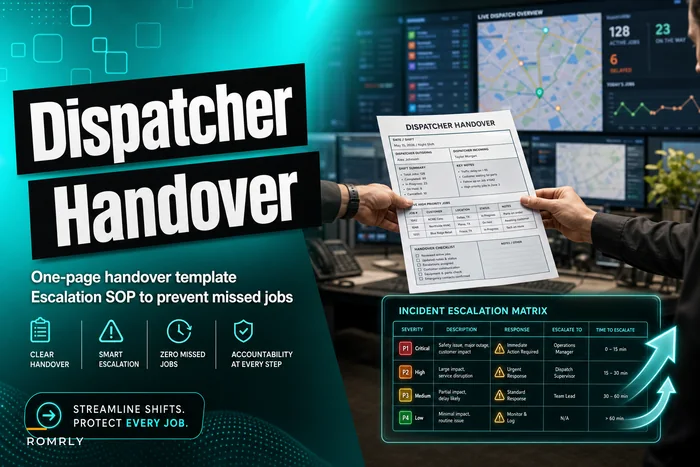
Who should NOT start here: if your dispatch and handover process is genuinely broken — jobs falling through the cracks, techs showing up to the wrong site — fix coordination first. Reclaimed minutes don't matter if the wrong tech is at the wrong address. Get your handover discipline solid before you optimize the workday, using something like a clean dispatcher shift handover template and escalation matrix so nothing gets dropped between shifts.
Wiring it into the metrics you already watch
Reclaimed time only sticks if it shows up somewhere you look regularly. A one-time audit that lives in a spreadsheet gets forgotten by next quarter. The move is to fold your two or three leakage buckets — especially closeout time per tech — into your standing reporting so drift gets caught early.
If you haven't already structured which metrics live at which level, it's worth mapping technician-level time buckets against your broader field service KPI framework so closeout time and wrench utilization sit next to the numbers your managers already act on. When leakage creeps back — and it will, as new hires bring old habits — you'll see it in the trend instead of discovering it a year later when someone asks why you need more trucks.
The honest bottom line on reclaiming tech hours
Technician time leakage stays hidden because it's undramatic. No single job feels wasteful. It's the accumulation — a few minutes of staging here, a re-typed note there, a between-jobs context switch — that quietly costs you a technician's worth of capacity you're already paying for.
Audit before you act. Sample honestly, bucket the time, and attack the cheapest, most reshapeable block first — which is almost always admin, not travel. The templating and batching fixes cost you nothing but a little discipline, and the automation layer should stay boring on purpose. Do that, and the hours you thought you needed to hire for are usually already sitting inside the workday, waiting to be pulled back.
Ready to optimize your field operations?
Join 2,000+ service teams using Romrly to boost productivity, reduce downtime, and enhance customer satisfaction.