
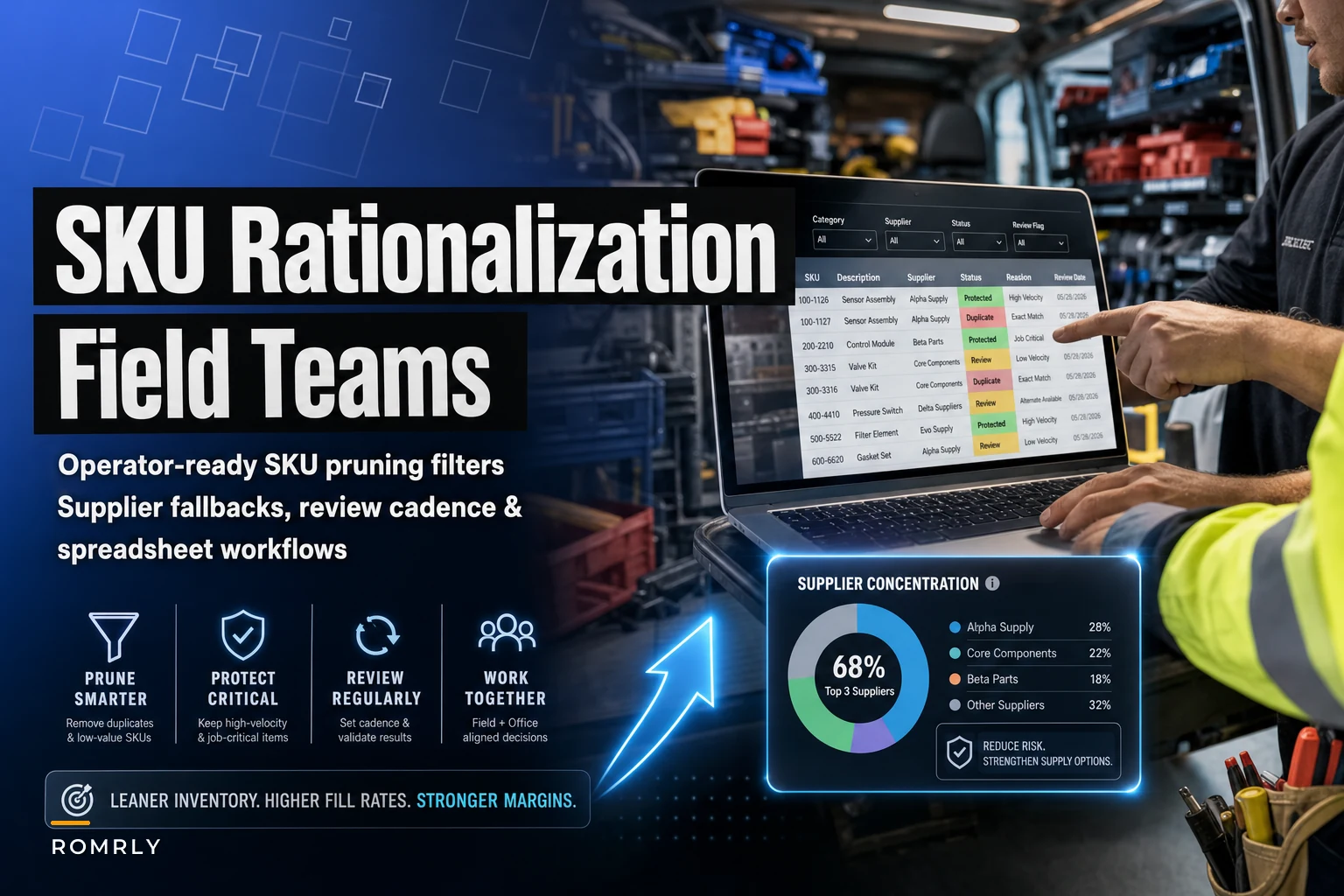

Most SKU rationalization advice is written for warehouse people who've never sat in a service van at 7am watching a tech dig through three bins looking for the right seal kit. The finance team sees 4,000 active SKUs and a carrying cost number they hate. The field sees 4,000 part numbers, half of which overlap, and nobody wants to be the one who retires the odd fitting that shows up on two emergency jobs a year.
That tension is the whole problem. Rationalization done wrong looks great on a spreadsheet and quietly destroys first-time-fix rates three months later. This post is about pruning SKUs in a way that survives actual field conditions — the specific criteria, the fallback rules so you don't strand a tech, the cadence that keeps the list honest, and the spreadsheet filters that do the sorting.
Why field SKU lists bloat in the first place
The count creeps up for reasons that all made sense at the time. A tech couldn't find a part during a callout, so purchasing added a "temporary" alternate. A new equipment line came in and the OEM kit got loaded whole, including six variants you'll never touch. A supplier changed packaging and both the old and new numbers stayed active for "transition." None of this gets cleaned up because nobody owns the cleanup.
Across field operations, roughly 20–30% of active SKUs haven't moved in 12 months, and another chunk are functional duplicates — same part, different number, different supplier, slightly different description. The description differences are usually the killer. "O-ring 2in EPDM" and "EPDM o-ring, 50mm, blk" are the same part to a human and two separate line items to your system.
The bloat isn't just carrying cost. It's slower van restocks, more counting errors, more wrong-part pulls, and a procurement team negotiating smaller volumes across more line items than they need to. Consolidation fixes all of that — if you don't accidentally retire something a tech depends on.
The criteria that actually matter for field teams
Warehouse rationalization usually leans on three numbers: usage velocity, carrying cost, and margin. Those matter, but for field work they're incomplete. A part can have near-zero annual usage and still be un-retireable because it's the one component that prevents a second truck roll on a high-penalty SLA account.
Eliminate field service chaos with Romrly.
Romrly helps you assign, track, and complete service jobs efficiently and on time.
- Unified job scheduling
- Technician dispatch & tracking
- Customer notifications & updates
No credit card required
The criteria need a field layer on top of the financial layer. Here's the breakdown.
| Criterion | What it measures | Why field teams care |
|---|---|---|
| Usage velocity | Pulls per rolling 12 months | Low-velocity isn't automatically "retire" — context matters |
| Duplicate overlap | Functional equivalence to another SKU | Biggest, safest consolidation win |
| First-time-fix dependency | % of jobs where this SKU closed the job in one visit | High-dependency = protect even at low velocity |
| SLA exposure | Linked to contracts with credit penalties | A $12 part can prevent a $900 SLA credit |
| Supplier risk | Single-source, long lead time, or discontinued | Affects fallback planning more than retirement |
| Shelf stability | Does it degrade (seals, batteries, adhesives)? | Changes whether consolidation = fewer stocking points |
The thing most people miss: velocity and dependency are different axes. A slow-moving part with high first-time-fix dependency is the most dangerous thing to retire, even though it looks like obvious dead weight on paper. That's exactly the SKU that, when missing, turns a one-visit job into two and eats your margin plus an SLA hit.
Before you prune anything, map your SKUs to the jobs and contracts they touch. If a part is linked to any account with SLA credit penalties, it goes into a protected bucket and gets reviewed differently — not deleted on velocity alone. This connects directly to the forecasting logic in our tiered parts-forecasting model, because the same mixed-usage SKUs that are hard to forecast are the ones most likely to get wrongly flagged for retirement.
Worked spreadsheet filters: how to actually sort the list
You don't need special software for the first pass. A clean export and a few filter columns gets you most of the way there. Here's the sequence that works.
Start with an export containing: SKU, description, 12-month pulls, last-pull date, on-hand qty, unit cost, supplier, lead time, and a flag for SLA-linked.
Filter 1 — Hard dead stock.
last-pull date > 18 months ago AND on-hand qty > 0 AND SLA-linked = No
This is your safest retire candidate pile. No movement in 18 months, not tied to a penalty contract. Even here, don't bulk-delete — this is a candidate list, not a kill list.
Don't bulk-delete — this is a candidate list, not a kill list.
Filter 2 — Duplicate hunting.
Sort by a normalized description. Strip units, punctuation, and reorder key terms into a helper column (=LOWER(SUBSTITUTE(...)) chains or a fuzzy-match helper). Then eyeball clusters where the same part sits under two or three numbers. These consolidate into one preferred SKU, and the others get retired with a cross-reference note.
Filter 3 — Slow but protected.
12-month pulls < 4 AND SLA-linked = Yes
These do not retire. They go to a review flag. The question for this pile isn't "keep or kill" — it's "where should this live?" Maybe it comes off the van and lives at a central locker instead of across every truck.
Filter 4 — Consolidation by kit. Parts that almost always get pulled together are candidates for a single kit SKU. We've covered this in depth in the piece on building kit SKUs and replenishment rules — kitting is often a cleaner win than outright retirement because it cuts line-item count without removing capability.
Filter 5 — Supplier concentration.
single-source = Yes AND lead time > 10 days
Not a retirement filter — a risk filter. These stay, but they need fallback rules before you touch anything around them.
A common mistake: people run Filter 1, get a big satisfying candidate count, and start retiring immediately. Don't. The candidate list feeds a review, not a decision.
A quick visual of the filtering and review workflow.
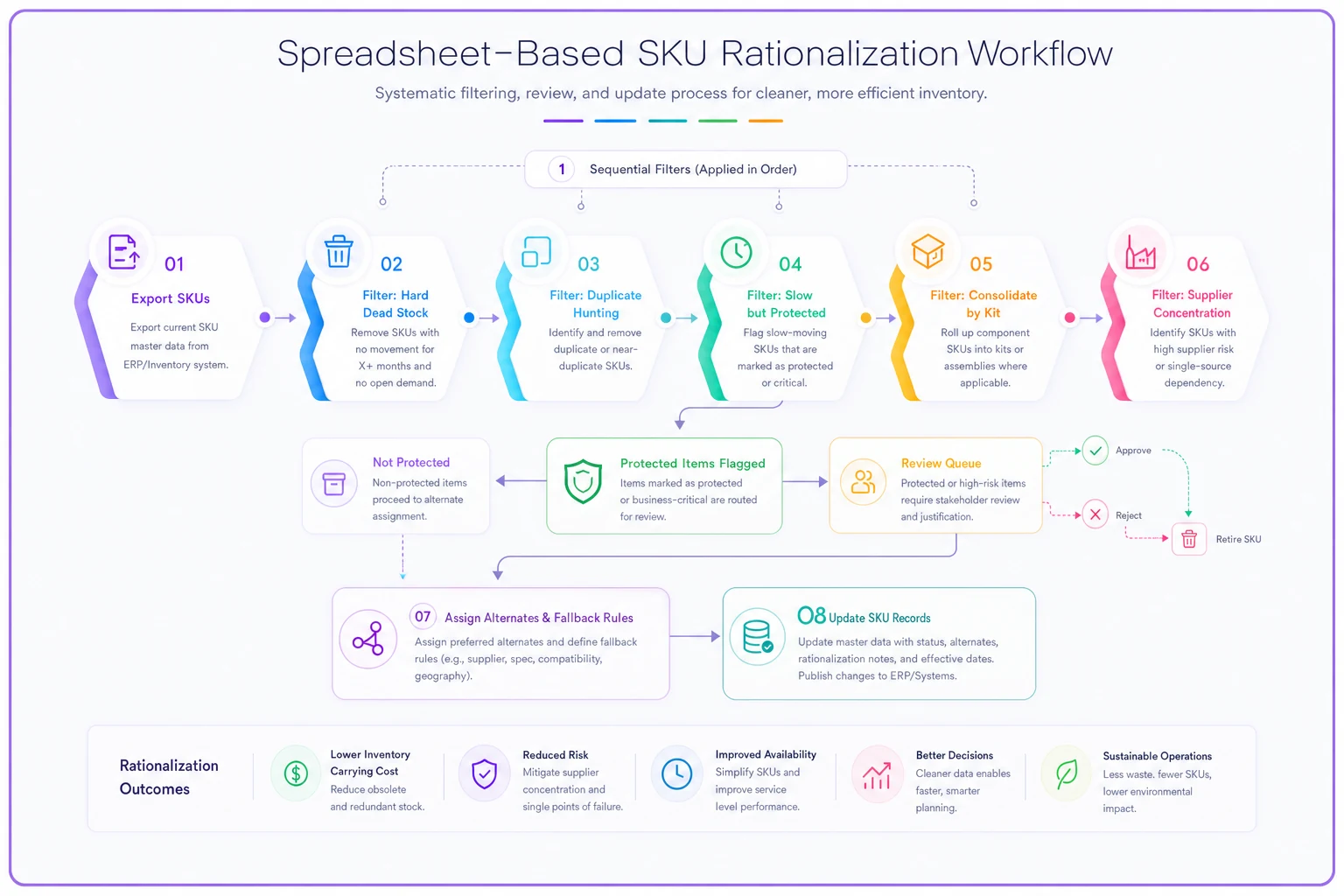
A common mistake: people run Filter 1, get a big satisfying candidate count, and start retiring immediately. Don't. The candidate list feeds a review, not a decision.
Supplier fallback rules so you don't strand a tech
Consolidation concentrates spend into fewer SKUs and often fewer suppliers. That's good for pricing and bad for resilience unless you build fallback rules first.
For every SKU you're keeping as a "preferred" after consolidation, define three things:
-
Primary source — normal buy, best price, known lead time.
-
Approved alternate — a cross-referenced equivalent you've verified fits and performs. This is the part you retired in consolidation, kept alive as an alternate, not an active stocking SKU.
-
Emergency path — local pickup, OEM direct, or a sister-branch transfer, with the expected cost premium noted so dispatch knows the trade-off.
The practical rule: never retire the only alternate for a single-source, long-lead preferred SKU. If your primary supplier discontinues a part or goes on backorder and you've already pruned every equivalent out of the system, a routine job can turn into a multi-day delay on a contract that carries penalties.
Write the fallback into the SKU record itself, not a separate document nobody reads. When a tech or dispatcher looks up the part and sees it's out, the alternate and emergency path should be right there. Keeping the cross-reference attached to the part — rather than buried in a procurement spreadsheet — is what actually makes fallback rules get used instead of ignored during a bad week.
Pruning cadence: why this is a rhythm, not a project
The single biggest reason SKU lists re-bloat is treating rationalization as a one-time cleanup. Six months after a big prune, the count is climbing again because the same forces that caused bloat never stopped.
-
Monthly auto-flag new SKUs created in the last 30 days and new zero-movement items. Quick review, catches "temporary alternate" additions before they calcify.
-
Quarterly run the full filter set, review candidate and protected piles, execute safe retirements and consolidations.
-
Annually revisit the protected/SLA-linked bucket with fresh contract data, and re-verify supplier fallbacks are still valid — parts get discontinued quietly.
The monthly flag is the one most teams skip and the one that matters most. Catching bloat at creation is far cheaper than hunting it down a year later. One flagged duplicate caught in week one is a thirty-second fix. The same duplicate found a year later has usage history, a purchase order, and a tech who's grown attached to it.
Whoever owns this cadence also needs authority to actually retire SKUs. Plenty of well-built rationalization lists die because the person who found the duplicates couldn't approve removing them, and the person who could never looked at the list.
When this makes sense — and when it's a bad idea
When it makes sense: You've got clear duplicate overlap, a meaningful dead-stock pile, and usage data covering at least 12 months. Twelve months matters — seasonal parts pulled only in summer or winter look dead in a six-month window.
When it's a bad idea: Right after a major equipment-line change, when usage history is too thin to trust. Or during a supply disruption, when "low usage" might just mean "couldn't get it." Rationalizing in the middle of a backorder wave gives you garbage signals.
Who should not run this solo: Finance, working from cost data alone. Every retirement decision needs a field voice — ideally a lead tech or two who can look at the protected pile and say "no, keep that, it saves us a return trip on the Henderson account." That one sanity check prevents most of the damage.
A real scenario
A regional HVAC service company — around 40 techs, mix of commercial maintenance contracts and residential — was carrying roughly 3,800 active SKUs. Carrying cost was climbing and van restocks were taking longer than anyone liked.
First pass with the filter set surfaced close to 900 candidates. The dead-stock filter alone flagged around 540 items with no movement in 18 months. Duplicate hunting found roughly 180 functional overlaps, mostly fittings, filters, and seal kits sitting under multiple descriptions.
What kept it from going wrong: the SLA-linked flag pulled about 120 of those "dead" SKUs straight into the protected bucket. Several were low-velocity parts tied to two commercial contracts with real penalty clauses. Retiring them on velocity alone would have risked second visits on exactly the accounts they couldn't afford to miss.
Final result over two quarters: active SKU count came down to roughly 2,900. Consolidated duplicates got proper cross-references and alternates. Van restock time dropped noticeably, wrong-part pulls fell, and — the part that actually mattered — first-time-fix on the protected accounts held steady because nothing those jobs depended on got cut. The carrying cost improvement was real but honestly secondary to the restock-speed and error-rate gains the techs felt day to day.
SKU rationalization in field service fails when it's treated as a finance exercise and succeeds when it's treated as an operational one. Keep the financial criteria, but layer first-time-fix dependency and SLA exposure on top of them. Build fallback rules before you concentrate your supply. Run it on a rhythm, not as a one-off. And put a field voice in the room before anything gets retired. Do that, and you shrink the list, speed up your vans, and tighten procurement — without discovering three months later that you cut the one part keeping your best contract out of penalty.
Ready to optimize your field operations?
Join 2,000+ service teams using Romrly to boost productivity, reduce downtime, and enhance customer satisfaction.