

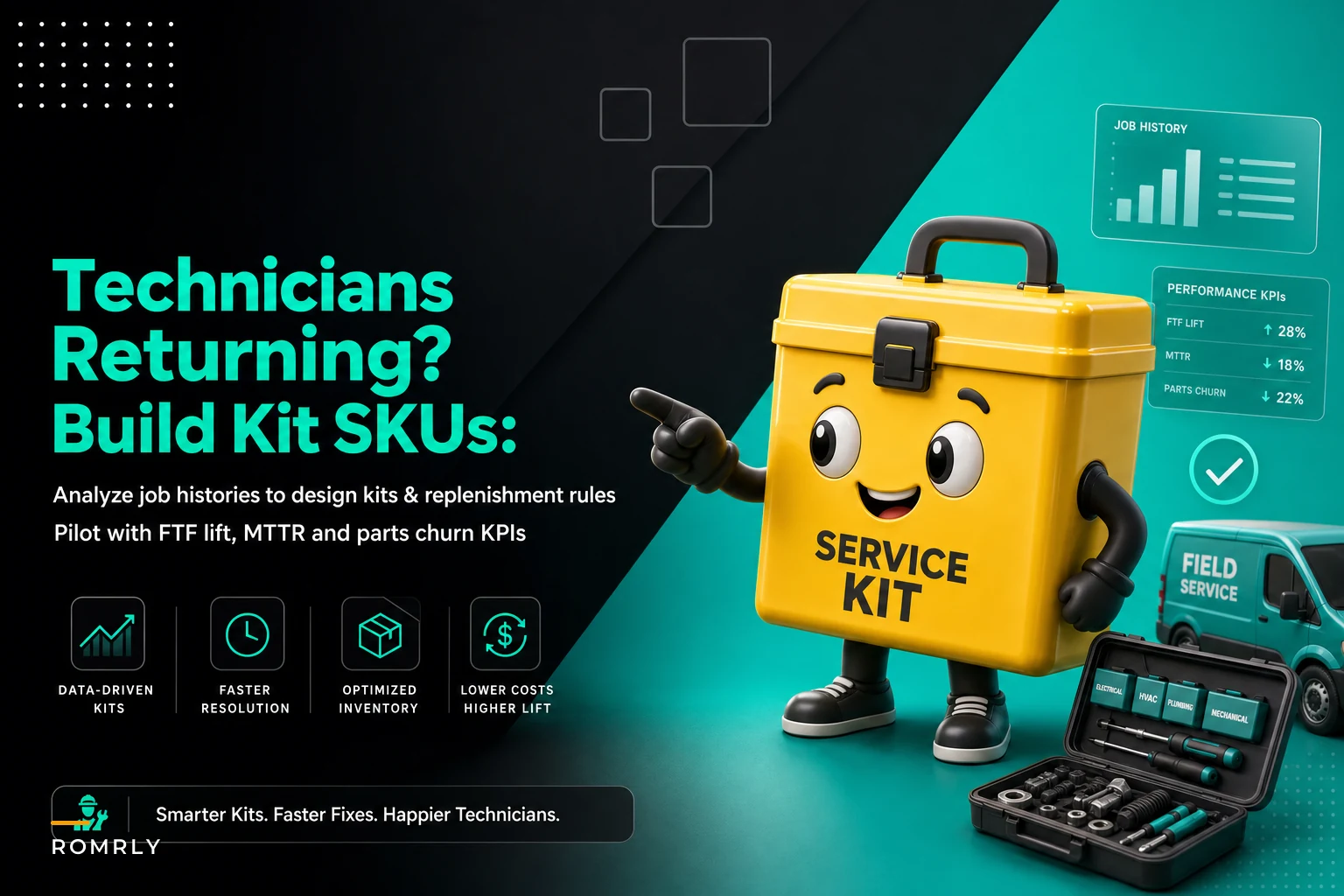

Your technician drives 40 minutes to a commercial HVAC job. Diagnoses a bad contactor and capacitor combo. Opens the van. No 45/5 MFD dual capacitor. Has the contactor, but wrong voltage rating. Another 40 minutes back to the warehouse, 40 minutes to return. That's 2 hours of windshield time gone, and the customer waited half a day for what should've been a 45-minute repair.
This pattern destroys field service operations. Not because technicians are careless or warehouse staff is incompetent. It happens because most service companies treat parts inventory like retail—individual SKUs sitting on shelves—instead of organizing around how jobs actually get done in the field.
The hidden math behind parts-related returns
Most field service managers track first-time fix rates somewhere between 75-85%. Sounds decent until you dig into why those 15-25% of jobs fail. Industry benchmarks suggest roughly 40% of return trips come from missing or wrong parts. On a base of 500 monthly service calls, that's 30-50 jobs requiring a second truck roll purely for parts issues.
Each return trip typically costs somewhere between $180-280 when you factor drive time, fuel, tech wages, and missed billable hours. For a mid-size operation, that's easily $7,000-12,000 monthly in direct costs alone. The indirect damage—frustrated customers, bad reviews, technician morale—compounds from there.
What makes this worse is how technicians respond to unreliable stock. They hoard parts in their vans. They grab extras of everything, creating phantom shortages in the warehouse while carrying thousands in duplicate inventory across their vehicles. One HVAC company found their 12 techs were collectively sitting on around $38,000 in duplicate capacitors and contactors because nobody trusted the standard van stock list.
Why standard van stock lists fail in practice
The conventional approach involves creating a master van stock list—maybe 150-200 SKUs for HVAC, 80-120 for plumbing—and expecting technicians to maintain it. Procurement orders based on min/max levels. Supervisors do quarterly van audits. Everyone pretends the system works.
Eliminate field service chaos with Romrly.
Romrly helps you assign, track, and complete service jobs efficiently and on time.
- Unified job scheduling
- Technician dispatch & tracking
- Customer notifications & updates
No credit card required
What actually happens: your residential HVAC tech doing mostly maintenance carries the same stock list as your commercial specialist handling rooftop units. The residential tech's van fills with unused commercial parts while they constantly run short on residential capacitors. The commercial tech improvises with undersized components because their stock assumes tune-ups.
Geography makes it worse. Techs working older neighborhoods burn through 30-amp breakers and dated thermostats. Those covering new construction need smart home components and high-SEER equipment parts. But everyone works off the same rigid list because nobody has time to analyze actual usage patterns by territory.
Building kit SKUs from historical job data
The fix isn't a better stock list. It's analyzing which parts actually get used together and building kit SKUs around those real patterns. That means pulling your service history and looking for part combinations that consistently show up on the same work orders.
Start with your top 20 most common job types by frequency. For each, pull 6 months of completed work orders and extract what parts were used. You're looking for combinations that appear together at least 60% of the time. In residential HVAC, a "no cooling" diagnostic kit might consistently include: 45/5 MFD capacitor, 35/5 MFD capacitor, 24V contactor, 3-amp fuse set, and terminal connectors.
Instead of tracking those as five separate SKUs that techs need to remember and warehouse staff picks individually, you create a single kit SKU: "NC-DIAG-KIT-01." One item to stock, one to grab, one to track.
The data reveals patterns you'd never catch manually. An appliance repair company analyzed their dishwasher calls and found door latch assemblies failed alongside control boards 73% of the time on one manufacturer's 2018-2020 models. They built model-specific kits that included both parts plus the specialized torx bits needed for that generation's hidden screws. First-time fix on those calls went from 65% to 91%.
Here's a simple workflow visualization.
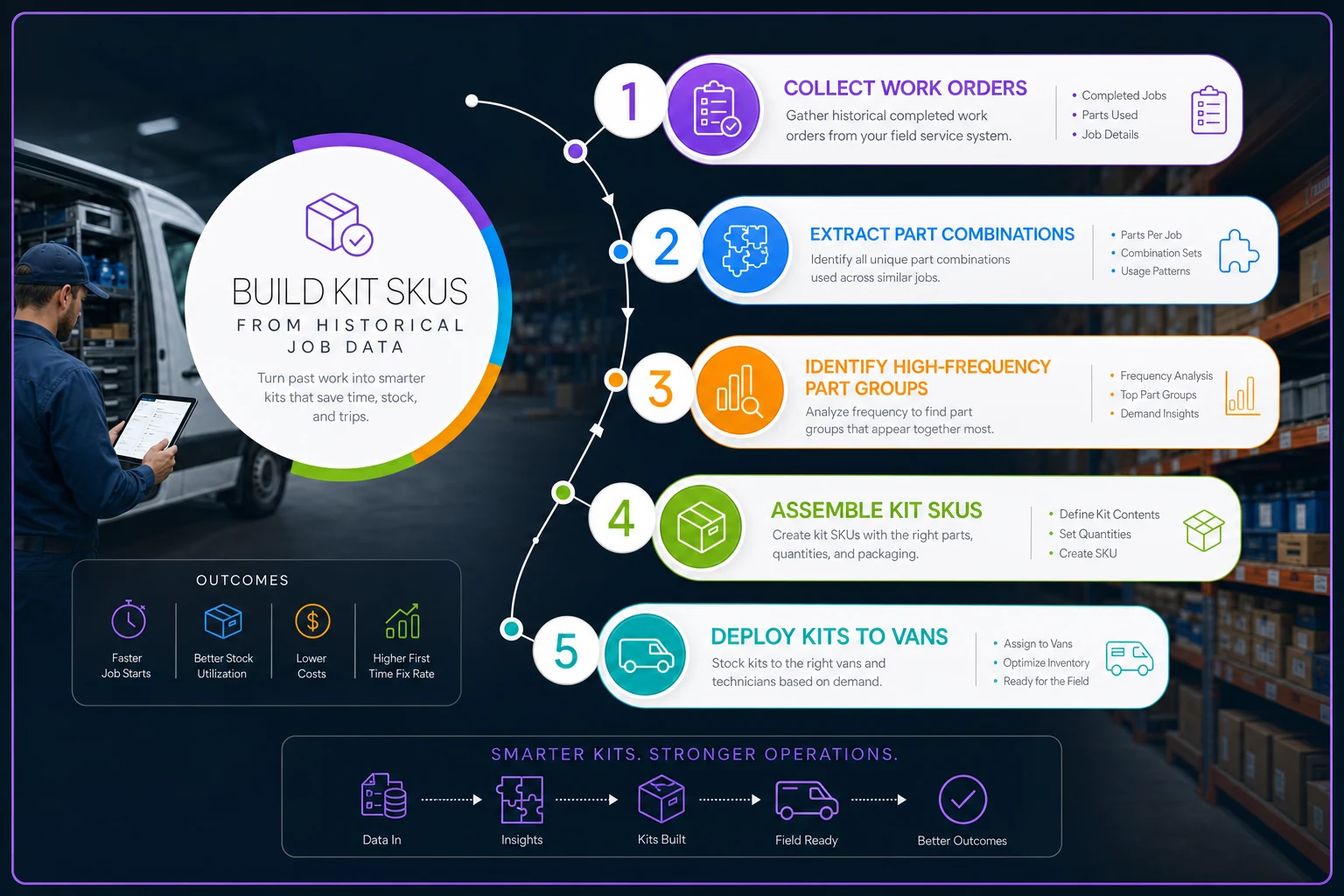
The graphic shows the end-to-end process from data extraction to kit deployment so teams can align on responsibilities.
Establishing replenishment rules based on job volume
Traditional min/max inventory assumes steady, predictable consumption. Field service doesn't work that way. You'll burn through 15 residential capacitor kits during the first heat wave, then use 2 per week in mild weather. Static replenishment rules leave you either overstocked or constantly scrambling.
Dynamic replenishment starts with categorizing kits by consumption pattern:
Seasonal surge kits follow predictable weather patterns. Track trailing 4-week average consumption and set reorder points at 2x that average during peak season, 0.5x during off-season. Your "no cooling" diagnostic kits might trigger reorder at 30 units in June but only 8 in December.
Failure-age correlation kits spike based on equipment installation dates in your service area. If there's a cluster of 8-10 year old furnaces in certain zip codes—prime ignitor failure territory—pre-position those repair kits before heating season. The trigger isn't current consumption; it's predictive based on your customer equipment database.
Campaign-specific kits align with maintenance contract schedules. Running spring tune-ups for 400 contracted customers means you need roughly 400 filter/belt/refrigerant top-off kits. Stage replenishment to match campaign progress: 25% stocked at launch, next 25% when you hit 20% completion, and so on.
One elevator service company mapped replenishment to building inspection cycles. Since inspections often trigger minor repairs, they'd surge door adjustment kits and safety sensor kits two weeks before each building's annual inspection date. Parts availability went from 68% to 89% without increasing total inventory spend.
Setting up pilot metrics for kit effectiveness
Running a parts kitting pilot without clear metrics is like dispatching without addresses—you'll stay busy but won't know if anything's actually improving. Most companies default to tracking first-time fix, but that's an outcome metric that takes weeks to move. You need leading indicators that tell you within days whether the kitting strategy is working.
Kit fill rate measures how often technicians use the complete kit versus breaking it apart for individual components. Target 70% or higher. If techs consistently only use 2 of 5 items in your "no cooling" kit, either the kit definition is off or you're seeing different job types than expected. Track this through work order parts consumption—when kit SKU "NC-DIAG-KIT-01" gets checked out, how often do all component SKUs appear on the resulting work order?
| Metric | What it measures | Notes |
|---|---|---|
| First-time fix lift specifically attributed to parts availability | is what matters, not overall FTF. Segment it. Mark every return trip with a reason code: parts, misdiagnosis, customer availability, equipment access, etc. | Your kitting program should drive the parts-related return rate toward zero while leaving other categories unchanged. |
| Mean Time to Repair (MTTR) | captures total clock time from dispatch to job completion. | Solid kitting drops MTTR 15-25% because technicians spend less time hunting through van stock. |
| Parts churn rate | reveals the hidden inventory win. Calculate: (parts returned to warehouse ÷ parts issued) × 100. | Well-designed kits should cut churn from typical rates of 25-35% down under 10%. |
Some companies track a "kit confidence score" through simple weekly tech surveys. One question: "How often did you have the right kit for the job?" Scores below 7/10 indicate poor kit design or inventory gaps. A commercial refrigeration company saw scores jump from 4.8 to 8.3 after switching from generic "refrigeration repair" kits to specific "walk-in cooler evaporator" and "reach-in freezer compressor" kits.
Creating templates for common service patterns
After working through enough work order histories across different trades, some clear kit templates emerge. These aren't rigid prescriptions—they're starting points you adjust based on your local patterns.
Diagnostic kits contain parts needed to test and temporarily restore operation. For residential HVAC:
-
Universal capacitor set (3 most common sizes)
-
Multi-voltage contactor
-
Fuse assortment
-
Wire nuts and terminals
-
Refrigerant gauge adapters
The goal is letting technicians diagnose and often fix simple issues without returning to the warehouse. Even when the permanent repair needs different parts, the customer at least gets temporary cooling or heating while you source them.
Failure-specific kits target known equipment weaknesses. For tankless water heaters:
-
Flow sensor
-
Ignition assembly
-
Ventilation pressure switch
-
Gasket set
-
Descaling solution
These match manufacturer failure patterns. Navien units from 2019-2021 had roughly a 31% flow sensor failure rate by year three. Rinnai units show ignition issues after 5-6 years. Build kits around those patterns.
Preventive maintenance kits bundle consumables and wear items. For commercial kitchen equipment:
-
Fryer
heating elements, temperature probes, high-limit switches
-
Grill
ignitors, thermocouples, control valves
-
Dishwasher
wash arms, door seals, rinse injectors
Include the specialized tools and cleaning supplies specific to that equipment. Having the right part but the wrong thread-cutting oil still kills the job.
A pest control company created seasonal kits that changed how their whole operation ran. "Wasp season kit" included spray cans, extension pole, protective gear, and customer notification door hangers. "Rodent exclusion kit" bundled steel wool, foam sealant, bait stations, and snap traps. Technicians stopped making hardware store runs, saving 4-6 hours weekly per tech.
Determining optimal replenishment cadence
Most operations default to weekly replenishment because that's what they've always done. Kit-based inventory needs different thinking. The right cadence depends on three things: consumption variability, storage constraints, and supplier minimums.
High-turn diagnostic kits often need twice-weekly replenishment during peak season. Two smaller warehouse runs beat having technicians raid each other's vans by Thursday afternoon. Set up Tuesday/Friday cycles for high-velocity kits during busy months, dropping to weekly during slower periods.
Failure-specific kits work on monthly cycles aligned with supplier orders. Since you're targeting known equipment weaknesses, consumption is fairly predictable within a 30-day window. Order when you hit 6 weeks of forward coverage based on trailing 90-day average usage—gives buffer for supplier delays without excess inventory.
Campaign kits follow project schedules, not calendar cycles. If you're doing 50 spring tune-ups weekly for 8 weeks, stage kit delivery in 100-unit batches every two weeks. Front-load slightly—kits waiting on techs beats techs waiting on kits.
Geographic clustering matters for multi-location operations. One company with 3 warehouses serving 50 technicians switched from each warehouse maintaining full kit inventory to specializing: main warehouse handled all kit assembly, satellites handled daily van replenishment. Kit preparation labor dropped around 60% while consistency improved significantly.
Also account for kit assembly time. If your warehouse team needs 4 hours to assemble 50 diagnostic kits, don't wait until you're at 10 units. Build in 2-3 days of average consumption as assembly buffer.
Measuring real impact: FTF lift, MTTR, and parts churn
Six months in, you need hard data proving the program works. Three metrics tell the real story, and they're probably not the ones on your current dashboard.
First-time fix lift specifically attributed to parts availability is what matters, not overall FTF. Segment it. Mark every return trip with a reason code: parts, misdiagnosis, customer availability, equipment access, etc. Your kitting program should drive the parts-related return rate toward zero while leaving other categories unchanged.
One commercial appliance service operation saw overall FTF go from 76% to 83% after implementing kits. The real story was in the segments though: parts-related returns dropped from 18% of all jobs to 4%. That 14-point improvement meant roughly 70 fewer truck rolls monthly on their 500-job volume.
Mean Time to Repair (MTTR) captures efficiency gains beyond parts availability alone. Track total clock time from dispatch to job completion. Solid kitting drops MTTR 15-25% because technicians spend less time hunting through van stock, making parts runs, or calling to verify inventory.
Watch the distribution, not just the average. Pre-kitting, you might see MTTR clustered around 90 minutes with a long tail of 3-4 hour outliers—the parts run jobs. Post-kitting, that tail should shrink noticeably. Even if the average only moves a little, eliminating those outliers improves customer satisfaction and schedule predictability in ways averages don't capture.
Parts churn rate reveals the hidden inventory win. Calculate: (parts returned to warehouse ÷ parts issued) × 100. High churn means technicians grab parts they don't need because they don't trust standard stock—and your warehouse team wastes hours processing returns while the system shows phantom availability.
Well-designed kits should cut churn from typical rates of 25-35% down under 10%. Technicians grab complete kits knowing they have what's needed. Unused kits return intact—30 seconds to check back in versus 10 minutes to process individual parts returns.
A water treatment company tracked secondary benefits they hadn't anticipated. Their "softener rebuild kit" included not just resin and brine components but also customer education materials and branded maintenance stickers. Technicians started completing more thorough services, which led to 23% fewer callback complaints and 15% higher maintenance contract renewals.
Common pitfalls in kit design and deployment
The biggest mistake is designing kits in a conference room instead of from actual job data. Your senior tech might swear every furnace call needs a hot surface ignitor, but if the data shows you only replace them on 15% of calls, don't kit them. Trust patterns over opinions—that's a hard sell sometimes, but it matters.
Over-kitting kills the program. Some operations get excited and build 50 different kit types in month one. Warehouse gets confused, technicians can't remember which kit fits which situation, and van stock gets more complex, not less. Start with 5-7 high-frequency kits. Add more only after those show measurable results.
Geographic blind spots hurt multi-territory operations. Phoenix techs need different capacitor sizes than Seattle. Rural routes see different equipment than urban cores. One company created "universal HVAC kits" that didn't work anywhere—too many parts for small vans, wrong parts for local equipment. Regional variants based on local patterns are worth the extra complexity.
Forcing kits on reluctant technicians backfires. Your 20-year veteran who's memorized every part number sees mandatory kitting as an insult. Run voluntary pilots with newer techs or those already struggling with parts issues. When veterans watch those techs nail first-time fixes they were missing before, most come around on their own.
Poor kit maintenance undermines trust fast. If technicians open three "complete" kits that are missing components, they'll never trust the fourth one. Implement rigid quality control: every returned kit gets inspected, missing items get documented, and patterns get investigated. One company found warehouse staff routinely pulling items from assembled kits for emergency orders—quietly destroying kit integrity without anyone realizing it.
Van organization systems that support kit-based inventory
Kits only work if technicians can find and grab them quickly. Throwing pre-packaged kits into the same cluttered van setup defeats the whole point. Physical organization needs to match the logic of your kit strategy.
Dedicated kit zones matter. Install clear-sided bins or labeled totes specifically for complete kits, positioned in the most accessible area—usually driver's side forward section for rear-entry vans, or first tier of side-entry configurations. Technicians should grab kits without climbing over other inventory.
Color-coding by kit type helps a lot more than people expect. Red for diagnostic, blue for repair, green for maintenance. Large laminated labels that survive van conditions. Photos of kit contents so techs can verify completeness at a glance. One company laminated QR codes linking to short video refreshers on when each kit type applies.
Color-code kits by type and attach laminated photos of contents for quick verification at a glance.
Train technicians to select probable kits during dispatch, not at the job site. If the call is "no cooling" and the customer mentioned the unit is 8 years old, grab both the diagnostic kit and the capacitor/contactor repair kit before leaving. Better to return an unopened kit than make a parts run.
Physical mounting prevents kits from becoming van projectiles during hard stops. Climate protection matters too—electronic components in diagnostic kits need protection from extreme temperatures. One company installed small battery-powered coolers for capacitor storage after heat degradation caused roughly 30% of their "new" capacitors to fail testing on arrival.
Some operations use portable "kit caddies"—cases technicians carry to the job site with 2-3 related kits. Instead of multiple van trips or guessing which kit to bring, they move all probable solutions in one shot. A commercial refrigeration company's techs became fans of their wheeled caddy system organized by equipment type with basic tools included.
Software automation for kit optimization
Manual kit management hits a wall around 20-30 active kits across 8-10 technicians. Beyond that, tracking consumption, maintaining kit integrity, and optimizing contents becomes a full-time job nobody has bandwidth for. This is where AI-powered operational software turns a good idea into a sustainable practice.
Modern field service platforms can analyze job histories automatically, surfacing part combinations without manual spreadsheet work. The system picks up patterns humans miss—like how certain zip codes require different capacitor sizes due to utility voltage variations, or how Monday morning calls have different parts needs than Friday afternoon emergencies.
Automated reorder triggers eliminate the Friday afternoon scramble when someone notices diagnostic kits are nearly gone. The platform tracks consumption velocity, adjusts for seasonality, and places orders before stockouts happen—accounting for supplier lead times and minimum order quantities in the process.
Real-time kit performance dashboards show which kits are delivering value versus sitting unused. If your "commercial RTU kit" shows 20% utilization while techs keep requesting individual RTU parts, the system flags the mismatch. You might discover the kit works fine for Carrier units but falls short on Trane, pointing toward brand-specific variants worth building.
The platform also catches errors before they waste windshield time. When a technician checks out a kit, the system verifies it matches the job type and equipment model. If someone grabs a residential kit for a commercial site, they get an alert pointing toward the correct kit.
Connecting with remote diagnostics capabilities takes it further. When remote diagnosis identifies likely failures before the truck rolls, the system can recommend specific kits with high confidence. Your technician arrives knowing they probably need the "inducer motor kit," not just a generic "furnace repair kit."
Implementation timeline and rollout strategy
Most rollouts that stick follow a fairly similar pattern. The timing isn't rigid, but the sequence matters.
-
Months 1-2 — Data gathering and analysis. Pull 6-12 months of work order history. Identify your top 20 job types by frequency. Extract parts usage for each. Look for combinations appearing together 60%+ of the time. This foundation determines everything else—rush it and the program fails.
-
Month 2 — Kit design. Build your first 5 kits based on highest-frequency patterns. Start with diagnostic or preventive maintenance kits—they're easier wins than repair kits. Create physical prototypes. Have 3-4 technicians test them on ride-alongs. Gather feedback on contents, packaging, and accessibility.
-
Month 3 — Pilot launch. Start with roughly 25% of technicians. Choose a mix of experience levels and territories. Track consumption daily. Survey techs weekly. Adjust contents based on actual usage. One company started with 8 items in their diagnostic kit and ended up with 11 after pilots revealed missing essentials.
-
Month 4 — Replenishment refinement. Initial consumption rate assumptions are usually off by 30-50%. Adjust reorder points and quantities. Train warehouse staff on kit assembly procedures. Document quality control checks.
-
Month 5 — Expand to half the team. Add 2-3 new kit types based on pilot success. Implement van organization systems and visual management tools. Start tracking MTTR and FTF improvements formally. Share early wins with the broader team.
-
Month 6 — Full rollout. All technicians using core kits. Monthly reviews of kit performance. Quarterly content adjustments based on seasonal patterns. Annual strategic review of the entire portfolio.
Expect resistance around month 2 and a real shift around month 4. The pilot techs become advocates when they see results. One operation had a skeptical senior tech completely reverse after his first-time fix rate jumped from 71% to 89% during the pilot. He became the program's loudest champion.
From reactive scrambling to proactive preparation
Parts management doesn't have to be a constant fight between technician needs and inventory costs. When you shift from managing individual SKUs to building job-focused kits, the whole operation changes. Technicians trust their van stock. Customers get fixed right the first time. Warehouse teams stop processing endless returns and emergency orders.
The data is already sitting in your system—those thousands of work orders contain patterns waiting to be found. Every time a technician returns for parts, they're showing you what should have been kitted together. Every parts return flags an over-kitting opportunity. Every emergency run identifies a replenishment gap.
Most field service operations accept 75-80% first-time fix as good enough. But when you dig into that 20-25% failure rate and find nearly half comes from parts issues, you're looking at $10,000+ monthly in preventable costs for even a mid-size operation. Money that could fund better wages, newer equipment, or just better margins.
Analyze your job patterns, build logical kits, test with willing pilots, measure real impact, and scale what works. In 6 months, you could eliminate most parts-related returns. Your technicians will stop hoarding. Your warehouse will stop firefighting. Your customers will stop waiting.
The question isn't whether kit-based inventory works—it's whether you'll get there before your competitors do. Once customers experience consistent first-time fixes, they don't go back to companies that need multiple trips for simple repairs.
The question isn't whether kit-based inventory works—it's whether you'll get there before your competitors do. Once customers experience consistent first-time fixes, they don't go back to companies that need multiple trips for simple repairs.
Ready to optimize your field operations?
Join 2,000+ service teams using Romrly to boost productivity, reduce downtime, and enhance customer satisfaction.